패키지, 저장소 및 앱 카테고리 검색

flutter_cached_pdfview 표지
패키지 상세v0.4.4

flutter_cached_pdfview

iOS 및 Android용 네이티브 PDF 뷰를 표시하기 위한 패키지로, 경로, 자산 또는 URL에서 열고 캐시하는 것을 지원합니다.

AndroidiOS
30일 다운로드
4.6만
좋아요
501
Pub 점수
140

패키지 설치

flutter pub add flutter_cached_pdfview

패키지 개요

공개 정보를 바탕으로 생성한 선택 가이드입니다.

iOS 및 안드로이드에서 네이티브 PDF 보기 기능을 제공하는 플러터 패키지로, 로컬 경로, 자산 또는 URL에서 PDF를 로드할 수 있습니다. 로드된 PDF는 자동으로 캐시되어 성능을 향상시키고 이후 방문 시 로딩 시간을 줄입니다. 최소한의 설정으로 원활한 통합을 위해 설계되었으며, 다양한 플랫폼 간에 효율적인 리소스 관리와 부드러운 PDF 문서 렌더링을 보장합니다.

사용 사례

  • 로컬 스토리지에서 PDF 표시
  • 네트워크 URL에서 PDF 로드
  • 앱 리소스에 포함된 PDF 렌더링
  • 자주 액세스되는 PDF 캐싱
  • 초기 다운로드 후 오프라인 PDF 보기

주요 기능

  • 여러 PDF 소스(경로, 자산, URL)를 지원합니다
  • 다운로드된 PDF 파일의 자동 캐싱
  • iOS 및 Android의 네이티브 렌더링
  • 효율적인 메모리 사용
  • 통합을 위한 간단한 API

적합한 대상

  • 오프라인 PDF 액세스가 필요한 앱
  • 다운로드 가능한 콘텐츠를 갖춘 전자 학습 플랫폼
  • 문서 중심 애플리케이션
  • 동적 PDF 콘텐츠를 갖춘 모바일 앱

고려 사항

  • 원격 PDF를 위해 인터넷 연결이 필요합니다
  • 캐시 관리는 수동 처리가 필요할 수 있습니다
  • 큰 PDF 파일은 성능에 영향을 줄 수 있습니다
  • PDF 뷰어 UI의 사용자 정의 제한
  • 플랫폼별 렌더링 차이

원본 README

연결된 소스 저장소의 README 원문 스냅샷입니다. 최신 내용은 저장소에서 확인하세요.

flutter_cached_pdfview

Awesome Flutter

Pub Version GitHub repo size issues-raw license last-commit stars Dart CI


A package to show Native PDF View for iOS and Android, support Open from a different resource like Path, Asset or Url and Cache it.

📖 Read the case study — how this package is built and maintained — and the step-by-step usage guide by the author.

Support = [ Android , IOS and WEB(soon) ];
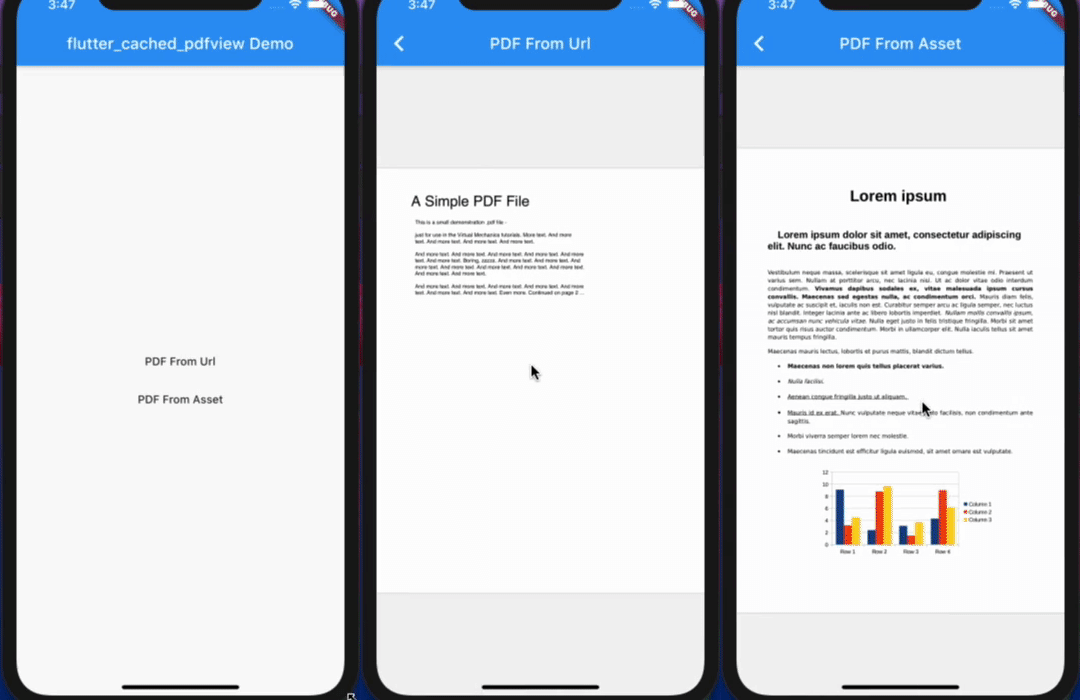
  • Open Pdf From Path(local file)
  • Open Pdf From Asset
  • Open Pdf From URl and Cache it
  • Display horizontally or vertically
  • Drag and zoom
  • Double tap for zoom
  • Support password protected pdf
  • Jump to a specific page in the pdf

Setup
iOS

Opt-in to the embedded views preview by adding a boolean property to the app's Info.plist file with the key io.flutter.embedded_views_preview and the value YES.

iOS (only support> 11.0) you need to add this line in your ios/Podfile

platform :ios, '11.0'

ready-made in the Example

Import it

Now in your Dart code, you can use:

import 'package:flutter_cached_pdfview/flutter_cached_pdfview.dart';

Options

Name Android iOS Default
defaultPage ✅ ✅ 0
onViewCreated ✅ ✅ null
onRender ✅ ✅ null
onPageChanged ✅ ✅ null
onError ✅ ✅ null
onPageError ✅ ❌ null
onLinkHandle ✅ ✅ null
gestureRecognizers ✅ ✅ null
filePath ✅ ✅
fitPolicy ✅ ❌ FitPolicy.WIDTH
enableSwipe ✅ ✅ true
swipeHorizontal ✅ ✅ false
password ✅ ✅ null
nightMode ✅ ❌ false
autoSpacing ✅ ✅ true
pageFling ✅ ✅ true
pageSnap ✅ ❌ true
preventLinkNavigation ✅ ✅ false
bockgroundColor ✅ ✅ null

Controller Options

Name Description Parameters Return
getPageCount Get total page count - Future<int>
getCurrentPage Get current page - Future<int>
setPage Go to/Set page int page Future<bool>

Example

from Asset
       PDF(
        enableSwipe: true,
        swipeHorizontal: true,
        autoSpacing: false,
        pageFling: false,
        backgroundColor: Colors.grey,
        onError: (error) {
          print(error.toString());
        },
        onPageError: (page, error) {
          print('$page: ${error.toString()}');
        },
        onPageChanged: (int page, int total) {
          print('page change: $page/$total');
        },
      ).fromAsset('assets/pdf/file-example.pdf'),

cached From Url
      PDF(
        swipeHorizontal: true,
      ).cachedFromUrl('https://ontheline.trincoll.edu/images/bookdown/sample-local-pdf.pdf'),

with placeholder until pdfFile download and errorWidget if there are problem
      PDF().cachedFromUrl(
             'https://ontheline.trincoll.edu/images/bookdown/sample-local-pdf.pdf',
             placeholder: (progress) => Center(child: Text('$progress %')),
             errorWidget: (error) => Center(child: Text(error.toString())),
           )

For production usage

If you use proguard, you should include this line [ready-made in the Example].

-keep class com.shockwave.**

Dependencies

Flutter

flutter_pdfview

flutter_cache_manager

Android (only support >= api 20)

AndroidPdfViewer

iOS (only support> 11.0)

PDFKit

Video

IOS

WEB

Developer

카테고리

의존성

의존성 목록 4 개

소스 저장소

이 패키지를 사용하는 프로젝트