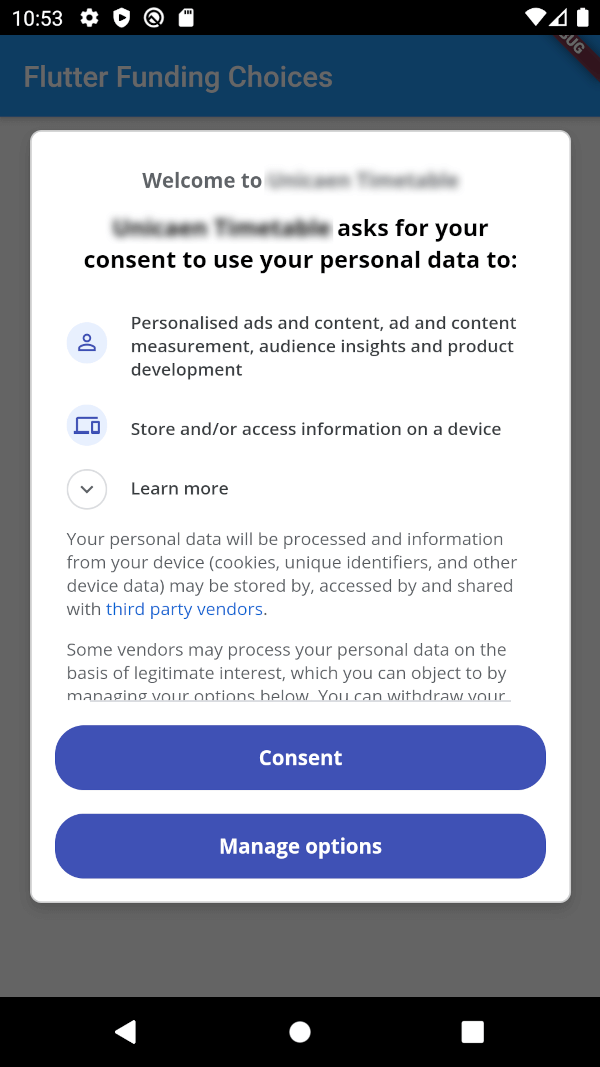
Flutter Funding Choices는 Google의 Funding Choices API를 통합하는 Flutter 패키지로, AdMob에서 개인화된 광고에 대한 사용자 동의를 요청할 수 있게 해줍니다. 이 패키지는 Android 및 iOS 플랫폼에서 필요한 동의 대화 상자를 표시함으로써 개인정보 보호 규정을 준수하는 원활한 방법을 제공합니다. 동의 상태 확인 및 동의 흐름을 트리거하는 간단한 메서드를 제공하여 구현을 간소화합니다. 기존 광고 제공 워크플로와 호환되면서도 GDPR 및 기타 개인정보 보호 기준을 준수합니다.
사용 사례
개인화 광고를 위한 사용자 동의 요청
GDPR 및 개인정보 보호 규정 준수
Flutter 앱에서 AdMob 통합
Android 및 iOS에서 동의 대화 상자 표시
광고 개인화 설정 관리
주요 기능
공식 Google 자금 선택 통합
Android 및 iOS 모두 지원
동의 확인 및 대화를 위한 간단한 API
동의 상태 자동 처리
경량이고 통합하기 쉬움
적합한 대상
AdMob를 사용하는 Flutter 앱
유럽 연합 사용자를 대상으로 하는 개발자
GDPR 준수를 요구하는 앱
광고 개인화를 관리하는 출판사
개인정보 보호에 중점을 둔 모바일 앱 개발자
고려 사항
AdMob 설정이 필요합니다
개인화된 광고를 표시하기 전에 동의를 얻어야 합니다
구글의 펀딩 콜라보 서비스에 한정
동의 관리를 위한 추가 UI가 필요할 수 있습니다
개인화되지 않은 광고 시나리오에는 적용되지 않음
원본 README
연결된 소스 저장소의 README 원문 스냅샷입니다. 최신 내용은 저장소에서 확인하세요.
Flutter Funding Choices
Flutter Funding Choices is an unofficial Flutter implementation of Funding Choices,
a Google service that allows to request user consent for personalized ads in AdMob.
Prerequisites
You must have linked your FundingChoices account to your Admob account.
See this documentation on Google Support.
Installation
Android
Your app must use Android Embedding V2.
Also, you need to add an app id in your AndroidManifest.xml (in the application tag) :
You can obtain your app ID by following these instructions.
You may also need to handle Apple's App Tracking Transparency message by putting this in your Info.plist :
<key>NSUserTrackingUsageDescription</key><string>This identifier will be used to deliver personalized ads to you.</string>
Feel free to configure the message as you want.
How to use
There are three methods :
FlutterFundingChoices.requestConsentInformation() : Allows to get current user consent information (whether you need to show the consent form, whether the user wants personalized ads, ...).
FlutterFundingChoices.showConsentForm() : Loads and shows the consent form. You must check first that there is a consent form (with isConsentFormAvailable on the returned object of the previous method).
FlutterFundingChoices.reset() : Resets the consent information.
You typically want to use it like this on Android :
@overridevoidinitState() {
super.initState();
WidgetsBinding.instance.addPostFrameCallback((_) async {
ConsentInformation consentInfo = awaitFlutterFundingChoices.requestConsentInformation();
if (consentInfo.isConsentFormAvailable && consentInfo.consentStatus == ConsentStatus.required) {
awaitFlutterFundingChoices.showConsentForm();
// You can check the result by calling `FlutterFundingChoices.requestConsentInformation()` again !
}
});
}
Contributions
You have a lot of options to contribute to this project ! You can :