패키지, 저장소 및 앱 카테고리 검색

flutter_story_presenter 표지
패키지 상세v1.0.7

flutter_story_presenter

Instagram, WhatsApp 및 기타 소셜 미디어 플랫폼처럼 비디오, 이미지, 텍스트를 스토리 형식으로 표시하는 Flutter 패키지

AndroidiOSmacOS
30일 다운로드
1.8천
좋아요
133
Pub 점수
150

패키지 설치

flutter pub add flutter_story_presenter

패키지 개요

공개 정보를 바탕으로 생성한 선택 가이드입니다.

Flutter 패키지로 인스타그램과 왓츠앱과 유사한 스와이프 가능한 전체 화면 형식으로 비디오, 이미지 및 텍스트를 포함한 스토리를 표시할 수 있습니다. 부드러운 전환, 자동 진행 및 사용자 정의 가능한 UI 요소를 지원합니다. 안드로이드, iOS, macOS 플랫폼에서 간편함과 성능을 위해 설계되었습니다. 기존의 Flutter 앱에 최소한의 설정으로 원활하게 통합 가능합니다. 소셜 미디어 앱, 콘텐츠 공유 플랫폼 또는 스토리형 경험을 필요로 하는 모든 앱에 적합합니다.

사용 사례

  • 소셜 미디어 앱
  • 콘텐츠 공유 기능
  • 사용자 온보딩 흐름
  • 인터랙티브 튜토리얼
  • 마케팅 캠페인

주요 기능

  • 스와이프 가능한 스토리 탐색
  • 비디오, 이미지 및 텍스트 지원
  • 스토리 간 자동 전환
  • 사용자 정의 가능한 UI 구성 요소
  • 크로스 플랫폼 호환성

적합한 대상

  • 소셜 기능을 구축하는 개발자
  • 상호작용 서사가 필요한 앱
  • 다양한 미디어 콘텐츠를 포함한 프로젝트
  • 모바일 우선 애플리케이션
  • 스토리 인터페이스의 빠른 프로토타이핑

고려 사항

  • 적절한 자산 관리가 필요합니다
  • 제한된 내장 사용자 정의 옵션
  • 복잡한 디자인을 위해 추가 스타일링이 필요할 수 있습니다
  • 플랫폼별 렌더링에 따라 다릅니다
  • 매우 긴 스토리 시퀀스에 최적화되지 않음

원본 README

연결된 소스 저장소의 README 원문 스냅샷입니다. 최신 내용은 저장소에서 확인하세요.

FlutterStoryPresenter

FlutterStoryPresenter

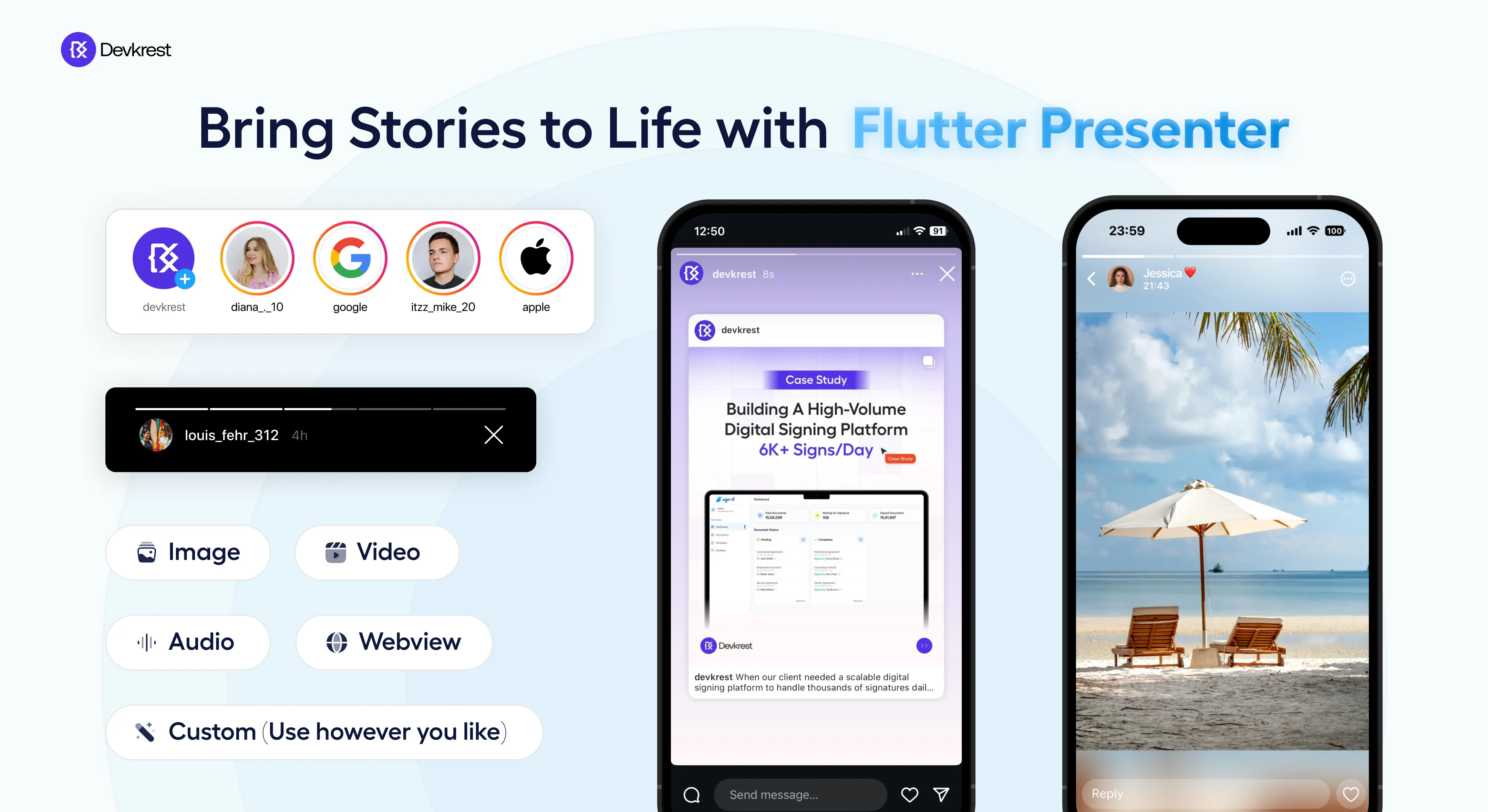
This Flutter package makes it easy to create story and news views like popular social media apps with just a few lines of code! 📱✨ It's loaded with features for customizing and managing stories, perfect for showcasing stories inside your awesome app.

🎖️ About

FlutterStoryPresenter

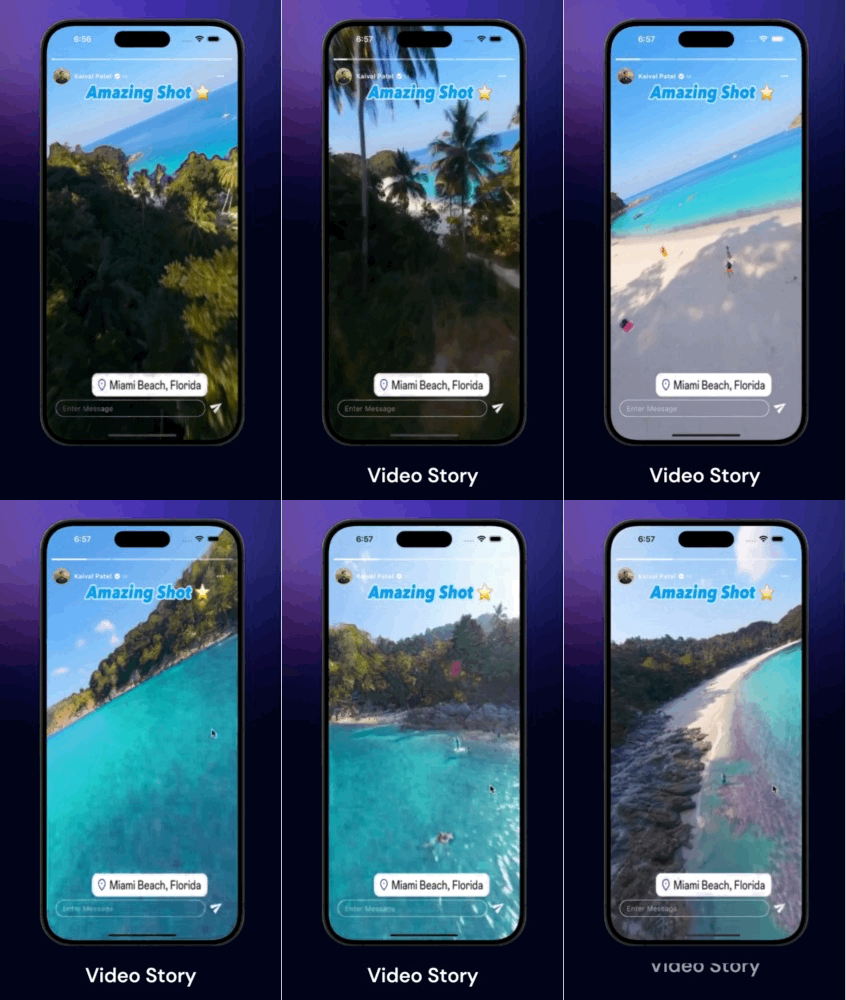
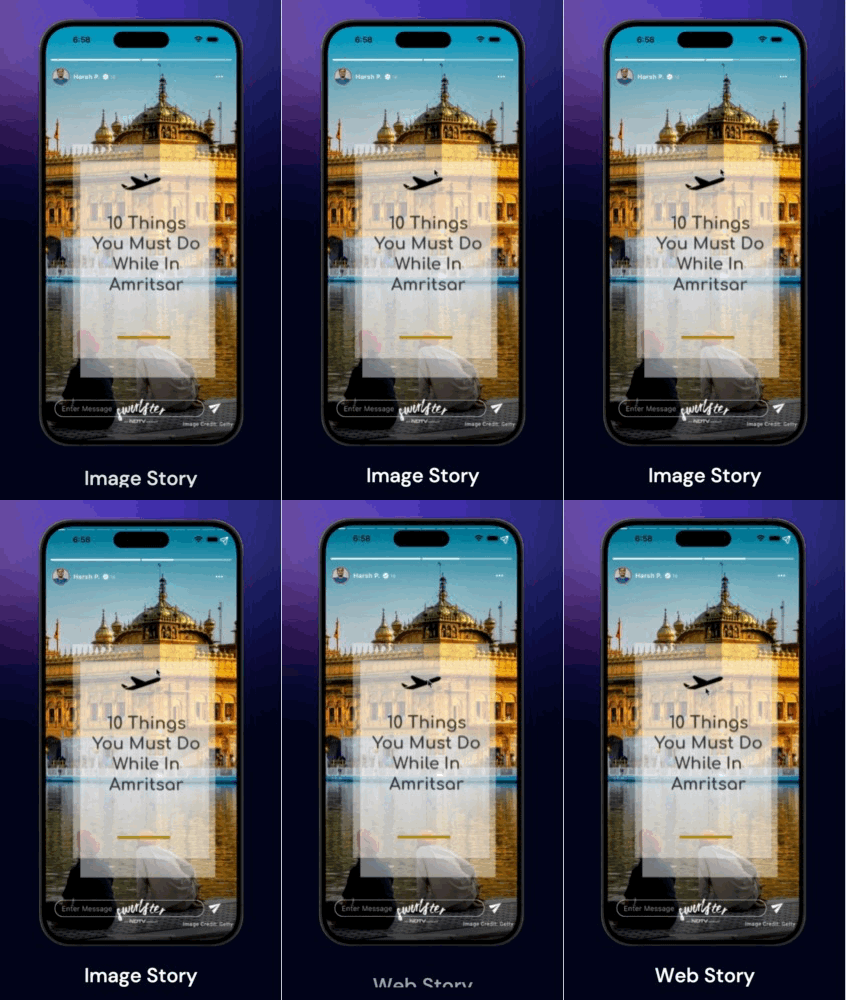
✨ Demo

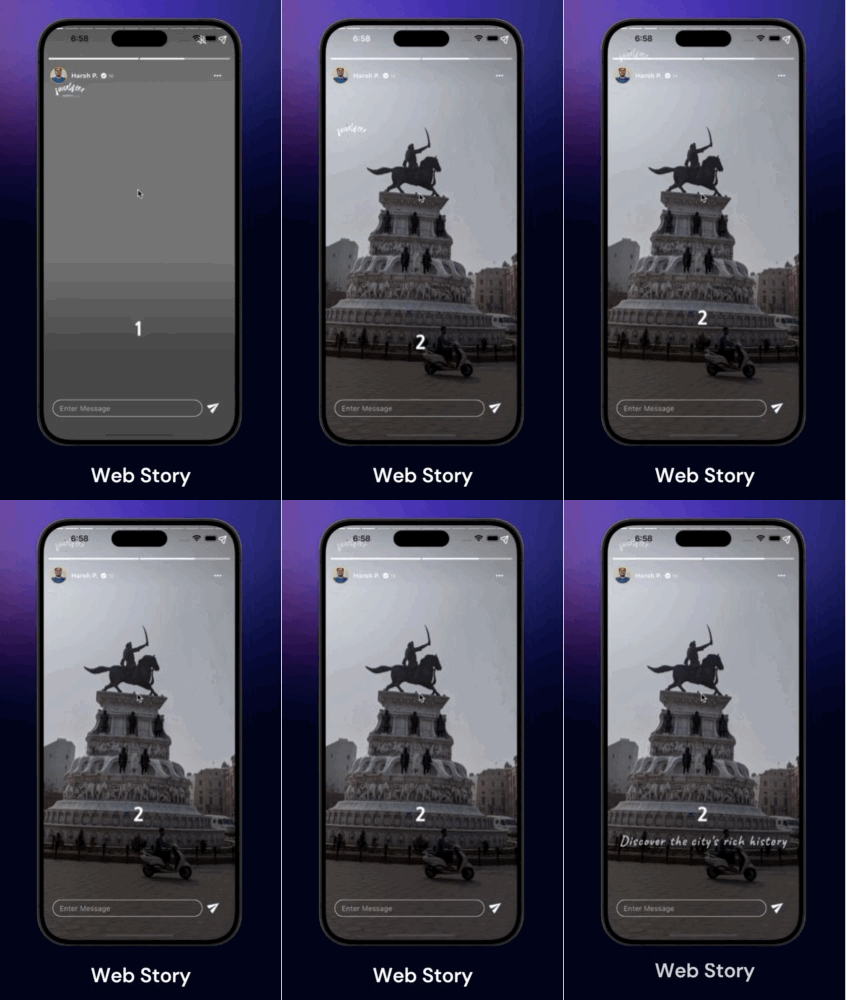
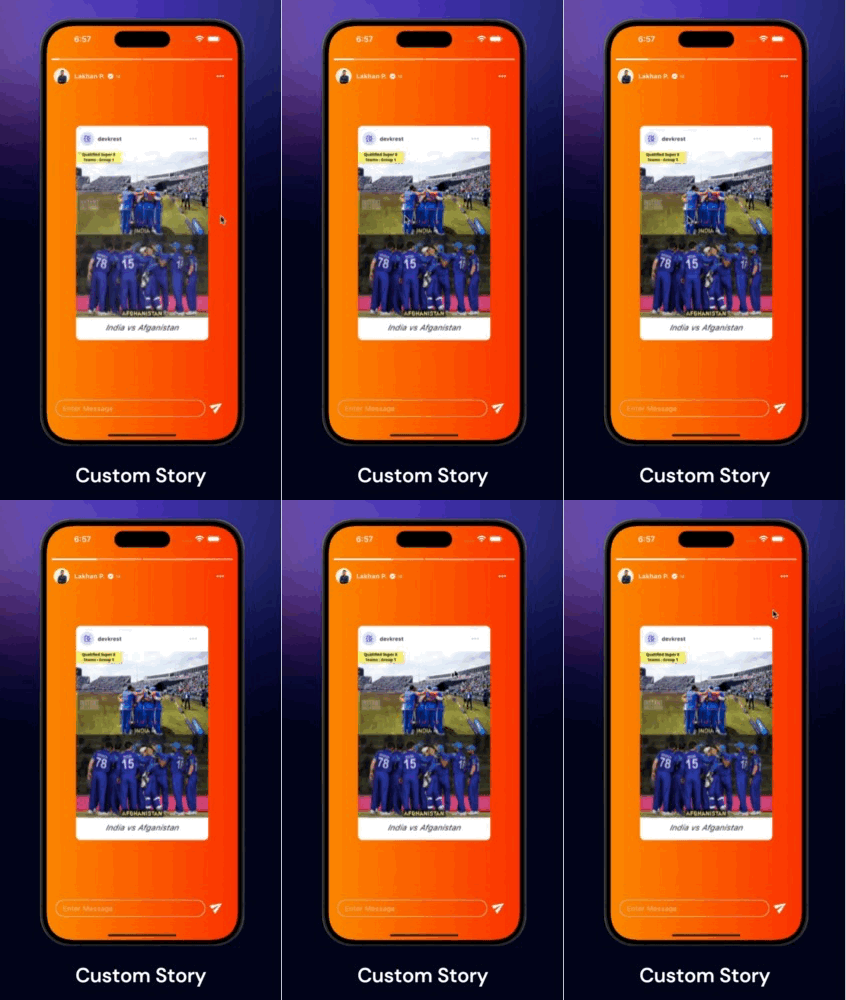
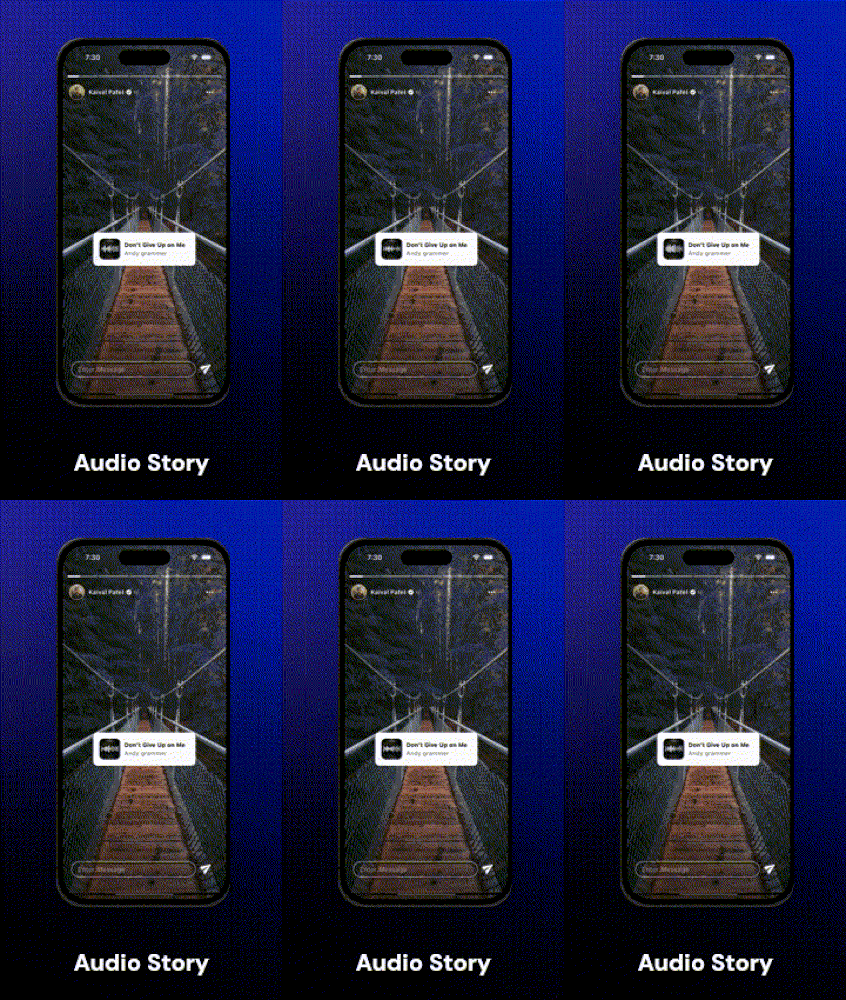
Video Story Image Story Web Story Custom Story 1 Custom Story 2 Audio Story

🎥 Video Demo

https://devkrest.com/flutter_story_presenter/flutter-story-presenter-demo.mp4

🤌🏻 Features

🔹 Supported Media Types: Images, Videos, Text, Web & Custom

🔹 Custom Loader & Thumbnails: Add your custom thumbnails or loaders while loading the story

🔹 Option to Cache: Image, Video, and show Loading Widgets

🔹 Accurate Animated Progress Bar

🔹 Color Customization: For Progress Bars

🔹 Header & Footer Widgets : For adding Profiles & Read more or Textfields

🔹 Controls: Pause, Resume, Next, Previous, Jump to, Mute, Unmute

🔹 Gestures: Tap, Right Tap, Left Tap, Slide or Drag Down

🔹 Customizable Widget: Display your own widgets as Story

🔹 Callbacks: Receive different callbacks based on the type of story item for handling state management.

⚙️ Installation

Add flutter_story_presenter to your pubspec.yaml dependencies. And Import it as

import 'package:flutter_story_presenter/flutter_story_presenter.dart';

🔭 Guide to use

For a detailed view and more examples, check out example/main.dart.

Use FlutterStoryPresenter to display stories on any screen. It accepts a list of StoryItem, each containing URLs for displaying images, videos, and web pages.

FlutterStoryPresenter(
    controller : FlutterStoryController(),
    items: [
        /// For Image Story Item
        StoryItem(
            url:'https://picsum.photos/1000/1000',
            type: StoryItemType.image,
        ),
        /// For Video Story Item
        StoryItem(
            url:'https://videos.pexels.com/video-files/7297870/7297870-hd_1080_1920_30fps.mp4',
            type: StoryItemType.video,
        ),
        /// For Text Story Item
        StoryItem(
            url:'We won this tournament ... Many more to go',
            type: StoryItemType.text,
        ),
        /// For Web Story Item
        StoryItem(
            url:'https://devkrest.com/',
            type: StoryItemType.web,
        ),
        /// For Custom Story Item
        StoryItem(
            customWidget: YourOwnBakedStoryWidget(),
            type: StoryItemType.custom,
        ),
    ]
)
FlutterStoryPresenter Properties

Here are some of the properties you may have look for further customisations & callbacks.

/// List of StoryItem objects to display in the story view.
final List<StoryItem> items;

/// Controller for managing the current playing media.
final FlutterStoryController? flutterStoryController;

/// Callback function triggered whenever the story changes or the user navigates to the previous/next story.
final OnStoryChanged? onStoryChanged;

/// Callback function triggered when all items in the list have been played.
final OnCompleted? onCompleted;

/// Callback function triggered when the user taps on the left half of the screen.
/// Returns a Future<bool> - if true, the story will navigate to the previous item; if false, navigation is blocked.
/// If not provided, tapping left will always navigate to the previous story.
final OnLeftTap? onLeftTap;

/// Callback function triggered when the user taps on the right half of the screen.
/// Returns a Future<bool> - if true, the story will navigate to the next item; if false, navigation is blocked.
/// If not provided, tapping right will always navigate to the next story.
final OnRightTap? onRightTap;

/// Callback function triggered when user drag downs the storyview.
final OnSlideDown? onSlideDown;

/// Callback function triggered when user starts drag downs the storyview.
final OnSlideStart? onSlideStart;

/// Indicates whether the story view should restart from the beginning after all items have been played.
final bool restartOnCompleted;

/// Index to start playing the story from initially.
final int initialIndex;

/// Configuration and styling options for the story view indicator.
final StoryViewIndicatorConfig? storyViewIndicatorConfig;

/// Callback function to retrieve the VideoPlayerController when it is initialized and ready to play.
final OnVideoLoad? onVideoLoad;

/// Widget to display user profile or other details at the top of the screen.
final Widget? headerWidget;

/// Widget to display text field or other content at the bottom of the screen.
final Widget? footerWidget;
Using FlutterStoryController

FlutterStoryController is a controller class designed to manage the current story displayed on FlutterStoryPresenter. It includes various methods such as play(), pause(), jumpTo(), next(), previous(), mute(), and unMute(), allowing you to control the existing StoryItem.

final storyController = FlutterStoryController();
FlutterStoryPresenter(
    controller : storyController,
    items: [
        /// Story Item goes here
    ]
)
...
/// Somewhere in your code
storyController.pause();
storyController.play();
storyController.next();
storyController.previous();
storyController.jumpTo(2);
storyController.mute();
storyController.unMute();
Using StoryItem

The StoryItem class is used to define the individual items displayed in a FlutterStoryPresenter. Each StoryItem can represent an image, video, text, web content, or a custom widget.

const StoryItem({
  this.url,
  required this.storyItemType,
  this.thumbnail,
  this.isMuteByDefault = false,
  this.duration = const Duration(seconds: 3),
  this.storyItemSource = StoryItemSource.network,
  this.videoConfig,
  this.errorWidget,
  this.imageConfig,
  this.textConfig,
  this.webConfig,
  this.customWidget,
});
Parameters
  • url: The URL, file path, or web URL of the story item. Required unless storyItemType is custom.
  • storyItemType: The type of story item. Required. It can be an image, video, text, web content, or custom.
  • thumbnail: A widget to display as a thumbnail.
  • isMuteByDefault: A boolean indicating whether the video should be muted by default. Applicable when storyItemType is video.
  • duration: The duration for displaying the widget. Defaults to 3 seconds.
  • storyItemSource: The source type of the story item. Defaults to StoryItemSource.network.
  • videoConfig: Configuration for video stories.
  • errorWidget: A widget to display when an error occurs while loading the view.
  • imageConfig: Configuration for image stories.
  • textConfig: Configuration for text stories.
  • webConfig: Configuration for web stories.
  • customWidget: A custom widget to display fully instead of any other view. Required when storyItemType is custom.
Example
StoryItem(
  url: 'https://example.com/image.jpg',
  storyItemType: StoryItemType.image,
  storyItemSource: StoryItemSource.network,
  duration: Duration(seconds: 5),
  thumbnail: Image.network('https://example.com/thumbnail.jpg'),
  imageConfig: StoryViewImageConfig(
    fit: BoxFit.cover,
    height: 300,
    width: 300,
    progressIndicatorBuilder: (_,_,loadProgress){
      return YourImageLoaderWidget();
    }
  ),
)

StoryItem(
  url: 'https://example.com/video.mp4',
  storyItemType: StoryItemType.video,
  isMuteByDefault: true,
  storyItemSource: StoryItemSource.network,
  duration: Duration(seconds: 10),
  videoConfig: StoryViewVideoConfig(
    cacheVideo: true,
    fit: BoxFit.cover,
    height: 500,
    width: 500,
    loadingWidget: MyVideoLoadingWidget(),
    /// If you opt to cache video, 
    // it will store to user device and then played, 
    // if already cached, will play without buffer 
    // from next time
    cacheVideo: false,
    useVideoAspectRatio: false,
    videoPlayerOptions: VideoPlayerOptions(mixWithOthers: true,),
  ),
)

StoryItem(
  storyItemType: StoryItemType.custom,
  customWidget: MyCustomWidget(),
)
Full Example

This is the full example demonstrating the usage of FlutterStoryPresenter. For more insights and detailed reference, refer to the official documentation.


import 'package:cached_network_image/cached_network_image.dart';
import 'package:flutter/cupertino.dart';
import 'package:flutter/material.dart';
import 'package:flutter/services.dart';
import 'package:flutter_story_presenter/flutter_story_presenter.dart';

void main() {
  SystemChrome.setSystemUIOverlayStyle(const SystemUiOverlayStyle(
    statusBarColor: Colors.transparent,
  ));
  runApp(const MainApp());
}

class MainApp extends StatelessWidget {
  const MainApp({super.key});

  @override
  Widget build(BuildContext context) {
    return MaterialApp(
      debugShowCheckedModeBanner: false,
      themeMode: ThemeMode.dark,
      darkTheme: ThemeData.dark(),
      home: const Home(),
    );
  }
}

class Home extends StatefulWidget {
  const Home({super.key});

  @override
  State<Home> createState() => _HomeState();
}

class _HomeState extends State<Home> {
  PageController pageController = PageController();

  //Story Data
  List<StoryModel> sampleStory = [
    StoryModel(
      userName: 'Kaival Patel',
      userProfile: 'https://avatars.githubusercontent.com/u/39383435?v=4',
      stories: [
        const StoryItem(
          storyItemType: StoryItemType.video,
          storyItemSource: StoryItemSource.asset,
          url: 'assets/fb8512a35d6f4b2e8917b74a048de71a.MP4',
          thumbnail: Center(
              child: Row(
                mainAxisAlignment: MainAxisAlignment.center,
                children: [
                  CupertinoActivityIndicator(
                    radius: 15,
                  ),
                  SizedBox(
                    width: 10,
                  ),
                  Text('Video Loading')
                ],
              )),
          videoConfig: StoryViewVideoConfig(
            fit: BoxFit.cover,
          ),
        ),
        const StoryItem(
            storyItemType: StoryItemType.video,
            url:
            'https://videos.pexels.com/video-files/5913245/5913245-uhd_1440_2560_30fps.mp4',
            thumbnail: Center(
                child: Row(
                  mainAxisAlignment: MainAxisAlignment.center,
                  children: [
                    CupertinoActivityIndicator(
                      radius: 15,
                    ),
                    SizedBox(
                      width: 10,
                    ),
                    Text('Video Loading')
                  ],
                )),
            videoConfig: StoryViewVideoConfig(
              fit: BoxFit.cover,
              height: double.infinity,
              width: double.infinity,
              loadingWidget: Center(child: CupertinoActivityIndicator()),
            )),
        StoryItem(
          storyItemType: StoryItemType.custom,
          customWidget: (p0) =>
              TextOverlayView(
                controller: p0,
              ),
          imageConfig: StoryViewImageConfig(
            fit: BoxFit.contain,
            progressIndicatorBuilder: (p0, p1, p2) =>
            const Center(
              child: CupertinoActivityIndicator(),
            ),
          ),
        ),
      ],
    ),
    StoryModel(
      userName: 'Lakhan P.',
      userProfile: 'https://devkrest.com/team/lakhan.png',
      stories: [
        StoryItem(
          storyItemType: StoryItemType.custom,
          duration: const Duration(seconds: 20),
          customWidget: (p0) =>
              PostOverlayView(
                controller: p0,
              ),
          imageConfig: StoryViewImageConfig(
            fit: BoxFit.contain,
            progressIndicatorBuilder: (p0, p1, p2) =>
            const Center(
              child: CupertinoActivityIndicator(),
            ),
          ),
        ),
        const StoryItem(
          storyItemType: StoryItemType.video,
          storyItemSource: StoryItemSource.asset,
          url: 'assets/StorySaver.net-_spindia_-Video-1718781607686.mp4',
          thumbnail: Center(
              child: Row(
                mainAxisAlignment: MainAxisAlignment.center,
                children: [
                  CupertinoActivityIndicator(
                    radius: 15,
                  ),
                  SizedBox(
                    width: 10,
                  ),
                  Text('Video Loading')
                ],
              )),
          videoConfig: StoryViewVideoConfig(
            fit: BoxFit.contain,
          ),
        ),
      ],
    ),
    StoryModel(
      userName: 'Harsh P.',
      userProfile: 'https://devkrest.com/team/harsh.jpg',
      stories: [
        StoryItem(
          storyItemType: StoryItemType.web,
          url: 'https://quirkywanderer.com/web-stories/bijli-mahadev-trek/',
          duration: const Duration(seconds: 20),
          imageConfig: StoryViewImageConfig(
            fit: BoxFit.contain,
            progressIndicatorBuilder: (p0, p1, p2) =>
            const Center(
              child: CupertinoActivityIndicator(),
            ),
          ),
        ),
        StoryItem(
          storyItemType: StoryItemType.web,
          url:
          'https://www.ndtv.com/webstories/travel/10-things-to-do-in-amritsar-from-golden-temple-visit-to-wagah-border-47',
          duration: const Duration(seconds: 20),
          imageConfig: StoryViewImageConfig(
            fit: BoxFit.contain,
            progressIndicatorBuilder: (p0, p1, p2) =>
            const Center(
              child: CupertinoActivityIndicator(),
            ),
          ),
        ),
      ],
    ),
  ];

  @override
  Widget build(BuildContext context) {
    return Scaffold(
      backgroundColor: Colors.black,
      body: PageView.builder(
        itemCount: sampleStory.length,
        physics: const NeverScrollableScrollPhysics(),
        controller: pageController,
        itemBuilder: (context, index) {
          return MyStoryView(
            storyModel: sampleStory[index],
            pageController: pageController,
          );
        },
      ),
    );
  }
}

class MyStoryView extends StatefulWidget {
  const MyStoryView({
    super.key,
    required this.storyModel,
    required this.pageController,
  });

  final StoryModel storyModel;
  final PageController pageController;

  @override
  State<MyStoryView> createState() => _MyStoryViewState();
}

class _MyStoryViewState extends State<MyStoryView> {
  late FlutterStoryController controller;

  @override
  void initState() {
    controller = FlutterStoryController();
    super.initState();
  }

  @override
  void dispose() {
    super.dispose();
  }

  @override
  Widget build(BuildContext context) {
    final storyViewIndicatorConfig = StoryViewIndicatorConfig(
      height: 4,
      activeColor: Colors.white,
      backgroundCompletedColor: Colors.white,
      backgroundDisabledColor: Colors.white.withOpacity(0.5),
      horizontalGap: 1,
      borderRadius: 1.5,
    );

    return FlutterStoryView(
      flutterStoryController: controller,
      items: widget.storyModel.stories,
      footerWidget: MessageBoxView(controller: controller),
      storyViewIndicatorConfig: storyViewIndicatorConfig,
      initialIndex: 0,
      headerWidget: ProfileView(storyModel: widget.storyModel),
      onStoryChanged: (p0) {
        // For Custom type story need to play custom view manually
        if (widget.storyModel.stories[p0].storyItemType ==
            StoryItemType.custom) {
          controller.playCustomWidget();
        }
      },
      onPreviousCompleted: () async {
        await widget.pageController.previousPage(
            duration: const Duration(milliseconds: 500),
            curve: Curves.decelerate);
      },
      onCompleted: () async {
        await widget.pageController.nextPage(
            duration: const Duration(milliseconds: 500),
            curve: Curves.decelerate);
        controller = FlutterStoryController();
      },
    );
  }
}

class MessageBoxView extends StatelessWidget {
  const MessageBoxView({
    super.key,
    required this.controller,
  });

  final FlutterStoryController controller;

  @override
  Widget build(BuildContext context) {
    return SafeArea(
      child: Padding(
        padding:
        const EdgeInsets.symmetric(horizontal: 20).copyWith(bottom: 10),
        child: Row(
          mainAxisAlignment: MainAxisAlignment.center,
          children: [
            Expanded(
              child: Container(
                decoration: BoxDecoration(
                  border: Border.all(
                    color: Colors.white,
                  ),
                  borderRadius: BorderRadius.circular(999),
                ),
                padding: const EdgeInsets.symmetric(horizontal: 15),
                child: TextFormField(
                  onTap: () {
                    controller.pause();
                  },
                  onTapOutside: (event) {
                    controller.play();
                    FocusScope.of(context).unfocus();
                  },
                  style: const TextStyle(
                    fontWeight: FontWeight.w400,
                  ),
                  decoration: const InputDecoration(
                      hintText: 'Enter Message',
                      border: InputBorder.none,
                      isDense: true,
                      contentPadding: EdgeInsets.symmetric(vertical: 6)),
                ),
              ),
            ),
            const SizedBox(
              width: 5,
            ),
            IconButton(
                onPressed: () {},
                iconSize: 30,
                icon: Transform.rotate(
                    angle: -0.6,
                    child: const Padding(
                      padding: EdgeInsets.only(bottom: 9),
                      child: Icon(
                        Icons.send,
                        color: Colors.white,
                      ),
                    )))
          ],
        ),
      ),
    );
  }
}

class ProfileView extends StatelessWidget {
  const ProfileView({
    super.key,
    required this.storyModel,
  });

  final StoryModel storyModel;

  @override
  Widget build(BuildContext context) {
    return Container(
      decoration: BoxDecoration(
        borderRadius: BorderRadius.circular(1),
      ),
      child: Padding(
        padding: const EdgeInsets.only(top: 30, left: 15, right: 15),
        child: Row(
          children: [
            Container(
              decoration: const BoxDecoration(
                color: Colors.amber,
                shape: BoxShape.circle,
              ),
              padding: const EdgeInsets.all(1),
              child: ClipOval(
                child: CachedNetworkImage(
                  imageUrl: storyModel.userProfile,
                  height: 35,
                  width: 35,
                  fit: BoxFit.cover,
                ),
              ),
            ),
            const SizedBox(
              width: 10,
            ),
            Expanded(
              child: Row(
                children: [
                  Flexible(
                    child: Text(
                      storyModel.userName,
                      style: const TextStyle(
                        color: Colors.white,
                        fontWeight: FontWeight.bold,
                        fontSize: 14,
                      ),
                    ),
                  ),
                  const SizedBox(
                    width: 5,
                  ),
                  const Icon(
                    Icons.verified,
                    size: 15,
                  ),
                  const SizedBox(
                    width: 3,
                  ),
                  const Text(
                    '1d',
                    style: TextStyle(color: Colors.white, fontSize: 10),
                  )
                ],
              ),
            ),
            IconButton(
              onPressed: () {},
              icon: const Icon(
                Icons.more_horiz,
                color: Colors.white,
              ),
            )
          ],
        ),
      ),
    );
  }
}

// Custom Story Data Model
class StoryModel {
  String userName;
  String userProfile;
  List<StoryItem> stories;

  StoryModel({
    required this.userName,
    required this.userProfile,
    required this.stories,
  });
}

// Custom Widget - Question
class TextOverlayView extends StatelessWidget {
  const TextOverlayView({super.key, required this.controller});

  final FlutterStoryController? controller;

  @override
  Widget build(BuildContext context) {
    return Container(
      padding: const EdgeInsets.symmetric(horizontal: 40),
      decoration: const BoxDecoration(
          image: DecorationImage(
              fit: BoxFit.cover,
              image: CachedNetworkImageProvider(
                  'https://images.pexels.com/photos/1761279/pexels-photo-1761279.jpeg?auto=compress&cs=tinysrgb&w=1260&h=750&dpr=2'))),
      child: Column(
        mainAxisAlignment: MainAxisAlignment.center,
        children: [
          Stack(
            clipBehavior: Clip.none,
            children: [
              Container(
                padding:
                const EdgeInsets.symmetric(horizontal: 22, vertical: 30),
                decoration: BoxDecoration(
                    color: Colors.white,
                    borderRadius: BorderRadius.circular(10),
                    boxShadow: [
                      BoxShadow(
                        color: Colors.black.withOpacity(0.2),
                        blurRadius: 10,
                        spreadRadius: 0,
                      )
                    ]),
                child: Column(
                  children: [
                    const SizedBox(
                      height: 20,
                    ),
                    const Text(
                      "What’s your favorite outdoor activity and why?",
                      textAlign: TextAlign.center,
                      style: TextStyle(
                        color: Colors.black,
                        fontWeight: FontWeight.w600,
                        fontSize: 18,
                      ),
                    ),
                    const SizedBox(
                      height: 10,
                    ),
                    TapRegion(
                      onTapOutside: (event) {
                        controller?.play();
                        FocusScope.of(context).unfocus();
                      },
                      child: Container(
                        decoration: BoxDecoration(
                          color: Colors.black.withOpacity(0.1),
                          borderRadius: BorderRadius.circular(10),
                        ),
                        padding: const EdgeInsets.symmetric(horizontal: 20),
                        child: IntrinsicWidth(
                          child: TextFormField(
                            style: const TextStyle(
                              color: Colors.black,
                            ),
                            onTap: () {
                              controller?.pause();
                            },
                            decoration: InputDecoration(
                                hintText: 'Type something...',
                                hintStyle: TextStyle(
                                  color: Colors.black.withOpacity(0.6),
                                ),
                                border: InputBorder.none),
                          ),
                        ),
                      ),
                    )
                  ],
                ),
              ),
              Positioned(
                top: -40,
                left: 0,
                right: 0,
                child: Container(
                  decoration: BoxDecoration(
                      color: const Color(0xffE2DCFF),
                      shape: BoxShape.circle,
                      boxShadow: [
                        BoxShadow(
                          color: Colors.black.withOpacity(0.2),
                          blurRadius: 20,
                        )
                      ]),
                  padding: const EdgeInsets.all(20),
                  child: CachedNetworkImage(
                    imageUrl: 'https://devkrest.com/flutter_story_presenter/devkrest_logo_outlined.png',
                    height: 40,
                    width: 40,
                  ),
                ),
              )
            ],
          ),
        ],
      ),
    );
  }
}

// Custom Widget - Post View
class PostOverlayView extends StatelessWidget {
  const PostOverlayView({super.key, required this.controller});

  final FlutterStoryController? controller;

  @override
  Widget build(BuildContext context) {
    return Container(
      padding: const EdgeInsets.symmetric(horizontal: 40),
      decoration: const BoxDecoration(
          gradient:
          LinearGradient(colors: [Color(0xffff8800), Color(0xffff3300)])),
      child: Column(
        mainAxisAlignment: MainAxisAlignment.center,
        children: [
          Container(
            padding: const EdgeInsets.symmetric(horizontal: 0, vertical: 5),
            decoration: BoxDecoration(
                color: Colors.white,
                borderRadius: BorderRadius.circular(10),
                boxShadow: [
                  BoxShadow(
                    color: Colors.black.withOpacity(0.1),
                    blurRadius: 0,
                    spreadRadius: 0,
                  )
                ]),
            child: IntrinsicWidth(
              child: Column(
                children: [
                  Padding(
                    padding: const EdgeInsets.symmetric(horizontal: 10),
                    child: Row(
                      mainAxisSize: MainAxisSize.min,
                      children: [
                        Container(
                          decoration: const BoxDecoration(
                            color: Color(0xffE2DCFF),
                            shape: BoxShape.circle,
                          ),
                          padding: const EdgeInsets.all(8),
                          child: CachedNetworkImage(
                            imageUrl:
                            'https://devkrest.com/flutter_story_presenter/devkrest_logo_outlined.png',
                            height: 15,
                            width: 15,
                          ),
                        ),
                        const SizedBox(
                          width: 8,
                        ),
                        const Expanded(
                          child: Text(
                            'devkrest',
                            style: TextStyle(
                              color: Colors.black,
                              fontWeight: FontWeight.w600,
                              fontSize: 12,
                            ),
                          ),
                        ),
                        IconButton(
                          onPressed: () {},
                          icon: const Icon(
                            Icons.more_horiz,
                          ),
                        )
                      ],
                    ),
                  ),
                  const SizedBox(
                    height: 5,
                  ),
                  CachedNetworkImage(
                    height: MediaQuery
                        .of(context)
                        .size
                        .height * 0.40,
                    fit: BoxFit.cover,
                    imageUrl:
                    'https://picsum.photos/500/500',),
                  const Padding(
                    padding: EdgeInsets.symmetric(horizontal: 10, vertical: 10),
                    child: Text(
                      "Random Image (Courtesy: picsum.photos)",
                      textAlign: TextAlign.center,
                      style: TextStyle(
                          color: Colors.black,
                          fontWeight: FontWeight.w400,
                          fontSize: 18,
                          fontStyle: FontStyle.italic),
                    ),
                  ),
                ],
              ),
            ),
          ),
        ],
      ),
    );
  }
}

Team Devkrest

We would like to extend our heartfelt thanks to the following contributors for their invaluable contributions to this package.

Kaival Patel
Kaival P

CEO

Harsh Prajapati
Harsh P

VP (Technology)

Lakhan Purohit
Lakhan P

CTO

Devkrest Technologies

카테고리

의존성

소스 저장소

이 패키지를 사용하는 프로젝트

아직 데이터가 없습니다.