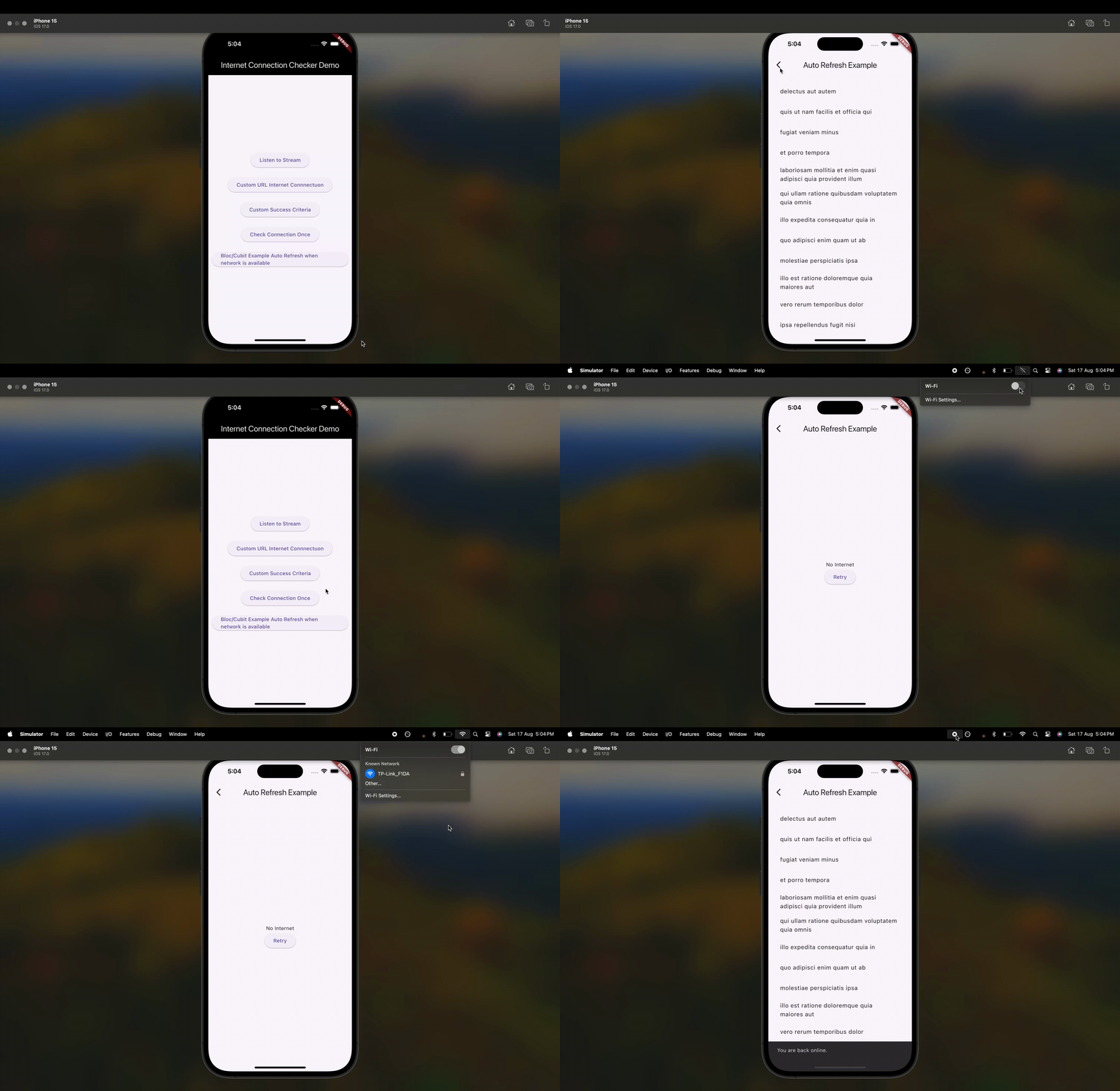
인터넷 연결 체커 패키지는 여러 플랫폼에서 인터넷 연결 상태를 확인하는 간단하고 신뢰할 수 있는 방법을 제공합니다. 개발자는 기기가 인터넷에 연결되어 있는지 여부와 느린 연결 조건을 감지할 수 있으며, 이에 따라 앱이 적절히 반응하도록 할 수 있습니다(예: 오프라인 상태 표시 또는 동작 조정). 크로스플랫폼 지원을 고려해 설계되었으며, 안드로이드, iOS, 웹, 맥OS, 윈도우, 리눅스에서 원활하게 작동합니다. 효율적인 백그라운드 검사를 통해 배터리 소모를 최소화하면서 실시간 업데이트를 보장합니다.
사용 사례
API 호출 전 온라인 상태 확인
네트워크 상태 표시기 표시
연결 속도에 따라 앱 동작 조정
오프라인 시나리오를 우아하게 처리하기
장시간 실행 작업 중 연결성 모니터링
주요 기능
실시간 연결 모니터링
느린 연결 감지 지원
크로스 플랫폼 호환성
경량이고 효율적
이벤트 스트림을 갖춘 간단한 API
자동 재연결 감지
적합한 대상
신뢰할 수 있는 네트워크 상태 인식이 필요한 앱
오프라인 우선 애플리케이션
네트워크에 따라 달라지는 기능 예: 동기화 또는 스트리밍
다중 플랫폼을 대상으로 하는 개발자
연결성에 대한 반응형 UI 피드백이 필요한 응용 프로그램
고려 사항
일부 플랫폼에서는 권한이 필요할 수 있습니다
적절히 관리되지 않으면 백그라운드 검사가 배터리 수명에 영향을 줄 수 있습니다
프록시 또는 방화벽 구성은 처리하지 않습니다
연결 감지에 국한되며 데이터 전송 검증은 포함되지 않음
제한 없이 고주파 풀링에 적합하지 않습니다
원본 README
연결된 소스 저장소의 README 원문 스냅샷입니다. 최신 내용은 저장소에서 확인하세요.
🌍 Internet Connection Checker
A library designed for seamless internet connectivity checks.
This library enables you to verify your internet connection
and can also detect slow internet connectivity.
Backend Server Checks:
Seamlessly verify internet connectivity and server reachability using built-in default addresses or by configuring custom backend server URLs tailored to your application needs.
Slow Internet Detection:
Efficiently detect and manage slow internet connections on the user's device to ensure a smooth user experience.
Auto Refresh:
Automatically refresh pages in your app when the internet becomes available, providing a dynamic and seamless user experience.
For detailed implementation, refer to the example files:
To prevent memory leaks, always dispose of the InternetConnectionChecker instance when it's no longer needed. For example, in a StatefulWidget's dispose method:
@overridevoiddispose() {
connectionChecker.dispose(); // Dispose of the InternetConnectionChecker instancesuper.dispose();
}
Description
Checks for an internet (data) connection, by checking accessible Uri's.
The defaults of the plugin should be sufficient to reliably determine if
the device is currently connected to the global network, e.i. has access to the Internet.
Platform Support
Android
iOS
MacOS
Web
Linux
Windows
✅
✅
✅
✅
✅
✅
Demo
Quick start
Add the following dependencies to your pubspec.yaml:
dependencies:internet_connection_checker:^2.0.0
Android Configuration
On Android, for correct working in release mode, you must add INTERNET & ACCESS_NETWORK_STATE
permissions to AndroidManifest.xml, follow the next lines:
On MacOS, you'll need to add the following entry to your DebugProfile.entitlements and Release.entitlements (located under macos/Runner) to allow access to internet.
The reason this package exists is that connectivity_plus package cannot reliably determine if a data connection is actually available. More info on its page here: https://pub.dev/packages/connectivity_plus.
Getting Started
The InternetConnectionChecker can be used as a singleton or can be instantiated with a custom instance with your curated AddressCheckOption's.
Best usage with Flutter Bloc/Cubit
The InternetConnectionChecker package is particularly useful in scenarios where you need to handle changes in network connectivity dynamically. For instance, you can use it to refresh the page or trigger specific actions when the device goes offline and then reconnects to the internet. This is useful for applications where real-time updates or data synchronization is critical.
See example folder for one specific example which illustrates how to retry page refresh when internet connection is available. The example files paths are listed below:
import'package:internet_connection_checker/internet_connection_checker.dart';
voidmain() async {
finalbool isConnected = awaitInternetConnectionChecker.instance.hasConnection;
if (isConnected) {
print('Device is connected to the internet');
} else {
print('Device is not connected to the internet');
}
}
Listen to Stream for Internet Connection availability changes:
import'package:internet_connection_checker/internet_connection_checker.dart';
voidmain() {
final connectionChecker = InternetConnectionChecker.instance;
final subscription = connectionChecker.onStatusChange.listen(
(InternetConnectionStatus status) {
if (status == InternetConnectionStatus.connected) {
print('Connected to the internet');
} else {
print('Disconnected from the internet');
}
},
);
// Remember to cancel the subscription when it's no longer needed
subscription.cancel();
}
Note: Remember to dispose of any listeners and the instance of InternetConnectionChecker,
when they're not required to prevent memory leaks.
e.g. in aStatefulWidget's dispose() method:
Note: Remember to dispose of InternetConnectionChecker instance,
when it's not needed to prevent memory leaks,
e.g. in aStatefulWidget's dispose() method:
Note: Ensure your slowConnectionThreshold's duration is not more than the checkInternal and checkTimeout Duration.
Using requireAllAddressesToRespond
To ensure that the internet connection status is marked as connected only when all specified addresses are reachable, you can enable the requireAllAddressesToRespond configuration.
import'package:internet_connection_checker/internet_connection_checker.dart';
voidmain() async {
// Create a custom instance with requireAllAddressesToRespond set to true/// Remember to dispose of [customChecker] instance, when it's not needed /// to prevent memory leaks.final customChecker = InternetConnectionChecker.createInstance(
requireAllAddressesToRespond: true,
addresses: [
AddressCheckOption(uri: Uri.parse('https://dummyapi.online/api/movies/1')),
AddressCheckOption(
uri: Uri.parse('https://jsonplaceholder.typicode.com/albums/1'),
),
],
);
// Check connectivityfinalbool isConnected = await customChecker.hasConnection;
if (isConnected) {
print('All specified backend servers are reachable.');
} else {
print('Not all specified backend servers are reachable.');
}
}
See example folder for more examples.
Features and bugs
Please file feature requests and bugs at the issue tracker.
Credits
NOTE: This package is a continuation of data_connection_checker which currently is not continued. *