로컬라이제이션 패키지는 번역 관리를 간편하게 해주는 방식으로 플러터 앱에서 국제화를 단순화합니다. 개발자가 언어 파일을 효율적으로 정리하고 동적으로 지역 설정을 전환할 수 있게 해주며, 다국어 사용자에게 더 나은 사용자 경험을 제공합니다. 안드로이드, iOS, 웹, 맥OS, 윈도우, 리눅스 등 모든 주요 플랫폼에서 지원되므로 앱 생명주기 전체에 걸쳐 일관된 번역 처리를 보장합니다. 이 패키지는 사용의 용이성을 고려해 설계되어 뼈대 코드를 줄이고 유지보수성을 향상시킵니다.
사용 사례
다국어 앱 개발
동적 언어 전환
중앙 집중형 번역 관리
크로스 플랫폼 로컬라이제이션
사용자 선호 기반 언어 선택
기존 Flutter 프로젝트와의 간편한 통합
주요 기능
간단한 번역 파일 구조
자동 로케일 감지
복수형 지원
간편한 키-값 번역 시스템
내장된 백업 메커니즘
플랫폼에 관계없는 설계
적합한 대상
글로벌 앱을 개발하는 개발자
다중 언어를 관리하는 팀
자주 번역 업데이트가 필요한 프로젝트
다양한 지역 청중을 겨냥한 앱
Flutter 초보자가 i18n 배우기
엄격한 현지화 일정을 가진 프로젝트
고려 사항
번역 파일의 수동 설정이 필요합니다
제한된 내장 번역 도구
외부 번역 서비스와 실시간 동기화 없음
정적 번역에 가장 적합
대규모 번역 워크플로우를 위해 추가 도구가 필요할 수 있습니다
런타임 번역 가져오기를 처리하지 않음
원본 README
연결된 소스 저장소의 README 원문 스냅샷입니다. 최신 내용은 저장소에서 확인하세요.
Localization
Package to simplify in-app translation.
Install
Use the Localization package together with flutter_localization.
Now, add the delegate in MaterialApp or CupertinoApp and define a path where the translation json files will be:
@overrideWidgetbuild(BuildContext context) {
// set json file directory// default value is ['lib/i18n']LocalJsonLocalization.delegate.directories = ['lib/i18n'];
//or set a map of translationsMapLocalization.delegate.translations = {
Locale('en', 'US'): {
'welcome-text': 'This text is in english',
},
Locale('es', 'ES'): {
'welcome-text': 'Este texto esta en español',
},
Locale('pt', 'BR'): {
'welcome-text': 'Este texto está em português',
},
};
returnMaterialApp(
localizationsDelegates: [
// delegate from flutter_localizationGlobalMaterialLocalizations.delegate,
GlobalWidgetsLocalizations.delegate,
GlobalCupertinoLocalizations.delegate,
// delegate from localization package.//json-fileLocalJsonLocalization.delegate,
//or mapMapLocalization.delegate,
],
home: HomePage(),
);
}
Json files
The json file pattern must have the name of the locale and its content must be a json of key and value ONLY.
Create the files in the directory configured (LocalJsonLocalization.delegate.directories):
For convenience, the i18n() method has been added to the String class via extension.
So just add the translation json file key as string and use i18n() method to bring up the translation.
String text = 'welcome-text'.i18n();
print(text) // prints 'This text is in english'
We can also work with arguments for translation. Use %s notion:
{"welcome-text":"Welcome, %s"}
String text = 'welcome-text'.i18n(['Peter']);
print(text); // Welcome, Peter
The %s notation can also be retrieved positionally. Just use %s0, %s1, %s2...
You could plularization your Strings. Use %b{true:false} notion, where left is a string value when condition is true and on the right is a value when condition is false:
{"person-text":"Welcome, %b{people:person}"}
final count = 2;
String text = 'person-text'.i18n(
        [], //args is a required positional parameter, if you don't gave a %s notation give a empty list []
        conditions: [count > 1]);
print(text); // Welcome, people
THAT`S IT!
Additional settings
After installation, the Localization package is fully integrated into Flutter and can reflect changes made natively by the SDK.
Here are some examples of configurations that we will be able to do directly in MaterialApp or CupertinoApp.
Add supported languages
This setting is important to tell Flutter which languages your app is prepared to work with. We can do this by simply adding the Locale in the supportedLocales property:
Often we will not have to make some decisions about what to do when the device language is not supported by our app or work with a different translation for different countries (eg pt_BR(Brazil) and pt_PT(Portugal).
For these and other decisions we can use the dsdsk property to create a resolution strategy:
returnMaterialApp(
localeResolutionCallback: (locale, supportedLocales) {
if (supportedLocales.contains(locale)) {
return locale;
}
// define pt_BR as default when de language code is 'pt'if (locale?.languageCode == 'pt') {
returnLocale('pt', 'BR');
}
// default languagereturnLocale('en', 'US');
},
...
);
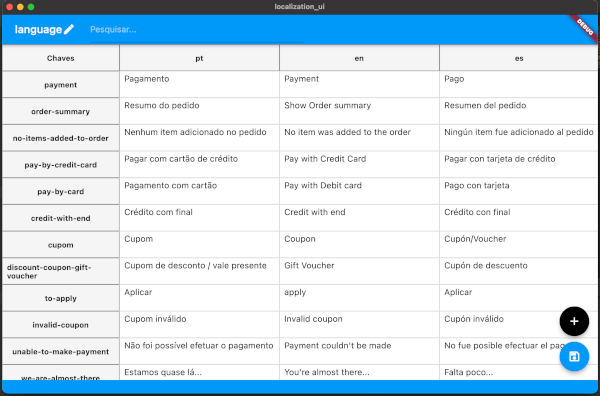
We have an application to help you configure your translation keys.
The project is also open-source, so be fine if you want to help it evolve!
Features and bugs
Localization package is constantly growing.
Let us know what you think of all this.
If you agree, give a Star in that repository representing that you are signing and consenting to the proposed standard.
Questions and Problems
The issues channel is open for questions, to report problems and suggestions, do not hesitate to use this communication channel.