패키지, 저장소 및 앱 카테고리 검색

material_segmented_control 표지
패키지 상세v5.0.1

material_segmented_control

iOS용 세그먼트 컨트롤과 유사하지만, Material 디자인을 사용합니다.

AndroidiOSWebmacOSWindowsLinux
30일 다운로드
1.1만
좋아요
103
Pub 점수
150

패키지 설치

flutter pub add material_segmented_control

패키지 개요

공개 정보를 바탕으로 생성한 선택 가이드입니다.

Material Design 미학을 구현한 세그먼트 컨트롤을 제공하는 플러터 위젯으로, iOS 스타일의 세그먼트 컨트롤과 시각적으로 일관된 대안을 제공합니다. 사용자가 상호 배타적인 선택 목록에서 하나를 선택할 수 있게 하며, 주로 설정이나 필터에 사용됩니다. 색상, 레이블 및 선택 동작의 맞춤화를 지원하면서도 안드로이드, iOS, 웹, 맥OS, 윈도우, 리눅스 등 다양한 플랫폼에서 적절한 스타일링을 유지합니다.

사용 사례

  • 폼 입력 선택
  • 카테고리별로 데이터 필터링
  • 사용자 선호 설정
  • 탭 간 탐색
  • 사용자 정의 가능한 UI 컴포넌트

주요 기능

  • 매터리얼 디자인 외관
  • 크로스 플랫폼 호환성
  • 사용자 지정 가능한 색상 및 레이블
  • 단일 선택 지원
  • 기존 위젯과의 간편한 통합

적합한 대상

  • 크로스 플랫폼 앱을 개발하는 개발자
  • Material 준수 UI 요소를 찾는 디자이너
  • 직관적인 탭 유사 탐색이 필요한 앱
  • 다양한 플랫폼 간 일관성을 우선시하는 팀
  • 필터링 또는 구성 인터페이스를 갖춘 프로젝트

고려 사항

  • 단일 선택만 가능
  • 선택 콜백을 수동으로 처리해야 합니다
  • 복잡한 레이아웃을 위해 추가 스타일링이 필요할 수 있습니다
  • 대규모 세그먼트에 최적화되지 않음
  • 외부 패키지 유지보수에 의존함

원본 README

연결된 소스 저장소의 README 원문 스냅샷입니다. 최신 내용은 저장소에서 확인하세요.

Material Segmented Control

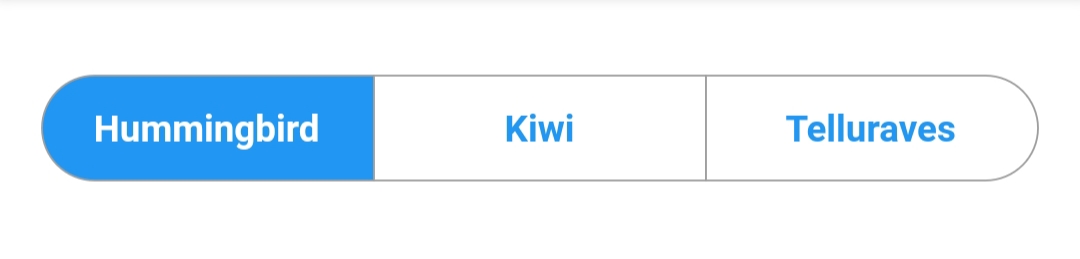
A material segmented control like the one for iOS, in Material style.

image

Why?

We all know well the Cupertino segmented widget in Flutter. But there is no similar in Material, so I thought, why not to create one.

You can check it out on pub.dev: (see package on pub.dev)

How to use

Import the package

In your pubspec.yaml, add

dependencies: 
    material_segmented_control: ^5.0.1
Import code

Wherever you want to use this widget, import

import 'package:material_segmented_control/material_segmented_control.dart';
Basic usage
int _currentSelection = 0;

MaterialSegmentedControl(
    children: _children,
    selectionIndex: _currentSelection,
    borderColor: Colors.grey,
    selectedColor: Colors.redAccent,
    unselectedColor: Colors.white,
    selectedTextStyle: TextStyle(color: Colors.white),
    unselectedTextStyle: TextStyle(color: Colors.redAccent),
    borderWidth: 0.7,
    borderRadius: 32.0,
    disabledChildren: [3],
    onSegmentTapped: (index) {
      setState(() {
        _currentSelection = index;
      });
    },
);

Map<int, Widget> _children = {
  0: Text('Hummingbird'),
  1: Text('Kiwi'),
  2: Text('Rio'),
  3: Text('Telluraves')
};
Features
  • Disable the selection for all children by setting selectionIndex to null. It un-selects all options.
  • Disable children to being not "clickable" (like setting onPressed to null on a button) by setting disabledChildren. Give it a list with all indices that should be disabled. Give it either null or an empty list to not use the disabled feature.

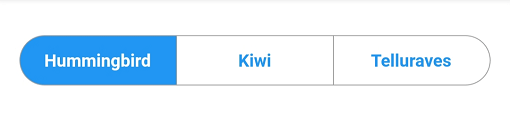
You might want to check out the example project.

카테고리

소스 저장소

이 패키지를 사용하는 프로젝트