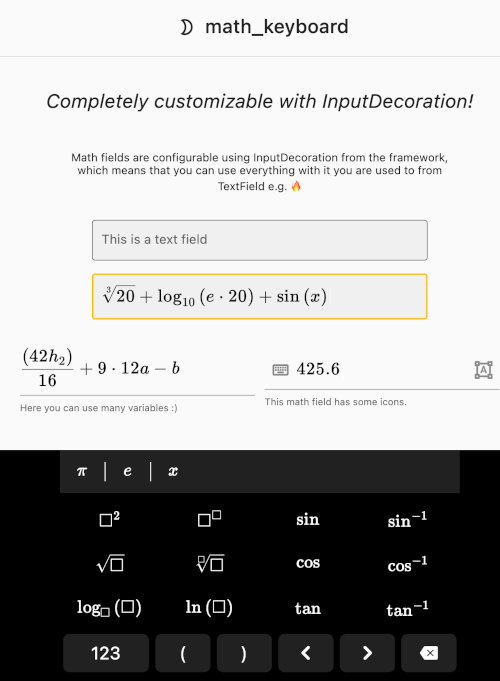
math_keyboard 패키지는 화면 소프트웨어 키보드 또는 물리적 키보드를 통해 플러터 앱에서 수학식을 직관적으로 입력할 수 있도록 합니다. 입력 필드 내에서 명확하고 시각적으로 정확한 수학 표기법을 위한 타입세트 렌더링을 지원합니다. 교육 및 과학 응용 프로그램을 위해 설계되었으며, 여러 플랫폼에서 플러터의 UI 프레임워크와 원활하게 통합됩니다. 복잡한 표현식을 적절한 형식으로 처리하여 인터랙티브 학습 도구 및 수학 중심 인터페이스에 이상적입니다.
사용 사례
수학 교육 앱
과학 계산기
인터랙티브 문제 해결기
온라인 수학 튜터링 플랫폼
기반 폼 수학 입력 양식
주요 기능
수식 타이포그래피 렌더링
화면 및 물리 키보드 지원
크로스 플랫폼 호환성
실시간 표현 편집
사용자 정의 키보드 레이아웃
적합한 대상
교육 앱 개발자
STEM 학습 도구 제작자
수학 중심의 폼 입력
인터랙티브 수학 인터페이스를 구축하는 Flutter 개발자
고려 사항
식 구문 분석을 신중하게 처리해야 합니다
복잡한 표현에 대해 추가 검증이 필요할 수 있습니다
수학 전용 입력 패턴에 한정
일반 텍스트 입력에 적합하지 않습니다
성능은 표현식의 복잡성에 따라 달라집니다
원본 README
연결된 소스 저장소의 README 원문 스냅샷입니다. 최신 내용은 저장소에서 확인하세요.
math_keyboard is a Flutter package that allows editing math expressions using a typeset input
field (so-called "math field") and a custom-made fully integrated math keyboard in Flutter only -
no plugins, no web views.
About math_keyboard
The math_keyboard package provides a widget that behaves like a Flutter TextField with the same
full integration, i.e. focus tree support, input decoration support, and both an
on-screen software keyboard as well as physical keyboard input support. On top of that, the
math field typesetting uses TeX and the package supports converting to math expressions (that e.g.
can be used for calculation).
math_keyboard is an open source project with the aim of providing a way to edit math expression
providing the best user experience in terms of input and UI as well as allowing accurate evaluation
of the mathematical expressions entered by the user. This is used by the
simpleclub app, hence, the association. It is also maintained by simpleclub
(see the LICENSE file).
Features & usage
See the package README for features and usage information.
You can also try the demo app or view the package on Pub →
Implementation
In the following, some high-level information regarding the implementation of the package is
described. This is useful in case you are curious or intend to contribute.
For information on implementing math_keyboard into your own app, please see the
package README.
Math expressions
Notice how the math_keyboard package includes a major feature that allows working with the input
expressions in a mathematical matter, i.e. by converting them into "math expressions" (this is how
we refer to the format in the context of this project).
We achieve this by essentially working with two formats:
The typeset display format, powered by TeX (see below).
A data format, i.e. math expressions.
This "data format" depends on the math_expressions package. Handling the
expressions in this format allows you to e.g. evaluate the expressions.
TeX typesetting
Both the math field content, i.e. the expressions typed by the user, as well as some symbols on the
keyboard itself are typeset using TeX. For TeX typesetting in Flutter, we created our own proof of
concept renderer in early 2020, called CaTeX. This project is on-hold for now and in the
meantime, we collaborated on the flutter_math package that aims to achieve something similar.
Due to lack of maintenance on that repo, we are currently using our forked version,
flutter_math_fork. Note that our ultimate goal is fully integrating the math_keyboard package
with the catex package, which would give us maximum control over the rendering of the typeset math.
Contributing
Our mission with open source repositories like math_keyboard in particular is creating an
ecosystem of science and education related packages for Flutter, allowing users on all platforms to
use the optimal tools for learning.
This is also why we want to share and collaborate on this software as a way to give back to the
community. Any contributions are more than welcome!
You might notice that some features that you would expect from the math_keyboard package are
missing or something is not working as expected. In that case, please file an issue.
In general, we can of course never fully solve every use case, however, especially in this case we
are aware of a few shortcomings. For example the customization options of the keyboard are currently
limited because this has simply not yet been a requirement in our internal usage. In that case,
please consider contributing pull requests to this repo in order to allow as many use cases
to be covered as possible :) Please refer to the contributing guide for that.
Repo structure
The math_keyboard repository is divided into multiple packages. These packages are the following:
During the research phase of this project, we came across the Num++ app, which served as
an inspiration for the math expression parsing part of the package.
The main difference between that app and this package (apart from one being a calculator app and the
other being a generalized usable package) is the fact that Num++ uses a web view and MathQuill for
editing the expression while we built the input field and editing ourselves.