패키지, 저장소 및 앱 카테고리 검색

multi_image_layout 표지
패키지 상세v2.0.0

multi_image_layout

적응형 레이아웃에서 여러 네트워크 및 자산 이미지를 표시하기 위한 유연한 갤러리 패키지입니다.

AndroidiOS
30일 다운로드
122
좋아요
61
Pub 점수
150

패키지 설치

flutter pub add multi_image_layout

패키지 개요

공개 정보를 바탕으로 생성한 선택 가이드입니다.

다수의 네트워크 및 자산 이미지를 적응형 레이아웃에서 표시하기 위한 유연한 갤러리 패키지입니다. 이미지 수에 따라 동적으로 그리드 배열을 조정하여 다양한 기기에서 최적의 시각적 표현을 보장합니다. 소셜 미디어 앱이나 이미지 공유 플랫폼에 이상적이며, 원격 및 로컬 이미지를 부드럽게 렌더링하고 반응형 디자인으로 효율적으로 처리합니다. 이 패키지는 가볍고 Flutter 프로젝트에 원활하게 통합됩니다.

사용 사례

  • 소셜 미디어 피드 표시
  • 앱 내 이미지 갤러리
  • 사용자 프로필 사진 그리드
  • 다중 이미지 공유 기능
  • 반응형 이미지 레이아웃 관리

주요 기능

  • 적응형 그리드 레이아웃
  • 네트워크 및 자산 이미지 지원
  • 부드러운 이미지 로딩
  • 반응형 디자인
  • 사용자 정의 가능한 간격 및 정렬

적합한 대상

  • 이미지가 많은 앱을 개발하는 개발자
  • 소셜 미디어 애플리케이션
  • 사진 공유 플랫폼
  • 동적 이미지 격자 필요 앱
  • Flutter 초보자가 이미지 표시 탐색 중

고려 사항

  • 손상된 이미지 URL에 대한 적절한 오류 처리가 필요합니다
  • 많은 이미지와 함께 성능을 위해 추가 캐싱이 필요할 수 있습니다
  • 레이아웃 구조를 넘어서는 사용자 정의 제한
  • 페이지네이션 없이 매우 큰 이미지 세트에 최적화되지 않음

원본 README

연결된 소스 저장소의 README 원문 스냅샷입니다. 최신 내용은 저장소에서 확인하세요.

multi_image_layout

Flexible Flutter layouts for mixed media grids and fullscreen viewing.

multi_image_layout lets you render single or multiple media items in adaptive layouts, then open them in a fullscreen viewer with captions, save support, and media-specific controls.

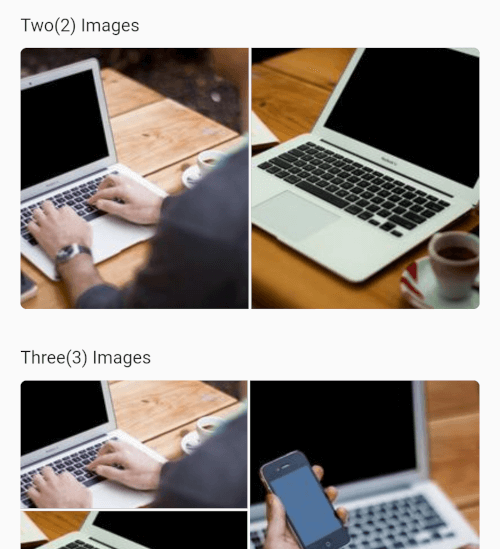
Screenshot 2026-03-22 at 23 42 57

Screenshot_20250430-162040

Features

  • Adaptive layouts for 1, 2, 3, 4, and 4+ items
  • Mixed image and video support in the same grid
  • Fullscreen media viewer with swipe navigation
  • Zoomable images
  • Zoomable fullscreen videos
  • Video autoplay with autoPlay: true by default
  • Video play/pause, mute, progress bar, elapsed time, and total duration
  • Shimmer loading placeholders for network images
  • Save support for images and videos
  • Video cache warm-up for faster repeat playback
  • Optional captions with expand/collapse support

Getting Started

Add the package to your project:

dependencies:
  multi_image_layout: ^1.0.0

Import it:

import 'package:multi_image_layout/multi_image_layout.dart';
iOS

If you use the save action, add these keys to ios/Runner/Info.plist:

<key>NSPhotoLibraryAddUsageDescription</key>
<string>This app saves images and videos to your photo library.</string>
<key>NSPhotoLibraryUsageDescription</key>
<string>This app accesses your photo library to save and manage media.</string>

Without these keys, iOS may terminate the app when save is triggered.

If you plan to load remote media, prefer https URLs. If you need http sources, configure App Transport Security for your app.

Android

If you load remote images or videos, make sure your app has internet access:

<uses-permission android:name="android.permission.INTERNET" />

If you use the save action, request the appropriate storage or media permissions for your target Android version. For older Android versions, that may include:

<uses-permission android:name="android.permission.WRITE_EXTERNAL_STORAGE" />

And, where needed:

<application android:requestLegacyExternalStorage="true" ...>

Permission handling is app-specific, so you should request it from your app layer before calling the save action. A package like permission_handler can be used for that flow.

Usage

Images only
MultiImageViewer(
  images: const [
    ImageModel(
      imageUrl:
          "https://4.img-dpreview.com/files/p/TS250x250~sample_galleries/3800753625/4684313123.jpg",
      caption: "Caption 1",
    ),
    ImageModel(
      imageUrl:
          "https://3.img-dpreview.com/files/p/TS250x250~sample_galleries/3800753625/8719688791.jpg",
      caption: "Caption 2",
    ),
  ],
);
Mixed Image and Video
MultiImageViewer(
  autoPlay: true,
  images: const [
    ImageModel(
      imageUrl:
          "https://4.img-dpreview.com/files/p/TS250x250~sample_galleries/3800753625/4684313123.jpg",
      caption: "Image caption",
    ),
    ImageModel.video(
      videoUrl:
          "https://flutter.github.io/assets-for-api-docs/assets/videos/butterfly.mp4",
      caption: "Video caption",
    ),
    ImageModel(
      imageUrl:
          "https://3.img-dpreview.com/files/p/TS250x250~sample_galleries/3800753625/8719688791.jpg",
      caption: "Another image caption",
    ),
  ],
  height: 220,
);
Disable Video Autoplay
MultiImageViewer(
  autoPlay: false,
  images: const [
    ImageModel.video(
      videoUrl:
          "https://flutter.github.io/assets-for-api-docs/assets/videos/butterfly.mp4",
      caption: "Tap to open and play",
    ),
  ],
);

API Notes

ImageModel

Use ImageModel(...) for images:

const ImageModel(
  imageUrl: 'https://example.com/image.jpg',
  caption: 'An image',
)

Use ImageModel.video(...) for videos:

const ImageModel.video(
  videoUrl: 'https://example.com/video.mp4',
  caption: 'A video',
)
MultiImageViewer

Common parameters:

  • images: media items to render
  • height: layout height
  • width: optional layout width
  • gap: spacing between tiles
  • radius: edge corner radius
  • enableSave: show or hide the save action in fullscreen
  • autoPlay: autoplay videos in the grid and fullscreen viewer
  • networkImageHeaders: headers used for remote image and video requests
  • textStyle: style for the +N overlay

Fullscreen Video Behavior

When a video is opened fullscreen, the viewer includes:

  • play/pause
  • mute/unmute
  • elapsed time
  • total duration
  • draggable seek bar
  • zoom support

Network videos are also warmed into cache to improve repeat playback speed.

Notes

  • The first playback of a remote video can still take time because the player must initialize and buffer the remote media.
  • Cached playback is most noticeable on repeat opens of the same video.
  • Save behavior depends on platform permissions being granted by the host app.

Contributing

Contributions, issues, and feature requests are welcome.

Feel free to check the issues page.

License

This project is MIT licensed.

카테고리

의존성

소스 저장소

이 패키지를 사용하는 프로젝트

아직 데이터가 없습니다.