Nenuphar CLI는 API 정의에서 OpenAPI 사양과 Dart 코드를 생성하기 위한 명령줄 도구로, Dart Frog과의 통합을 전용으로 설계되었습니다. Very Good CLI가 개발한 이 도구는 OpenAPI 스키마 기반으로 타입 안전한 클라이언트 코드를 자동 생성함으로써 백엔드에서 프론트엔드로의 개발을 간소화합니다. Android, iOS, Web, macOS, Windows, Linux 등 다양한 플랫폼을 지원하여 전체적인 Dart 애플리케이션에 적합합니다. 수동으로 작성하는 부가 코드를 줄이고 API 계약과 구현 간 일관성을 보장함으로써 개발 생산성을 향상시킵니다.
사용 사례
OpenAPI 사양에서 클라이언트 코드 생성
API 계약 동기화 자동화
Dart Frog 프로젝트에 OpenAPI 통합
풀스택 다트 개발 간소화
Flutter 앱에서 타입 안전한 API 호출 활성화
주요 기능
OpenAPI 사양 생성
클라이언트용 Dart 코드 생성
무결점 Dart Frog 통합
다중 플랫폼 지원
자동화를 위한 명령줄 인터페이스
REST API 계약을 지원합니다
적합한 대상
Dart Frog 개발자
풀스택 Dart 팀
API 우선 개발 워크플로우
OpenAPI 사양을 사용하는 팀
자동 클라이언트 생성을 찾는 개발자
고려 사항
입력으로 OpenAPI 사양이 필요합니다
Dart Frog 생태계에 제한됨
외부 OpenAPI 스키마 품질에 의존
복잡한 API에 대해 구성이 필요할 수 있습니다
Dart Frog 프로젝트가 아닌 경우 적합하지 않습니다
원본 README
연결된 소스 저장소의 README 원문 스냅샷입니다. 최신 내용은 저장소에서 확인하세요.
Nenuphar - Your OpenAPI generator CLI
Nenuphar is a CLI application to generate Swagger UI OpenAPI definition files for your Dart Frog Server.
Dart Frog is a minimalistic backend framework for Dart.
Create a new Dart Frog project
To create a new Dart Frog backend project, run the following command:
dart pub global activate dart_frog_cli
dart_frog create <project name>
Nenuphar CLI
Installation
dart pub global activate nenuphar_cli
Initialize your project
First you need to initialize your project by running the following command in the root of your project:
nenuphar init
This will create new file public/index.html. This file will be served statically by your Dart Frog server to expose your Swagger UI documentation.
Generate openapi definition file
Nenuphar scans your Dart Frog project to generate an OpenAPI definition file.
Each route will generate the CRUD operations documentation for the exposed resource.
First create a Dart Frog route:
dart_frog new route "/todos"
Then generate the OpenAPI definition file
nenuphar gen
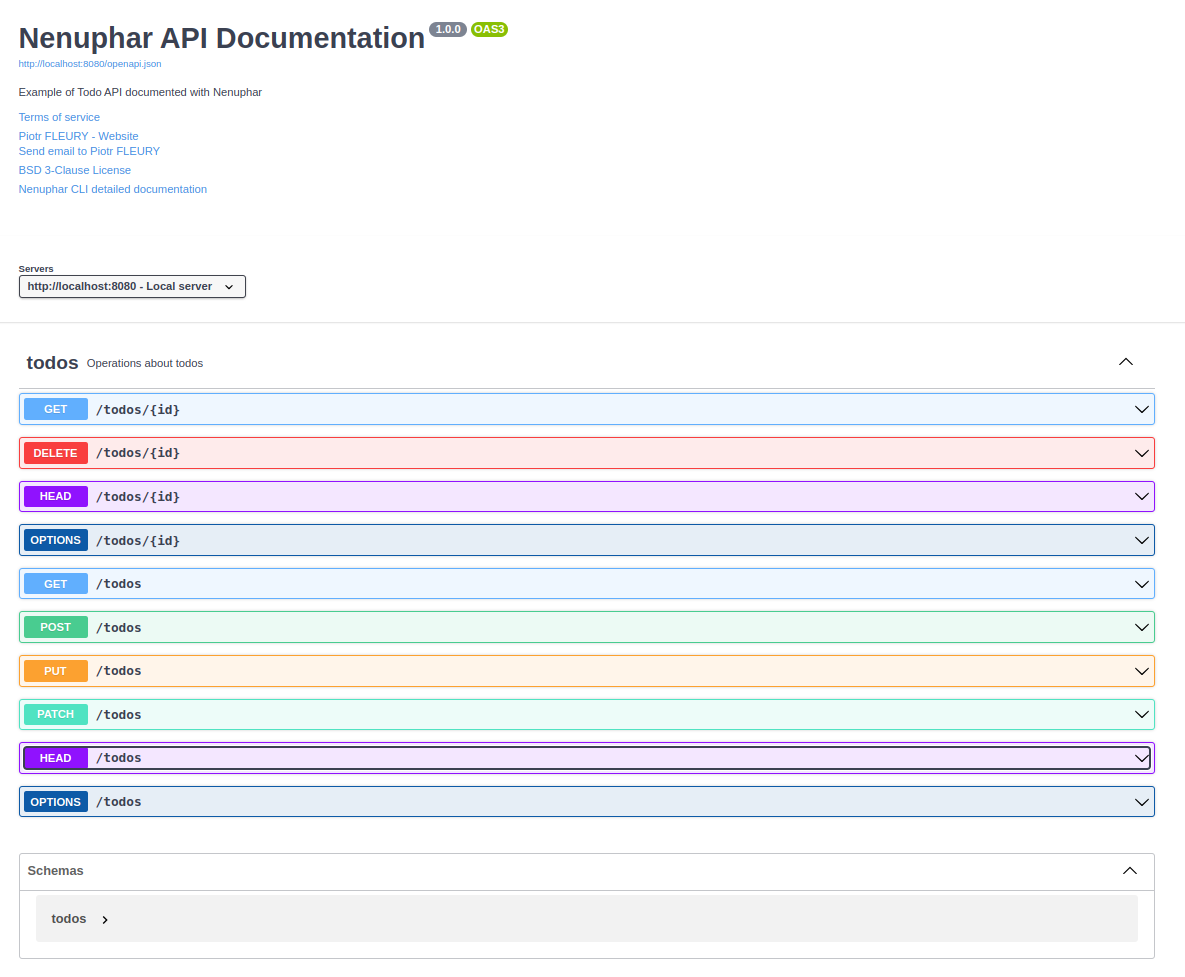
The openapi specification will be written in the public/openapi.json file.
This file is loaded by the public/index.html file to display the documentation.
Start your Dart Frog server
You're now ready to start your Dart Frog server
dart_frog dev
Visit http://localhost:8080/index.html to see your documentation.