Pakete, Repositories und App-Kategorien suchen

Cover von animate_gradient
Paketdetailsv0.0.4

animate_gradient

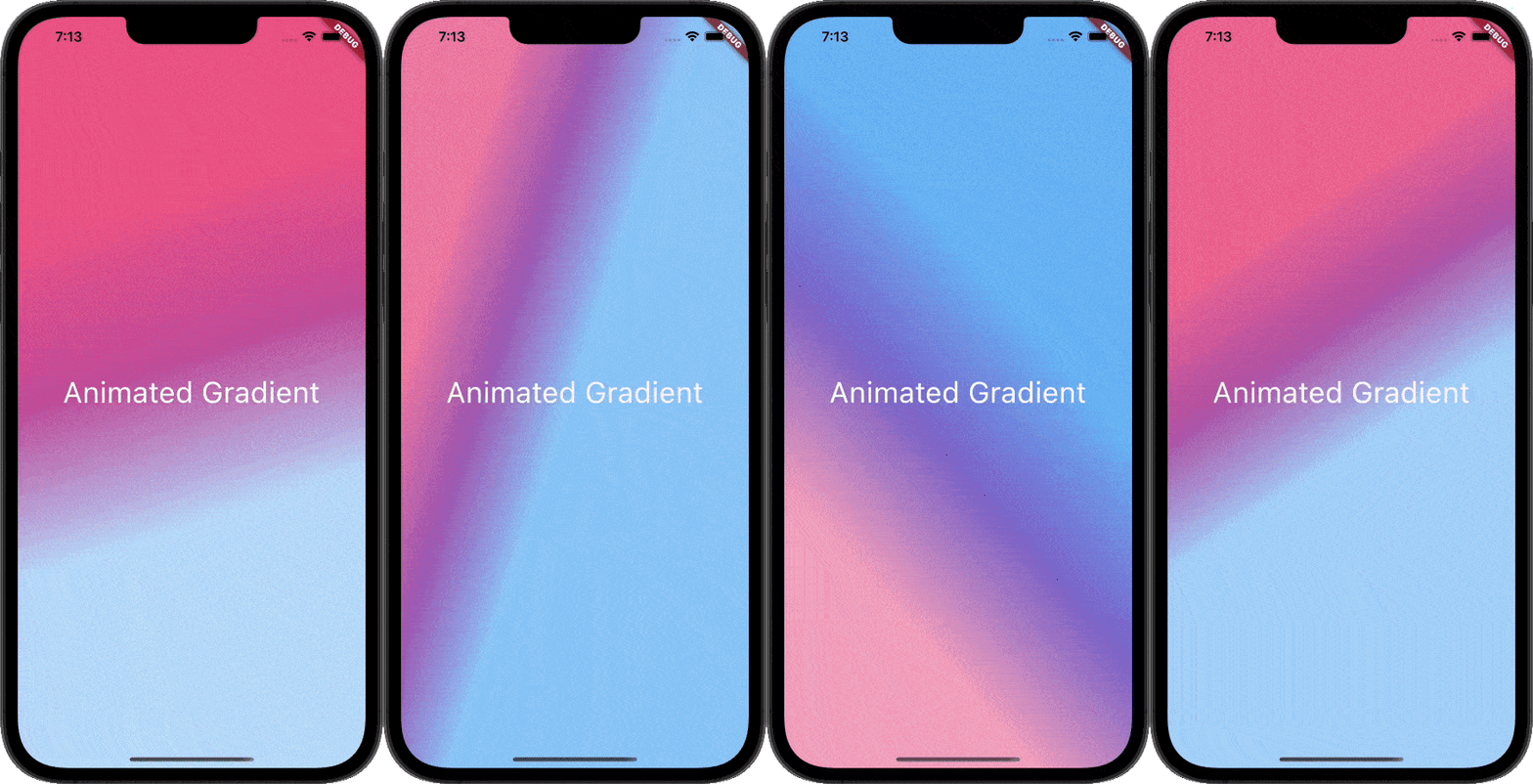
Dieses Paket ermöglicht es Ihnen, animierte Gradienten problemlos zu erstellen. Geben Sie einfach die Primär- und Sekundärfarben an und fertig.

AndroidiOSWebmacOSWindowsLinux
30-Tage-Downloads
5130
Likes
215
Pub-Punkte
160

Paket installieren

flutter pub add animate_gradient

Paketübersicht

Aus öffentlichen Paketdaten erstellte Orientierung.

Animate Gradient ist ein Flutter-Paket, das die Erstellung animierter Verläufe vereinfacht. Durch die Angabe von Primär- und Sekundärfarben können Entwickler nahtlos dynamische, fließende Farbverläufe über verschiedene Benutzeroberflächenelemente erzeugen. Es unterstützt mehrere Plattformen wie Android, iOS, Web, macOS, Windows und Linux und ist daher ideal für plattformübergreifende Anwendungen. Das Paket verarbeitet die Animationslogik intern, reduziert Boilerplate-Code und ermöglicht eine schnelle Integration in bestehende Projekte. Perfekt für moderne, visuell ansprechende Oberflächen.

Anwendungsfälle

  • Dynamische App-Hintergründe erstellen
  • Splash-Bildschirme verbessern
  • UI-Elemente mit Farbübergängen animieren
  • Interaktive Buttons gestalten
  • Visuell ansprechende Onboarding-Flows erstellen

Hauptmerkmale

  • Einfache farbbasierte Konfiguration
  • Glatte Verlaufsanimationen
  • Plattformübergreifende Kompatibilität
  • Minimale Einrichtung erforderlich
  • Eingebaute Animationsverarbeitung

Geeignet für

  • Flutter-Anfänger
  • UI/UX-Designer
  • Cross-Platform-App-Entwickler
  • Apps mit visuellem Flair

Hinweise

  • Begrenzte Anpassungsmöglichkeiten außer Farbe und Geschwindigkeit
  • Kann die Leistung auf Low-End-Geräten beeinträchtigen
  • Nicht geeignet für komplexe Gradientenmuster

Original-README

Originaler README-Schnappschuss aus dem verknüpften Quell-Repository. Aktuelle Inhalte finden Sie im Repository.

Animate Gradient

pub Animated-Gradient

This Package lets you make animated gradients without any hassle. Just pass the primary and secondary colors and you're done. You can do amazing effects using the alignments. For More info read the docs below.

Usage

Create your first animated gradient.

The only two required arguments are the primaryColors and secondaryColors.

| primaryColors length must greater or equal to 2.| | secondaryColors length must be equal to primaryColors length.|

    import 'package:animate_gradient/animate_gradient.dart';

     AnimateGradient(
        primaryColors: const [
          Colors.pink,
          Colors.pinkAccent,
          Colors.white,
        ],
        secondaryColors: const [
          Colors.blue,
          Colors.blueAccent,
          Colors.white,
        ],
        child: YourWidget(),
      ),
drawing
Play with alignments.

Alignments are optional. You can pass any of the following alignments.

primaryBegin primaryEnd secondaryBegin secondaryEnd

With this in place, you can have some crazy effects.

   import 'package:animate_gradient/animate_gradient.dart';

    AnimateGradient(
       primaryBegin: Alignment.topLeft,
       primaryEnd: Alignment.bottomLeft,
       secondaryBegin: Alignment.bottomLeft,
       secondaryEnd: Alignment.topRight,
       primaryColors: const [
         Colors.pink,
         Colors.pinkAccent,
         Colors.white,
       ],
       secondaryColors: const [
         Colors.white,
         Colors.blueAccent,
         Colors.blue,
       ],
       child: YourWidget(),
     ),
drawing
Alternatively! Use AlignemntGeometry for better control

With the apps built in rtl format normal Alignments cannot always work. So, you can use AlignemntGeometry instead.

primaryBegin --> primaryBeginGeometry

primaryEnd --> primaryEndGeometry

secondaryBegin --> secondaryBeginGeometry

secondaryEnd --> secondaryEndGeometry

With this, you also have an additional property textDirectionForGeometry. This will be used to resolve the AlignmentGeometry

   import 'package:animate_gradient/animate_gradient.dart';

    AnimateGradient(
      primaryBeginGeometry: const AlignmentDirectional(0, 1),
      primaryEndGeometry: const AlignmentDirectional(0, 2),
      secondaryBeginGeometry: const AlignmentDirectional(2, 0),
      secondaryEndGeometry: const AlignmentDirectional(0, -0.8),
      textDirectionForGeometry: TextDirection.rtl,
       primaryColors: const [
         Colors.pink,
         Colors.pinkAccent,
         Colors.white,
       ],
       secondaryColors: const [
         Colors.white,
         Colors.blueAccent,
         Colors.blue,
       ],
       child: YourWidget(),
     ),
drawing

Please note that AlignmentGeometry will be given more priority over Alignment

Available properties

Property Type Description
primaryColors List Starting colors of the animation.
secondaryColors List Ending colors of the animation.
primaryBegin Alignment? Starting Alignment of primaryColors.
primaryEnd Alignment? Ending Alignment of primaryColors.
secondaryBegin Alignment? Starting Alignment of secondaryColors.
secondaryEnd Alignment? Ending Alignment of secondaryColors.
primaryBeginGeometry AlignmentGeometry? Starting AlignmentGeometry of primaryColors.
primaryEndGeometry AlignmentGeometry? Ending AlignmentGeometry of primaryColors.
secondaryBeginGeometry AlignmentGeometry? Starting AlignmentGeometry of secondaryColors.
secondaryEndGeometry AlignmentGeometry? Ending AlignmentGeometry of secondaryColors.
textDirectionForGeometry TextDirection? TextDirection that will be used to resolve AlignmentGeometry
duration Duration? Duration between the transition.
controller AnimationController?
You can pass your own animation controller and use that

to control animation however you want.
animateAlignments bool? If you want to animate alignments.
reverse bool? If you want to reverse the animation.
repeat bool? If you want to repeat the animation.
curve Curve? The curve to use for the animation.
child Widget? You can pass your widget.

Author

This plugin is developed by Vikas Kumar.

Kategorien

Quell-Repository

Projekte, die dieses Paket verwenden

Noch keine Daten verfügbar.