Pakete, Repositories und App-Kategorien suchen

Cover von app_bar_with_search_switch
Paketdetailsv1.8.6

app_bar_with_search_switch

Eine Erweiterung für AppBar, die ihn in ein Suchfeld umwandeln kann.

AndroidiOSWebmacOSWindowsLinux
30-Tage-Downloads
598
Likes
59
Pub-Punkte
150

Paket installieren

flutter pub add app_bar_with_search_switch

Paketübersicht

Aus öffentlichen Paketdaten erstellte Orientierung.

Ein Flutter-Paket, das die Funktionalität von AppBar erweitert, um nahtlos zwischen einer Standard-App-Leiste und einem Suchfeld zu wechseln. Es bietet eine saubere, interaktive Möglichkeit, zwischen Navigations- und Suchmodus innerhalb der App-Leiste zu wechseln und verbessert die Benutzererfahrung in Apps mit häufigen Suchinteraktionen. Das Paket ist leichtgewichtig und lässt sich problemlos in bestehende Benutzeroberflächen integrieren. Es unterstützt alle wichtigen Plattformen, einschließlich Android, iOS, Web, macOS, Windows und Linux.

Anwendungsfälle

  • Dynamische Suchleisten in mobilen und Web-Anwendungen implementieren
  • Intuitive Navigation mit Bedarfs-Suche erstellen
  • Verbesserung der Benutzererfahrung in inhaltsreichen Anwendungen
  • Reaktive Schnittstellen mit minimalen UI-Änderungen erstellen
  • Schneller Zugriff auf die Suche über die oberste App-Leiste aktivieren

Hauptmerkmale

  • Ein-Klick-Umschalten zwischen App-Leiste und Suchmodus
  • Anpassbare Darstellung des Suchfelds
  • Unterstützt plattformspezifische Verhaltensweisen
  • Leichtgewichtig und einfach zu integrieren
  • Eingebaute Animationen für reibungslose Übergänge

Geeignet für

  • Entwickler, die Apps mit häufigen Suchanforderungen erstellen
  • UI-Designer, die eine elegante Suchintegration suchen
  • Cross-Platform-App-Entwickler, die mehrere Betriebssysteme ansprechen
  • Apps, die minimalistische aber funktionale Suchinterfaces erfordern

Hinweise

  • Erfordert die manuelle Behandlung der Suchlogik außerhalb des Pakets
  • Möglicherweise sind zusätzliche Stile für benutzerdefinierte Themen erforderlich
  • Beschränkt auf Suchfunktionen auf App-Bar-Ebene
  • Nicht geeignet für komplexe Suchworkflows
  • Abhängig von Flutter's Material- oder Cupertino-Widgets für vollständige Kompatibilität

Original-README

Originaler README-Schnappschuss aus dem verknüpften Quell-Repository. Aktuelle Inhalte finden Sie im Repository.

AppBar with search switch

Content

Intro

An AppBar that can switch into search field.

The AppBarWithSearchSwitch is a replacement class for AppBar, essentially, it returns two different app bars based on whether search is active.

Note: version 1.5+ is lightweight version of this package, version 2.0+ uses SpeechToText package for speech recognition.

This is complete rewrite of flutter_search_bar with support of these features:

Features

Quick overview

Use appBarBuilder parameter to build default AppBar with:

The appBarBuilder is the only required parameter, all other parameters are optional!

Use one of these callbacks to get text from TextField:

Also, there are callbacks for:

This widget support almost all properties of AppBar, but:

  • leading and title properties are now expect - Widget Function(context)?:

    • this is made in order to access AppBarWithSearchSwitch.of(context) methods in them,
    • don't change them unless it necessary and use templates if you need to change these properties.
  • preferredSize here is a method, you should set it via toolbarWidth and toolbarHeight.

Here is a list of all other new properties(without mentioned above) with their default values:

Examples

Online example here: https://alexqwesa.github.io/app_bar_with_search_switch/.

Full example of Stateful widget is here: https://pub.dev/packages/app_bar_with_search_switch/example.

Full example of Stateless widget is here: (github).

Full example of Stateless widget with 10000 elements searched in place and with search button outside of app bar is here: (github).

Full example of Stateless widget there android back button will close search is here: (github).

And the fragment of example code is here:

  //...
  @override
  Widget build(BuildContext context) {
    return Scaffold(
      //
      // *** The Widget AppBarWithSearchSwitch
      //
      appBar: AppBarWithSearchSwitch(
        onChanged: (text) {
          // update you provider here
          // searchText.value = text;
        }, // onSubmitted: (text) => searchText.value = text,
        appBarBuilder: (context) {
          return AppBar(
            title: Text('Example '),
            actions: [
              AppBarSearchButton(),
              // or
              // IconButton(onPressed: AppBarWithSearchSwitch.of(context)?startSearch, icon: Icon(Icons.search)),
            ],
          );
        },
      ),
      // search in body by any way you want, example:
      body: AppBarOnEditListener(builder: (context) { return /* your code here */ ;} ),
    );
  }

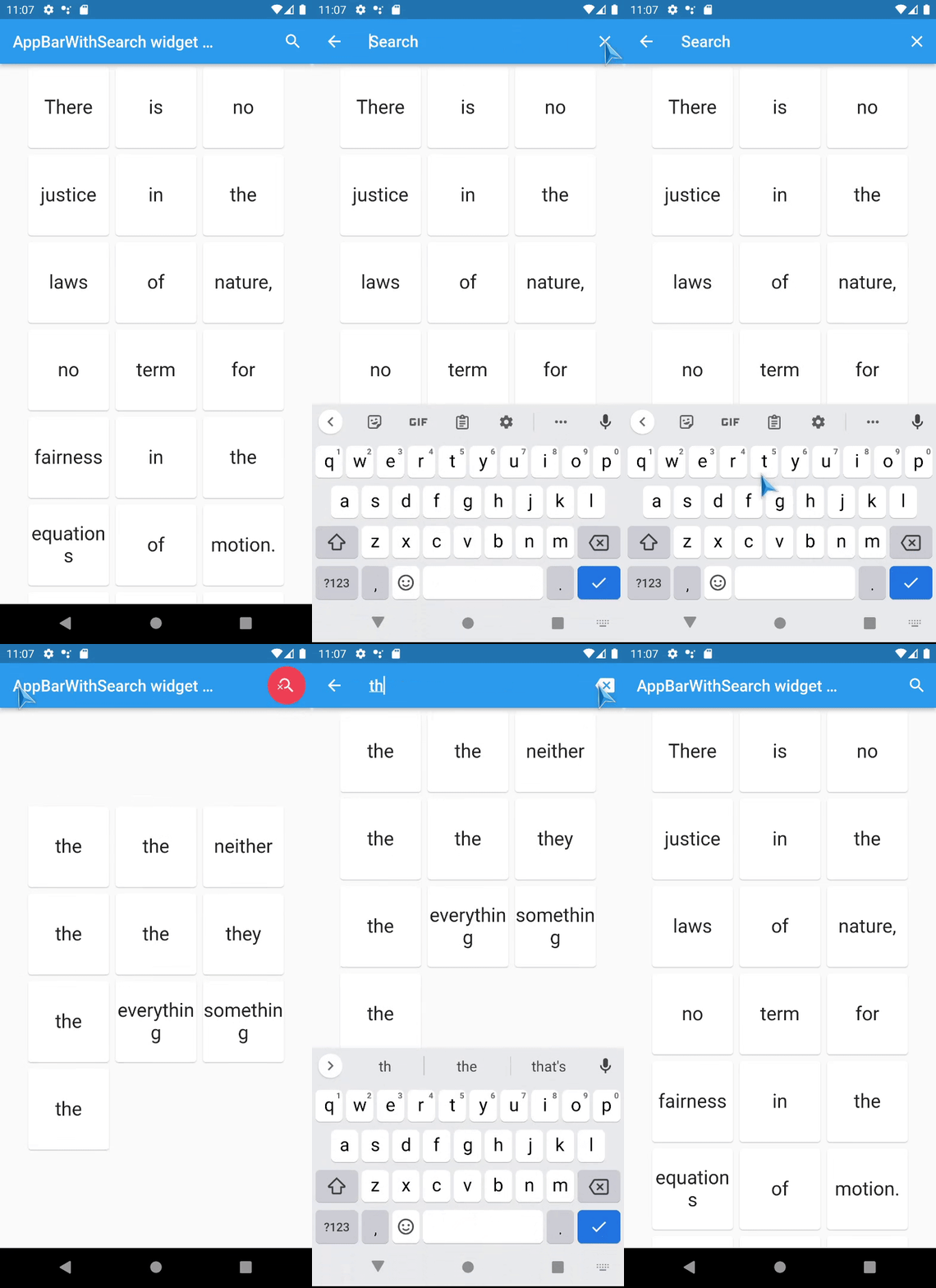
Screenshots

TODO

  • [x] Add speech to text support - done in version 2.0+,
  • [x] Animation for Search app bar activation - done in versions 1.5+
  • [ ] don't use shared default ValueNotifier and TextEditingController ?

FAQ

How to activate search field (isSearchMode=true) of AppBarWithSearchSwitch from somewhere far away?

  • If it is inside the same Scaffold or its children, then:

    1. use AppBarWithSearchFinder,
    2. call AppBarWithSearchFinder.of(context)?.triggerSearch() inside.
  • If it is outside of Scaffold, use customIsSearchModeNotifier,

    1. Initialise variable of type ValueNotifier somewhere up in the widget tree,
    2. Set customIsSearchModeNotifier property of AppBarWithSearchSwitch with this variable,
    3. Set value of this ValueNotifier to true to show Search AppBar,
    4. (Note: currently, if you stop search via this variable(by setting it false), clearOnClose will not work, and callBack onClose will not be called), so use GlobalKey if you need them.

How to make android back button close search? (instead of going to previous screen or exit app)

  1. Initialise variable searchText and isSearchMode of type ValueNotifier somewhere up in the widget tree,
  2. Assign these variables to customIsSearchModeNotifier, customTextNotifier,
  3. Wrap WillPopScope widget over Scaffold, and define parameter onWillPop as in example below:
... // inside a widget
  final isSearchMode = ValueNotifier<bool>(false);
  final searchText = ValueNotifier<String>(''); 

  @override
  Widget build(BuildContext context) {

    return WillPopScope(
      onWillPop: () async { // android back button handler
        if (searchText.value != '') {
          isSearchMode.value = false;
          searchText.value = ''; 
          return false;
        }
        return true;
      },
      child: Scaffold(
        //
        // *** The Widget AppBarWithSearchSwitch
        //
        appBar: AppBarWithSearchSwitch(
          customIsSearchModeNotifier: isSearchMode,
          customTextNotifier: searchText,
          appBarBuilder: (context) {
            return AppBar(
... // you code here

How to add autocompletion to search field?

... // inside a widget
  @override
  Widget build(BuildContext context) {

    return Scaffold(
        appBar: AppBarWithSearchSwitch(
          title:  (context) {
                return Autocomplete<String>(
                  optionsBuilder: (TextEditingValue textEditingValue) {
                    // your code here
                  },
                ); 
          }
          appBarBuilder: (context) {
            return AppBar(
... // you code here

Can it be used with old flutter sdk versions?

The release 1.3.5 is a special release with support of old flutter sdk, it tested with flutter 2.10.0

Known issues

Kategorien

Quell-Repository

Projekte, die dieses Paket verwenden