Pakete, Repositories und App-Kategorien suchen

Paketdetailsv0.0.8

auto_store_translate

Eine Bibliothek, die die Übersetzung und Registrierung von Metadaten (Titel, Beschreibung usw.) in App Store/Play Store automatisiert.

AndroidiOSmacOSWindowsLinux
30-Tage-Downloads
66
Likes
12
Pub-Punkte
120

Paket installieren

flutter pub add auto_store_translate

Paketübersicht

Aus öffentlichen Paketdaten erstellte Orientierung.

Auto Store Translate ist ein Flutter/Dart-Paket, das die Übersetzung und Registrierung von App-Metadaten – wie Titel, Beschreibungen und Schlüsselwörter – für den Apple App Store und den Google Play Store automatisiert. Es vereinfacht lokale Arbeitsabläufe durch Integration mit Übersetzungs-Diensten und Verwaltung von Metadaten-Updates in mehreren Sprachen. Speziell für Entwickler konzipiert, die Apps effizient auf globalen Märkten veröffentlichen möchten, reduziert es manuelle Aufwand und minimiert Fehler bei mehrsprachigen App-Listings. Das Paket unterstützt die Plattformen Android, iOS, macOS, Windows und Linux.

Anwendungsfälle

  • Automatisierung der Lokalisierung von App-Store-Metadaten
  • Internationale App-Veröffentlichungen vereinfachen
  • Reduzierung manueller Übersetzungsarbeiten
  • Metadaten in mehreren Sprachen aktualisieren
  • Integration in CI/CD-Pipelines

Hauptmerkmale

  • Automatisierte Metadatenübersetzung
  • Unterstützung für App Store und Play Store
  • Multiplattformkompatibilität
  • Integration mit Übersetzungs-APIs
  • CI/CD-fähiger Workflow

Geeignet für

  • Globale App-Publisher
  • Entwicklungsteams, die mehrsprachige Apps verwalten
  • CI/CD-Automatisierungs-Enthusiasten
  • Lokalisierungsspezialisten

Hinweise

  • API-Schlüssel für Übersetzungs-Dienste erforderlich
  • Abhängig von der Qualität des externen Übersetzungsanbieters
  • Möglicherweise ist eine manuelle Überprüfung des übersetzten Inhalts erforderlich
  • Beschränkt auf Metadaten, nicht auf App-UI oder Inhalt
  • plattformspezifische Metadatenbeschränkungen

Original-README

Originaler README-Schnappschuss aus dem verknüpften Quell-Repository. Aktuelle Inhalte finden Sie im Repository.

Auto Store Translate

Pub

A library that automates translation/registration of metadata (title, description, etc.) in the App Store/Play Store.

playstore & appstore translated screenshot

"Buy Me A Coffee"

How to Use?

1. Setup the config file
dependencies:
  auto_store_translate:
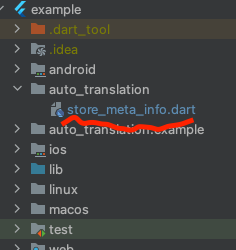
2. Create a dart file in your project and paste the code below.

create dart file in your project
project path > auto_translation > store_meta_info.dart

please fill in all the information below.

import 'package:auto_store_translate/auto_store_translate.dart';

/// write your store info here.

MyStoreInfo myStoreInfo = MyStoreInfo(
  // Play Store Title 30 characters or less
  playStoreTitle: "",

  // Play Store Short Description 80 characters or less
  playStoreShortDescription: "",

  // Play Store Long Description 4000 characters or less
  playStoreFullDescription: '''
  

  ''',

  // Play Store Translation Start Language
  playStoreStartLanguage: "en",

  // Play Store Title Translation
  translatePlayStoreName: true,

  // App Store Title 30 characters or less
  appStoreTitle: "",

  // App Store Subtitle 30 characters or less
  appStoreSubTitle: "",

  // App Store Description 4000 characters or less
  appStringDescription: '''
  

  ''',

  // App Store Keywords 100 characters or less , separated by commas, SEO
  appStoreKeywords: "",

  // App Store Translation Start Language
  appStoreStartLanguage: "en",

  // App Store Title Translation
  translateAppStoreName: true,

  // Whether to display the first letter of the App Store title in uppercase
  onlyFirstCharacterUpperAppName: true,

  // App Store Update Notes
  releaseNote: "fix small bug :)",

  // Home Page URL
  homepageLink: "",

  // Privacy Policy URL
  policyPageLink: "",
);

main() {
  AutoStoreTranslate.translateStoreInfo(
      myStoreInfo: myStoreInfo,

      // google translate api key
      googleTranslateApiKey: "INPUT_YOUR_GOOGLE_TRANSLATE_API_KEY",

      // true: translate only title, false: translate title + all
      onlyAppNameTranslate: false);
}

It works even if you don't put the Google Translate api key, but you will soon reach the free limit.
For a guide to getting the Google Translate api key, please refer to this document.

3. Run the code above and wait for the translation to complete.

4. you will see the translated folder in the project.

5. Set up fastlane for each android/ios and register the information in the play store/app store.

registering with the PlayStore(android)

1. Setup the fastlane config file(android)

please refer to the official document.

2. Add the code below under platform:android do in the android/fastlane/fastfile file.
    lane :metaOnly do
      upload_to_play_store(
          track: 'internal',
          metadata_path: '../auto_translation/metadata/android',
          skip_upload_screenshots: true,
          skip_upload_changelogs: true,
          release_status: 'draft',
          aab: '../build/app/outputs/bundle/release/app-release.aab',
      )
    end
3. Open the terminal in the android project location and enter the following.
    fastlane metaOnly
4. You will see the translated information in the play store console.

registering with the App Store(iOS)

1. Setup the fastlane config file(ios)

please refer to the official document.

2. Add the code below under platform:ios do in the ios/fastlane/fastfile file.
    lane :metaOnly do
        get_certificates          
        get_provisioning_profile  
        deliver(
            metadata_path: '../auto_translation/metadata/ios',
            force: true, # Skip HTMl report verification
            skip_screenshots: true,
            skip_binary_upload: true,
        )
    end
3. Open the terminal in the ios project location and enter the following.
    fastlane metaOnly
4. You will see the translated information in the app store connect.

Kategorien

Abhängigkeiten

Abhängigkeiten 6 Einträge

Quell-Repository

Projekte, die dieses Paket verwenden

Noch keine Daten verfügbar.