Aus öffentlichen Paketdaten erstellte Orientierung.
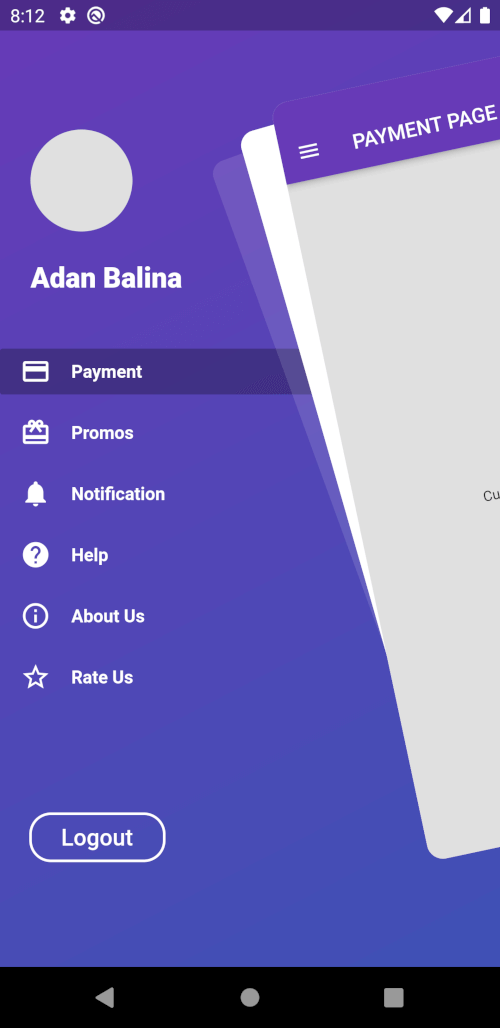
Awesome Drawer Bar ist ein Flutter-Paket, das einen anpassbaren Seitenmenü (Drawer) mit modernem, edlem Design bereitstellt. Für Entwickler, die eine stilvolle Navigationserfahrung suchen, bietet es reibungslose Animationen, responsive Layouts und eine einfache Integration in Apps für mehrere Plattformen. Der Drawer unterstützt sowohl helle als auch dunkle Themen und kann mit benutzerdefinierten Widgets, Symbolen und Übergängen angepasst werden. Er ist ideal für Anwendungen, die intuitive Navigation mit einer sauberen Oberfläche erfordern. Das Paket wird aktiv gepflegt und ist Open Source, was Gemeinschaftsbeiträge und Transparenz ermöglicht.
Anwendungsfälle
Mobile App-Navigation
Web-Dashboard-Schnittstellen
Menüs für Desktop-Anwendungen
anpassbare Seitenteile
Plattformübergreifende Navigation
Hauptmerkmale
Glatte Animationen
Anpassbares Design
Multiplattformunterstützung
Kompatibilität mit hellen und dunklen Themen
Einfache Integration in bestehende Flutter-Projekte
Geeignet für
Flutter-Entwickler, die plattformübergreifende Apps erstellen
Designer, die flexible Navigationskomponenten benötigen
Apps, die elegante Seitenmenüs erfordern
Hinweise
Grundkenntnisse in Flutter erforderlich
Möglicherweise sind zusätzliche Stile für komplexe Layouts erforderlich
Abhängig von plattformspezifischen Rendering-Verhalten
Original-README
Originaler README-Schnappschuss aus dem verknüpften Quell-Repository. Aktuelle Inhalte finden Sie im Repository.
Flutter Awesome Drawer Bar
A Flutter package with custom implementation of the Side Menu (Drawer)
Getting Started
To start using this package, add awesome_drawer_bar dependency to your pubspec.yaml
Controller to have access to the open/close/toggle function of the drawer
mainScreen
Widget
Yes
Screen containing the main content to display
menuScreen
Widget
Yes
Screen containing the menu/bottom screen
slideWidth
double
No
Sliding width of the drawer - defaults to 275.0
borderRadius
double
No
Border radius of the slided content - defaults to 16.0
angle
double
No
Rotation angle of the drawer - defaults to -12.0 - should be 0.0 to -30.0
backgroundColor
Color
No
Background color of the drawer shadows - defaults to white
showShadow
bool
No
Boolean, whether to show the drawer shadows - defaults to false
openCurve
Curve
No
open animation curve - defaults to Curves.easeOut
closeCurve
Curve
No
close animation curve - defaults to Curves.easeOut
Controlling the drawer
To get access to the drawer, and be able to control it, there are 2 ways:
Using a AwesomeDrawerBarController inside the main widget where ou have the AwesomeDrawerBar widget and providing it to the widget, which will allow you to trigger the open/close/toggle methods.
    final _drawerController = AwesomeDrawerBarController();

    _drawerController.open();
    _drawerController.close();
    _drawerController.toggle();
    _drawerController.isOpen();
    _drawerController.stateNotifier;
Using the static method inside ancestor widgets to get access to the AwesomeDrawerBar.
Please file any issues, bugs or feature request as an issue on our GitHub page.
Want to contribute
If you would like to contribute to the plugin (e.g. by improving the documentation, solving a bug or adding a cool new feature), please carefully review our contribution guide and send us your pull request.
Credits
Credits goes to pedromassango as most of this package comes from his implementation.