Aus öffentlichen Paketdaten erstellte Orientierung.
Das background_task-Paket ermöglicht Flutter-Anwendungen, Operationen durchzuführen, insbesondere Standortaktualisierungen, auch wenn die App im Hintergrund ausgeführt wird. Es ist für Android und iOS konzipiert und ermöglicht Entwicklern, kontinuierliche Funktionalität wie die Verfolgung der Benutzerbewegung ohne Unterbrechung aufrechtzuerhalten. Das Paket integriert sich in native Plattformfunktionen, um eine zuverlässige Ausführung während Hintergrundzustände sicherzustellen. Besonders nützlich ist es für Anwendungen, die Echtzeit-Standortüberwachung oder periodische Datenerfassung erfordern. Die Lösung wurde mit minimalem Overhead entwickelt und unterstützt beide Plattformen über dedizierte native Implementierungen.
Anwendungsfälle
Echtzeit-Standortverfolgung
Periodische Daten-Synchronisation
Hintergrund-Geofencing
Ausführung einer langlaufenden Aufgabe
stromspare Hintergrundverarbeitung
Hauptmerkmale
Unterstützt Android und iOS
Verarbeitet Standortaktualisierungen im Hintergrund
Minimale Batteriewirkung
Native Plattformintegration
Einfache API für Aufgabenplanung
Geeignet für
Fitness- und Navigations-Apps
Logistik und Lieferverfolgung
Feldservice-Management
Apps, die eine persistierende Hintergrundaktivität erfordern
Standortbasierte Dienste
Hinweise
Erfordert die richtigen Berechtigungen auf beiden Plattformen
Kann durch Energiesparmodi des Betriebssystems eingeschränkt werden
Testen auf echten Geräten erforderlich
Hintergrundausführungsbeschränkungen unterscheiden sich je nach Betriebssystemversion
Der Benutzer muss den Standortzugriff gewähren
Original-README
Originaler README-Schnappschuss aus dem verknüpften Quell-Repository. Aktuelle Inhalte finden Sie im Repository.
Enable developers to continue processing even when the application transitions to the background, we have created a package that allows processing to continue using location updates.This package was created with reference to background_location.
Can be used when you want to run the program periodically in the background.
Monitor and notify the distance walked and steps.
Notification of destination arrival.
Tracking location information (sending it to a server).
Usage
// Monitor notifications of background processes.// However, Cannot be used while the app is in task kill.BackgroundTask.instance.stream.listen((event) {
// Implement the process you want to run in the background.// ex) Check health data.
});
// Start background processing with location updates.awaitBackgroundTask.instance.start();
// Stop background processing and location updates.awaitBackgroundTask.instance.stop();
// Define callback handler at the top level.@pragma('vm:entry-point')
voidbackgroundHandler(Location data) {
// Implement the process you want to run in the background.// ex) Check health data.
}
voidmain() {
WidgetsFlutterBinding.ensureInitialized();
BackgroundTask.instance.setBackgroundHandler(backgroundHandler); // 👈 Set callback handler.runApp(constMyApp());
}
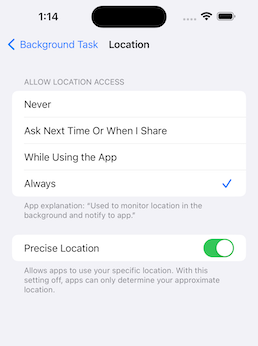
To get the latest location information in a task-killed status, set the app to Always.
This is an implementation for when you want to stop using the application when it is killed.
final status = awaitPermission.location.request();
final statusAlways = awaitPermission.locationAlways.request();
if (status.isGranted && statusAlways.isGranted) {
awaitBackgroundTask.instance.start();
}
Setup
pubspec.yaml
dependencies:background_task:
iOS: Info.plist
<key>NSLocationAlwaysAndWhenInUseUsageDescription</key><string>Used to monitor location in the background and notify to app.</string><key>NSLocationAlwaysUsageDescription</key><string>Used to monitor location in the background and notify to app.</string><key>NSLocationWhenInUseUsageDescription</key><string>Used to monitor location in the background and notify to app.</string><key>UIBackgroundModes</key><array><string>fetch</string><string>location</string></array>
To use an external package (shared_preference etc..) in callback handler, register DispatchEngine in AppDelegate.