Aus öffentlichen Paketdaten erstellte Orientierung.
Ein Flutter-Paket, das zur Erstellung interaktiver Sitzbuchungslayouts für Verkehrsmittel und Veranstaltungsorte wie Busse, Theater und Flugzeuge entwickelt wurde. Es bietet anpassbare UI-Komponenten zur Darstellung von Sitzen, sodass Benutzer Buchungen einfach auswählen, hervorheben und verwalten können. Das Paket unterstützt mehrere Plattformen wie Android, iOS, Web, macOS, Windows und Linux und ist daher ideal für plattformübergreifende Anwendungen, die intuitive Sitzauswahl-Interfaces erfordern.
Anwendungsfälle
Bus Ticket Buchung
Theaterplatzreservierung
Flugzeug-Sitzanordnung
Ereignis-Ticketing-Systeme
Multi-Ort-Buchungs-Apps
Interaktive Sitzpläne
Hauptmerkmale
Anpassbare Sitzgestaltung
Echtzeit-Sitzplatzauswahl
Unterstützung für verschiedene Sitzanordnungen
Plattformübergreifende Kompatibilität
Eingebaute Sitzzustandsverwaltung
Responsive Design für alle Geräte
Geeignet für
Reise- und Transport-Apps
Event- und Veranstaltungsmangement-Software
Ticketing-Plattformen
Mobile und Web-Buchungsschnittstellen
Entwickler, die wiederverwendbare Sitz-UI-Komponenten benötigen
Hinweise
Benötigt manuelle Integration der Buchungslogik
Eingeschränkte integrierte Überprüfung auf Sitzkonflikte
Am besten geeignet für statische oder halb-dynamische Sitzplatzanordnungen
Für komplexe Workflows kann zusätzliche Zustandsverwaltung erforderlich sein
Hängt von externen Daten zur Sitzverfügbarkeit ab
Original-README
Originaler README-Schnappschuss aus dem verknüpften Quell-Repository. Aktuelle Inhalte finden Sie im Repository.
book_my_seat
This is a flutter package to create seat booking layout for bus, theatre, aeroplane etc. This gives you facility to select a seat by gestures like zoom-in, zoom-out, pan etc.
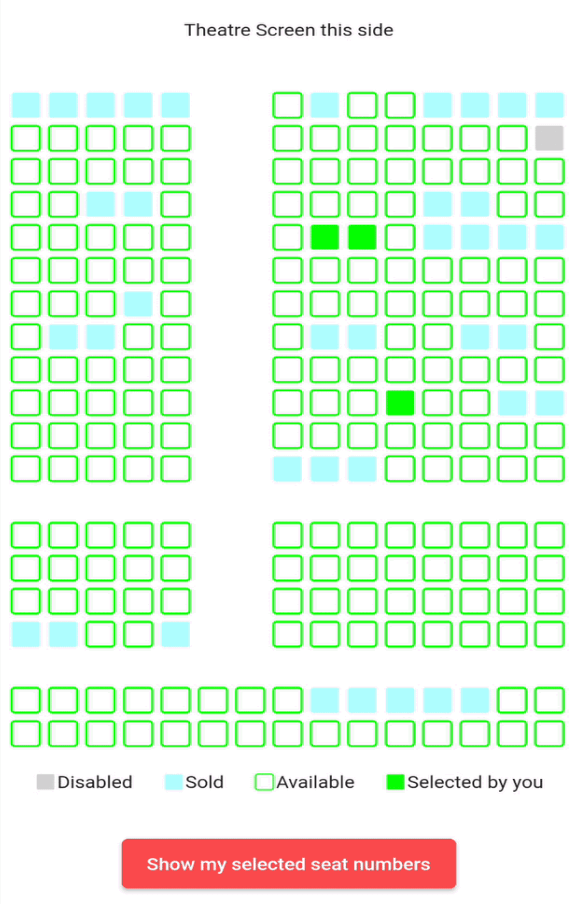
Some examples(below is for theatre but you can implement the package for bus etc also)
" "
Example project and blog for better understanding 🚀
onSeatStateChanged: - This is a callback method which gets called when user clicks on a seat which has current state equals to either SeatState.selected or SeatState.unselected.
The params in this method are: rowIndex - the index of the row where this seat is situated colIndex - the index of the column where this seat is situated updatedSeatState - this is the updated state of the seat after user clicks on the seat. It is an enum of type SeatState
stateModel: - It is an object of class SeatLayoutStateModel which describes the initial state of the whole layout(maybe bus or aeroplane or theatre). The params in this method are: rows - number of rows in the area(I will refer bus/aeroplane/theatre etc as area from now onwards) cols - number of columns in the area. seatSvgSize - size of individual seat pathUnSelectedSeat, pathSelectedSeat, pathSoldSeat, pathDisabledSeat - path of the svg assets you want to show for unselected(available), selected(by you right now), already sold and disabled(non-choosable) seats respectively currentSeatsState - this is the main parameter. It is a 2D list i.e. of type List<List<SeatState>> (SeatState enum is explained below). This describes the initial state of the area i.e. state of each seat whether it is already sold or unselected(available) or selected by you or disabled(non-selectable).
SeatState enum:
It is a dart enum. This describes the current state of individual seat. This currently holds 5 states unselected, selected, sold, disabled and empty.
Brief description of each:
unselected - state when a seat is available and user can select it
selected - state when user has selected an unselected(available) seat (i.e. a seat which had its state == unselected)
sold - state when it is already sold to some other user
disabled - state when a seat is disabled and nobody can select it
empty - state of the cell in 2D area which is an empty place(consider vacant ground) in the bus/theatre/aeroplane etc. This can mimic staircase or aisle or some other place in the area where there are no seats
NOTE: User can only click on seats which have state equals to SeatState.selected or SeatState.unselected.
Example project and blog for better understanding 🚀

 " "