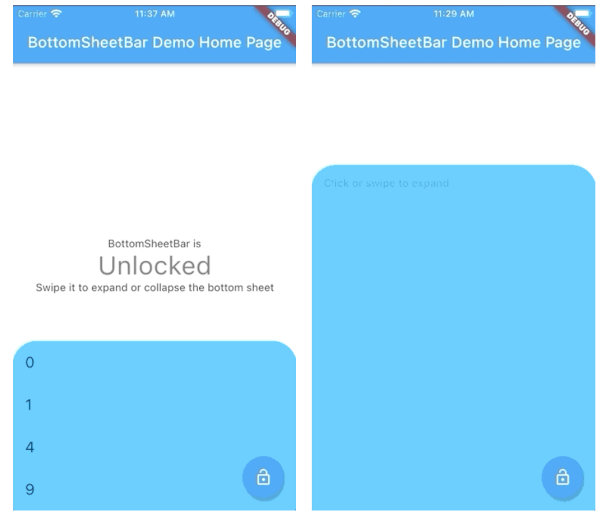
Aus öffentlichen Paketdaten erstellte Orientierung.
BottomSheetBar ist ein Flutter-Paket, das eine am unteren Bildschirmrand angebrachte Werkzeugleiste bereitstellt, die sich zu einem vollständigen Bottom-Sheet erweitern kann. Es bietet einen reibungslosen Übergang zwischen kompaktem und erweitertem Zustand und eignet sich ideal für Navigation, Steuerung oder den Zugriff auf zusätzlichen Inhalt. Das Widget ist anpassbar und funktioniert auf allen wichtigen Plattformen wie Android, iOS, Web, macOS, Windows und Linux. Für intuitive Benutzerinteraktion entwickelt, verbessert es den UI-Fluss, indem wichtige Aktionen zugänglich bleiben, ohne die Hauptoberfläche zu überladen.
Anwendungsfälle
Schnellzugriff auf Steuerelemente
Navigation mit einklappbarem Menü
Formular-Eingabe mit erweiterbarem Panel
Medienwiedergabesteuerung
Dynamische Inhaltfilterung
Hauptmerkmale
Unten ausgerichtete Werkzeugleiste
Glatte Erweiterung in die untere Seite
Plattformübergreifende Kompatibilität
Anpassbare Erscheinung
Durch Gesten gesteuertes Öffnen/Schließen
Reaktive Gestaltung
Geeignet für
Mobile-first-Anwendungen
Interaktive Dashboards
inhaltsstarke Schnittstellen
Benutzerzentrierte Navigation
Apps mit einklappbaren Werkzeugleisten
Hinweise
Kann mit anderen unteren Überlagerungen konflikten
Erfordert sorgfältige Layoutplanung
Leistungsbeeinträchtigung bei großem Inhalt
Eingeschränkte Anpassung im Standardzustand
Nicht geeignet für Vollbild-Modals
Original-README
Originaler README-Schnappschuss aus dem verknüpften Quell-Repository. Aktuelle Inhalte finden Sie im Repository.
bottom_sheet_bar
A toolbar that aligns to the bottom of a widget and expands into a bottom sheet.
Widget body - The toolbar will be aligned to the bottom of the body Widget. Padding equal to height is added to the bottom of this widget.
Function(ScrollController) expandedBuilder - A function to build the widget displayed when the bottom sheet is expanded. If the expanded content is scrollable, pass the provided ScrollController to the scrollable widget.
Optional
Widget collapsed - A Widget to be displayed on the toolbar in its collapsed state
BottomSheetBarController controller - A controller can be used to listen to events, and expand and collapse the bottom sheet.
Color color - The background color of the toolbar and bottom sheet. Defaults to Colors.white
Color backdropColor - The backdrop color that overlays the [body] widget when the bottom sheet is expanded. Defaults to Colors.transparent (no backdrop)
BorderRadius borderRadius - Provide a border-radius to adjust the shape of the toolbar
BorderRadius borderRadiusExpanded - Provide a border-radius to adjust the shape of the bottom-sheet when expanded
List<BoxShadow> boxShadows - Provide shadow decoration to the bottom sheet
double height - The height of the collapsed toolbar. Default to kToolbarHeight (56.0)
bool isDismissable - If true, the bottom sheet can be dismissed by tapping elsewhere. Defaults to true
bool locked - If true, the bottom sheet cannot be opened or closed with a swipe gesture. Defaults to true
bool willPopScope - If true, the bottom sheet widget will be wrapped in a WillPopScope widget to handle back-gestures. Defaults to false
bool backButtonListener - If true, the bottom sheet widget will be wrapped in a BackButtonListener widget to handle back-gestures. Defaults to false
BottomSheetBarController
A controller used to expand or collapse the bottom sheet of a BottomSheetBar. Listeners can be added to respond to expand and collapse events. The expanded or collapsed state can also be determined through this controller.
bool get isCollapsed - Only returns [true] if the bottom sheet if fully collapsed
bool get isExpanded - Only returns [true] if the bottom sheet if fully expanded
TickerFuture collapse() - Collapse the bottom sheet built by BottomSheetBar.expandedBuilder
TickerFuture expand() - Expand the bottom sheet built by BottomSheetBar.expandedBuilder
void addListener(Function listener) - Adds a function to be called on every animation frame
void removeListener(Function listener) - Removes a previously added listener
void dispose() - Removes all previously added listeners
void attach(AnimationController animationController) - Used internally to assign the AnimationController created by BottomSheetBar to the controller. Unless you're using advanced animation techniques, you probably won't ever need to use this method.
Example
A quick demonstration can be found in the example directory. To run the example: