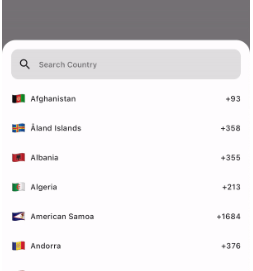
Aus öffentlichen Paketdaten erstellte Orientierung.
Ein einfaches und anpassbares Flutter-Paket zur Auswahl eines Landes oder dessen Vorwahl mit integrierter Suchfunktion. Speziell entwickelt, um die Benutzererfahrung bei Formularen, die eine Länderauswahl erfordern, zu verbessern, unterstützt es mehrere Plattformen wie Android, iOS, Web, macOS, Windows und Linux. Der Picker ist leichtgewichtig, einfach zu integrieren und ermöglicht Entwicklern die Anpassung von Aussehen und Verhalten gemäß den Anforderungen ihrer App.
Anwendungsfälle
Benutzerregistrierung mit Länderauswahl
Telefonnummer-Eingabe mit Ländercode
Internationale Formularfelder
Erfassung von Reise- oder Versandadresse
Mehrsprachige Unterstützung in Ländernamen
Hauptmerkmale
Suchbare Länderliste
Anpassbare Benutzeroberfläche
Unterstützt Wählcodes
Plattformübergreifende Kompatibilität
Leicht und schnell
Einfache Integration mit Flutter-Formularen
Geeignet für
Mobile und Web-Anwendungen, die eine Länderauswahl erfordern
Apps für internationale Nutzer
Formulare, die Eingabe einer Telefonnummer erfordern
Entwickler, die einen einfachen Länderauswahl-Widget suchen
Projekte mit minimalen Abhängigkeiten
Hinweise
Beschränkt auf vordefinierte Länderdaten
Keine Echtzeit-Länderaktualisierungen
Die Anpassung erfordert möglicherweise zusätzliche Kenntnisse in der Gestaltung
Enthält keine Geolocation-Funktionen
Möglicherweise sind manuelle Aktualisierungen für neue Länderzusätze erforderlich
Original-README
Originaler README-Schnappschuss aus dem verknüpften Quell-Repository. Aktuelle Inhalte finden Sie im Repository.
A Simple, Customizable Flutter Country picker for picking a Country or Dialing code with Search functionality.
Preview
How to use
If you want to show the country picker bottom sheet, use:
If you want to show the country list as a UI component, use the CountryCodeSelector widget:
CountryCodeSelector(
   onCountryCodeTap: (CountryCode code) {
      /// Specify country code tap event
   },
    //Note: Cannot provide both onCountryCodeTap and codeBuilder, as onCountryCodeTap will not work if you have provided codeBuilder.
)
How to get a country code from the country alpha-2:,
CountryCode code = CountryCode.getCountryCodeByAlpha2(
    countryAlpha2Code:"IN", // its case-insensitive you can use both IN or in
);
You can use await Alpha2CountryCode,getCurrentCountryCode() to obtain the current alpha-2 code:
Note: Using await Alpha2CountryCode.getCurrentCountryCode() will return the current country alpha-2 code based on the IP location from the 'http://ip-api.com/json/' API.
You can also get the current country alpha-2 code based on the user's device region, using PlatformDispatcher locale.
CountryCode code = CountryCode.getCountryCodeByAlpha2(
    countryAlpha2Code: WidgetsBinding.instance.platformDispatcher.locale.countryCode,
    /// if you have context, use View.of(context).platformDispatcher.locale.countryCode
);
Note: WidgetsBinding and View.of(context) are provided by the Flutter SDK.
How to get a country code from the country dial code,
For customizations, we are providing the CustomizationBuilders class to customize each section.
customizationBuilders: CustomizationBuilders(
codeBuilder: (CountryCode code) {
// Return something to change the country list item UI.// Note: onCountryCodeTap will be overridden by codeBuilder in customizationBuilders.// If want to do some customization in default country code view, you can usereturnDefaultCountryCodeListItemView(
onCountryCodeTap: () {},
code: code,
locale: 'US', // To show a localized country name,
);
},
codeSeparatorBuilder: (BuildContext context, int index) {
// Return something to add a separator between country codes.returnconstSizedBox(); // Default
},
countryListBuilder: (List<CountryCode> codes, ScrollController? controller) {
// Return something to customize the country list
},
textFieldBuilder: (voidFunction(String)? filter) {
// Return the search text field widget//// If you want to do some customization in the default text field, you can usereturnDefaultCountryCodeFilterTextField(
filter: filter,
);
// Use filter(searchText); to update the country code list.
},
),
Bugs and Feedback
For bugs, feedback, questions and discussions please use the Github Issues.
Credits
Canopas Country Picker is owned and maintained by the Canopas team.
You can follow us on Twitter at @canopassoftware for project updates and releases.
We regularly upload blogs on new topics, which you can read here.