Originaler README-Schnappschuss aus dem verknüpften Quell-Repository. Aktuelle Inhalte finden Sie im Repository.
chips_input
Flutter library for building input fields with InputChips as input options.


Usage
Import
import 'package:chips_input/chips_input.dart';
Example
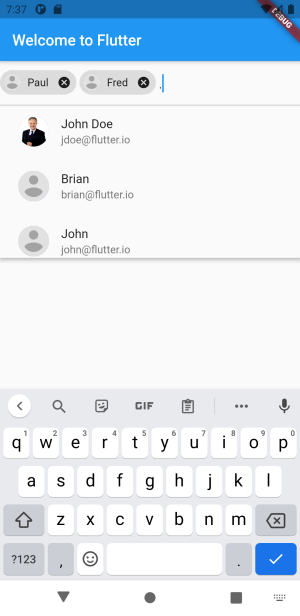
First create some sort of Class that holds the data. You could also use a simple String.
class AppProfile {
  final String name;
  final String email;
  final String imageUrl;

  const AppProfile(this.name, this.email, this.imageUrl);

  @override
  bool operator ==(Object other) =>
      identical(this, other) ||
      other is AppProfile &&
          runtimeType == other.runtimeType &&
          name == other.name;

  @override
  int get hashCode => name.hashCode;

  @override
  String toString() {
    return name;
  }
}
Initialize some data and implement the ChipsInput Widget to your liking.
const mockResults = <AppProfile>[
AppProfile('John Doe', 'jdoe@flutter.io',
'https://d2gg9evh47fn9z.cloudfront.net/800px_COLOURBOX4057996.jpg'),
AppProfile('Paul', 'paul@google.com',
'https://upload.wikimedia.org/wikipedia/commons/7/7c/Profile_avatar_placeholder_large.png'),
AppProfile('Fred', 'fred@google.com',
'https://upload.wikimedia.org/wikipedia/commons/7/7c/Profile_avatar_placeholder_large.png'),
AppProfile('Brian', 'brian@flutter.io',
'https://upload.wikimedia.org/wikipedia/commons/7/7c/Profile_avatar_placeholder_large.png'),
AppProfile('John', 'john@flutter.io',
'https://upload.wikimedia.org/wikipedia/commons/7/7c/Profile_avatar_placeholder_large.png'),
AppProfile('Thomas', 'thomas@flutter.io',
'https://upload.wikimedia.org/wikipedia/commons/7/7c/Profile_avatar_placeholder_large.png'),
AppProfile('Nelly', 'nelly@flutter.io',
'https://upload.wikimedia.org/wikipedia/commons/7/7c/Profile_avatar_placeholder_large.png'),
AppProfile('Marie', 'marie@flutter.io',
'https://upload.wikimedia.org/wikipedia/commons/7/7c/Profile_avatar_placeholder_large.png'),
AppProfile('Charlie', 'charlie@flutter.io',
'https://upload.wikimedia.org/wikipedia/commons/7/7c/Profile_avatar_placeholder_large.png'),
AppProfile('Diana', 'diana@flutter.io',
'https://upload.wikimedia.org/wikipedia/commons/7/7c/Profile_avatar_placeholder_large.png'),
AppProfile('Ernie', 'ernie@flutter.io',
'https://upload.wikimedia.org/wikipedia/commons/7/7c/Profile_avatar_placeholder_large.png'),
AppProfile('Gina', 'fred@flutter.io',
'https://upload.wikimedia.org/wikipedia/commons/7/7c/Profile_avatar_placeholder_large.png'),
];
ChipsInput(
maxChips: 3,
initialValue: [mockResults[1]],
findSuggestions: (String query) {
if (query.isNotEmpty) {
var lowercaseQuery = query.toLowerCase();
final results = mockResults.where((profile) {
return profile.name
.toLowerCase()
.contains(query.toLowerCase()) ||
profile.email
.toLowerCase()
.contains(query.toLowerCase());
}).toList(growable: false)
..sort((a, b) => a.name
.toLowerCase()
.indexOf(lowercaseQuery)
.compareTo(
b.name.toLowerCase().indexOf(lowercaseQuery)));
return results;
}
return mockResults;
},
onChanged: (data) {
print(data);
},
chipBuilder: (context, state, AppProfile profile) {
return InputChip(
key: ObjectKey(profile),
label: Text(profile.name),
avatar: CircleAvatar(
backgroundImage: NetworkImage(profile.imageUrl),
),
onDeleted: () => state.deleteChip(profile),
materialTapTargetSize: MaterialTapTargetSize.shrinkWrap,
);
},
suggestionBuilder: (context, AppProfile profile) {
return ListTile(
key: ObjectKey(profile),
leading: CircleAvatar(
backgroundImage: NetworkImage(profile.imageUrl),
),
title: Text(profile.name),
subtitle: Text(profile.email),
);
},
)
Instead of the suggestionBuilder you can also pass an optionsViewBuilder for more customization:
optionsViewBuilder: (context, onSelected, options) {
return Align(
alignment: Alignment.topLeft,
child: Material(
elevation: 4.0,
child: Container(
height: 200.0,
child: ListView.builder(
padding: EdgeInsets.all(8.0),
itemCount: options.length,
itemBuilder: (BuildContext context, int index) {
final option = options.elementAt(index);
return GestureDetector(
onTap: () {
onSelected(option);
},
child: ListTile(
key: ObjectKey(option),
leading: CircleAvatar(
backgroundImage: NetworkImage(option.imageUrl),
),
title: Text(option.name),
subtitle: Text(option.email),
),
);
},
),
),
),
);
},
Credit

