Pakete, Repositories und App-Kategorien suchen

Cover von circular_countdown_timer
Paketdetailsv0.2.4

circular_countdown_timer

Erstellen Sie eine animierte kreisförmige Rückwärtszählung mithilfe des Circular Countdown Timers.

AndroidiOSWebmacOSWindowsLinux
30-Tage-Downloads
30.400
Likes
617
Pub-Punkte
140

Paket installieren

flutter pub add circular_countdown_timer

Paketübersicht

Aus öffentlichen Paketdaten erstellte Orientierung.

Ein Flutter-Paket, das Entwicklern ermöglicht, animierte kreisförmige Countdown-Timer mit reibungslosen visuellen Übergängen zu erstellen. Es bietet ein anpassbares, optisch ansprechendes Timer-Widget, das sich ideal für Apps eignet, die zeitbasierte Interaktionen erfordern, wie zum Beispiel Quizze, Fitness-Tracking oder Meditationssitzungen. Der Timer unterstützt konfigurierbare Farben, Strichbreiten und Animationseffekte und ist somit sowohl für einfache als auch komplexe Anwendungsfälle geeignet. Auf Leistung ausgelegt, läuft er effizient auf allen wichtigen Plattformen, einschließlich Mobilgeräte, Web und Desktop.

Anwendungsfälle

  • Quiz-Anwendungen
  • Fitness- und Trainings-Timer
  • Meditations- und Fokussessions
  • Ereignis-Countdowns
  • Interaktive Lern-Apps

Hauptmerkmale

  • Animierter kreisförmiger Fortschrittsanzeiger
  • Anpassbare Farben und Strichbreite
  • glatter Countdown-Animation
  • Plattformübergreifende Kompatibilität
  • Einfache Integration mit Flutter-Widgets
  • Konfigurierbare Start- und Endzeiten

Geeignet für

  • Entwickler, die zeitkritische Apps erstellen
  • Designer, die ansprechende UI-Komponenten suchen
  • Entwickler von Bildungs- und Wohlfühlanwendungen
  • Apps, die intuitive Countdown-Visuals erfordern

Hinweise

  • Erfahrung mit grundlegenden Flutter-Widgets erforderlich
  • Beschränkt auf kreisförmigen Timer-Entwurf
  • Keine integrierte Pause-/Fortsetzfunktion
  • Kann zusätzliche Logik für komplexe Zeitablauf-Szenarien erfordern
  • Nicht für extrem lange Countdown-Dauer optimiert

Original-README

Originaler README-Schnappschuss aus dem verknüpften Quell-Repository. Aktuelle Inhalte finden Sie im Repository.

Circular Countdown Timer

Make an animated circular countdown using Circular Countdown Timer.

Getting Started

To use this plugin, add circular_countdown_timer as a dependency in your pubspec.yaml file.

Features

  • Forward Countdown Timer.
  • Reverse Countdown Timer.
  • Start, Pause, Resume, Restart and Reset Timer.

Usage

CircularCountDownTimer(
     duration: 10,
     initialDuration: 0,
     controller: CountDownController(),
     width: MediaQuery.of(context).size.width / 2,
     height: MediaQuery.of(context).size.height / 2,
     ringColor: Colors.grey[300]!,
     ringGradient: null,
     fillColor: Colors.purpleAccent[100]!,
     fillGradient: null,
     backgroundColor: Colors.purple[500],
     backgroundGradient: null,
     strokeWidth: 20.0,
     strokeCap: StrokeCap.round,
     textStyle: TextStyle(
         fontSize: 33.0, color: Colors.white, fontWeight: FontWeight.bold),
     textAlign: TextAlign.center,
     textFormat: CountdownTextFormat.S,
     isReverse: false,
     isReverseAnimation: false,
     isTimerTextShown: true,
     autoStart: false,
     onStart: () {
        debugPrint('Countdown Started');
     },
     onComplete: () {
        debugPrint('Countdown Ended');
     },
     onChange: (String timeStamp) {
        debugPrint('Countdown Changed $timeStamp');
     },
     timeFormatterFunction: (defaultFormatterFunction, duration) {
        if (duration.inSeconds == 0) {
           return "Start";
        } else {
           return Function.apply(defaultFormatterFunction, [duration]);
        }
     },
 );

Parameters

Name Type Default Value Description
key Key null Key for Countdown Timer.
duration int null Countdown duration in Seconds.
initialDuration int 0 Countdown initial elapsed Duration in Seconds.
controller CountDownController null Controls (i.e Start, Pause, Resume, Restart) the Countdown Timer.
width double null Width of the Countdown Widget.
height double null Height of the Countdown Widget.
ringColor Color null Ring Color for Countdown Widget.
ringGradient Gradient null Ring Gradient for Countdown Widget. Note that ringColor will not be effective if gradient is provided.
fillColor Color null Filling Color for Countdown Widget.
fillGradient Gradient null Filling Gradient for Countdown Widget. Note that fillColor will not be effective if gradient is provided.
backgroundColor Color null Background Color for Countdown Widget.
backgroundGradient Gradient null Background Gradient for Countdown Widget. Note that backgroundColor will not be effective if gradient is provided.
strokeWidth double 5.0 Border Thickness of the Countdown Ring.
strokeCap StrokeCap StrokeCap.butt Begin and end contours with a flat edge and no extension.
textStyle TextStyle TextStyle(fontSize: 16.0,color: Colors.black,) Text Style for Countdown Text.
textFormat String null Format for the Countdown Text.
isReverse bool false Handles Countdown Timer (true for Reverse Countdown (max to 0), false for Forward Countdown (0 to max)).
isReverseAnimation bool false Handles Animation Direction (true for Reverse Animation, false for Forward Animation).
isTimerTextShown bool true Handles visibility of the Countdown Text.
autoStart bool true Handles the timer start.
onStart VoidCallback null This Callback will execute when the Countdown Starts.
onComplete VoidCallback null This Callback will execute when the Countdown Ends.
onChange ValueChanged<String> null This Callback will execute when the Countdown Changes.
timeFormatterFunction Function(Function(Duration duration) defaultFormatterFunction,Duration duration) null This Callback allows you to format the current duration to any String in Countdown Widget.

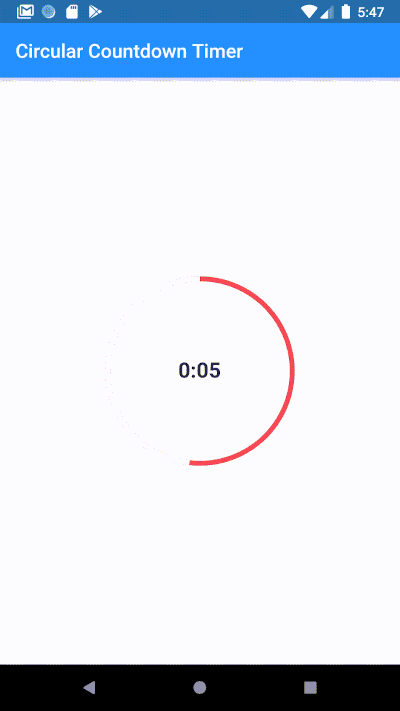
Demo

demo

Youtube

Bekar Programmer

Buy Me A Coffee

Kategorien

Quell-Repository

Projekte, die dieses Paket verwenden