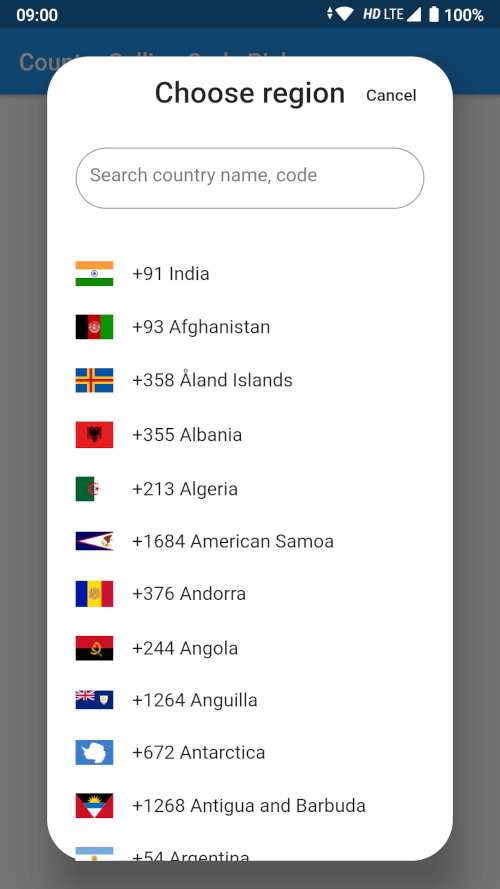
Aus öffentlichen Paketdaten erstellte Orientierung.
Ein flexibles und anpassbares Landauswahl-Widget für Flutter, das Benutzern die Auswahl eines Landes und die Abfrage des entsprechenden Ländercodes sowie Vorwahlnummern ermöglicht. Speziell für die nahtlose Integration in Formulare mit Eingabe internationaler Telefonnummern konzipiert, unterstützt es sowohl Android als auch iOS. Das Paket bietet eine intuitive Oberfläche mit Suchfunktion und Flaggenanzeige, die die Benutzererfahrung bei der Landauswahl verbessert. Leichtgewichtig und einfach zu implementieren, ist es ideal für Apps, die präzise Informationen zur internationalen Wahl benötigen.
Anwendungsfälle
Internationale Telefonnummer-Eingabe
Benutzerprofil-Einrichtung mit Länderauswahl
Multiregionale App-Lokalisierung
Kontaktformular mit Ländercode-Unterstützung
Authentifizierungsabläufe, die eine Telefonüberprüfung erfordern
Hauptmerkmale
Durchsuchbare Länderliste
Anzeige von Länderflaggen
Automatische Abruf von Rufnummerncodes
Anpassbare UI-Themen
Unterstützung für Ländercode und Rufcode-Ausgabe
Geeignet für
Mobile Apps, die internationale Telefon-Eingaben erfordern
Benutzer-Onboarding-Flows
Globale E-Commerce-Plattformen
Messaging- oder Anrufanwendungen
Formulare mit internationalen Kontaktdaten
Hinweise
Benötigt manuelle Handhabung der Speicherung von Ländercodes
Begrenzte Anpassungsmöglichkeiten jenseits der grundlegenden Gestaltung
Keine integrierte Überprüfung für Telefonnummern
Abhängig von einer externen Datenquelle für die Länderliste
Kann zusätzliche Logik für die Zeitzone oder Sprachübereinstimmung erfordern
Original-README
Originaler README-Schnappschuss aus dem verknüpften Quell-Repository. Aktuelle Inhalte finden Sie im Repository.
Country Calling Code Picker
A searchable country picker for Flutter, ready to use in a dialog, a bottom sheet
or full screen. Gives you the country name, its ISO code, its international
calling code and a bundled flag image for 250 countries and territories.
Pure Dart — no platform channels, no native build setup. It runs on Android,
iOS, web, macOS, Windows and Linux.
class_MyPageStateextendsState<MyPage> {
Country? _selectedCountry;
bool _didInit = false;
@overridevoiddidChangeDependencies() {
super.didChangeDependencies();
if (!_didInit) {
_didInit = true;
_initCountry();
}
}
Future<void> _initCountry() async {
final country = awaitgetDefaultCountry(context);
if (!mounted) return;
setState(() => _selectedCountry = country);
}
}
getDefaultCountry resolves the device region from the platform locale. Pass
fallbackCountryCode to choose what happens when the platform reports a region
that is not in the list:
final country = awaitgetDefaultCountry(context, fallbackCountryCode: 'US');
Bottom sheet
final country = awaitshowCountryPickerSheet(context);
if (country != null) {
setState(() => _selectedCountry = country);
}
Dialog
final country = awaitshowCountryPickerDialog(context);
// Every country, for your own custom picker.finalList<Country> countries = awaitgetCountries(context);
// Or without a BuildContext, e.g. from a repository or a unit test.finalList<Country> countries = awaitgetCountriesFromBundle();
// A single country by ISO code (case insensitive, null when unknown).finalCountry? india = awaitgetCountryByCountryCode(context, 'IN');
// The device region, e.g. 'IN'. Null when the platform reports none.finalString? code = getDeviceCountryCode(context);
Showing a flag
Flag images ship inside this package, so they need the package name:
Or skip the images entirely and use the emoji flag:
Text(country.flagEmoji); // 🇮🇳
CountryPickerWidget options
Parameter
Default
Description
onSelected
null
Called with the tapped Country.
itemTextStyle
TextStyle(fontSize: 16)
Text style of a list item.
searchInputStyle
TextStyle(fontSize: 16)
Text style of the search box.
searchInputDecoration
null
Replaces the search box decoration entirely.
searchHintText
'Search country name, code'
Hint of the search box.
flagIconSize
32
Width of the flag image.
showSeparator
false
Draw a Divider between items.
focusSearchBox
false
Open the keyboard as soon as the picker shows.
showDeviceCountryFirst
true
Move the device's country to the top of the list.
Search matches the country name (accent insensitive, so aland finds Åland),
the ISO code, and the calling code with or without its leading +.
Upgrading from 2.x
Version 3.0.0 requires Dart 3 / Flutter 3.24 or newer.
The flutter_sim_country_code dependency is gone.getDefaultCountry
now reads the device region from the platform locale instead of the SIM card,
which is why the package no longer needs any native code and works on web and
desktop. On a device whose region setting and SIM disagree, the resolved
country can differ from 2.x.
getCountryByCountryCode now really returns null for an unknown code.
It used to throw a StateError. Its match is also case insensitive now.
The country matching the device is still moved to the top of the picker, but
countries that merely share its calling code are no longer removed from the
list — picking the US no longer made Canada disappear.
getDefaultCountry takes an optional fallbackCountryCode.
CountryPickerWidget.focusSearchBox is now actually forwarded by
showCountryPickerSheet and showCountryPickerDialog.