Pakete, Repositories und App-Kategorien suchen

Cover von csc_picker
Paketdetailsv0.2.7

csc_picker

Ein Flutter-Paket zum Anzeigen einer Liste von Ländern, Bundesländern und Städten abhängig von der Auswahl. Außerdem können Sie weltweit nach Land, Bundesland und Stadt suchen.

30-Tage-Downloads
1860
Likes
223
Pub-Punkte
70

Paket installieren

flutter pub add csc_picker

Paketübersicht

Aus öffentlichen Paketdaten erstellte Orientierung.

csc_picker ist ein Flutter-Paket, das Benutzern die Auswahl von Ländern, Bundesländern und Städten in einer hierarchischen Dropdown-Struktur ermöglicht. Es unterstützt die Suche über alle Länder, Bundesländer und Städte weltweit und ist daher ideal für Formulare mit Ortsangaben. Das Paket ist leichtgewichtig und einfach zu integrieren und bietet eine saubere Benutzeroberfläche zur Auswahl von Land, Bundesland und Stadt basierend auf den Benutzerwahl. Es ist besonders nützlich in Anwendungen, die internationale Adressangaben oder regionenspezifische Datenerfassung erfordern.

Anwendungsfälle

  • Internationale Adressformulare
  • Benutzerprofilstandort-Einrichtung
  • E-Commerce-Versanddetails
  • Reisebuchungssysteme
  • Multiregionale App-Lokalisierung

Hauptmerkmale

  • Hierarchische Auswahl von Land-Staat-Stadt
  • Globale Suchfunktion
  • Leichtgewichtig und einfach zu integrieren
  • Unterstützt dynamische Abhängigkeiten zwischen Auswahlmöglichkeiten
  • Sauber und anpassbarer UI

Geeignet für

  • Apps, die internationale Standorteingabe erfordern
  • Formulare mit mehrstufigen Standortfeldern
  • Entwickler, die einen einfachen Länderauswahl-Tool suchen
  • Projekte mit weltweiter Nutzerbasis
  • Mobile Apps mit Lokalisierungsanforderungen

Hinweise

  • Kein Offline-Daten-Caching enthalten
  • Beschränkte Anpassung des Aussehens der Dropdown-Liste
  • Benötigt Internet für die vollständige Suchfunktion
  • Unterstützt keine benutzerdefinierten Regionen oder nicht-standardmäßige Hierarchien
  • Die erste Ladezeit kann bei großen Datensätzen langsam sein

Original-README

Originaler README-Schnappschuss aus dem verknüpften Quell-Repository. Aktuelle Inhalte finden Sie im Repository.

csc_picker

version version

A flutter package to display a country, states, and cities. In addition it gives the possibility to select a list of countries, States and Cities depends on Selected, also you can search country, state, and city all around the world.

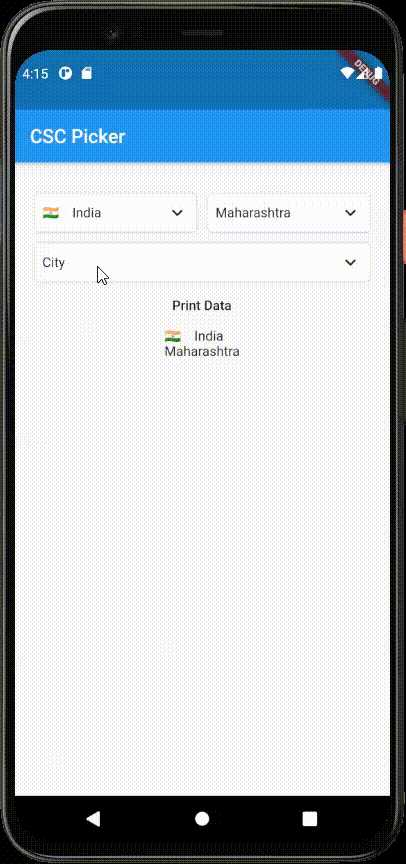
Horizontal Layout Vertical Layout

How to Use

To use this Package, add csc_picker as a dependency in your pubspec.yaml.

      	CSCPicker(
              onCountryChanged: (value) {
      			setState(() {
      					countryValue = value;
      				});
                  },
                  onStateChanged:(value) {
                      setState(() {
      					stateValue = value;
      				});
                  },
                  onCityChanged:(value) {
                  setState(() {
                      cityValue = value;
      			});
      		},
          ),

you will get feedback in onChanged functions

Parameters
ParametersTypeDescription
flagStateCountryFlagEnable (get flag with country name) / Disable (Disable flag) / ShowInDropdownOnly (display flag in dropdown only)
layoutLayoutToggle dropdown layout (Horizontal / Vertical)
showStatesBoolean Enable disable States dropdown (true / false)
showCitiesBoolean Enable disable Cities dropdown (true / false)
dropdownDecorationBoxDecorationDropdown box decoration to style your dropdown selector [OPTIONAL PARAMETER] (USE with disabledDropdownDecoration)
disabledDropdownDecorationBoxDecorationDisabled Dropdown box decoration to style your dropdown selector [OPTIONAL PARAMETER] (USE with disabled dropdownDecoration)
selectedItemStyleTextStyleTo change selected item style
dropdownHeadingStyleTextStyleTo change DropdownDialog Heading style
dropdownItemStyleTextStyleTo change DropdownDialog Item style
dropdownDialogRadiusdoubleTo change DropdownDialogBox radius
searchBarRadiusdoubleTo change search bar radius
defaultCountryCscCountryTo select default country
disableCountryBooleanDisable country dropdown (Note: use it with default country)
countryFilterList of CscCountryShow only countries in dropdown that you want
countrySearchPlaceholderStringPlaceholder for country search field
stateSearchPlaceholderStringPlaceholder for state search field
citySearchPlaceholderStringPlaceholder for city search field
countryDropdownLabelStringLabel/Title for country dropdown
countryDropdownLabelStringLabel/Title for state dropdown
countryDropdownLabelStringLabel/Title for city dropdown
Example
import 'package:csc_picker/csc_picker.dart';
import 'package:flutter/material.dart';

/// This is a implementation of the Country State City Picker.
void main() {
  runApp(MyApp());
}

class MyApp extends StatelessWidget {
  @override
  Widget build(BuildContext context) {
    return MaterialApp(
      title: 'CSC Picker',
      theme: ThemeData(
        primarySwatch: Colors.blue,
        visualDensity: VisualDensity.adaptivePlatformDensity,
      ),
      home: MyHomePage(title: 'CSC Picker'),
    );
  }
}

class MyHomePage extends StatefulWidget {
  MyHomePage({Key key, this.title}) : super(key: key);

  final String title;

  @override
  _MyHomePageState createState() => _MyHomePageState();
}

class _MyHomePageState extends State<MyHomePage> {
  /// Variables to store country state city data in onChanged method.
  String countryValue = "";
  String stateValue = "";
  String cityValue = "";
  String address = "";

  @override
  Widget build(BuildContext context) {

    GlobalKey<CSCPickerState> _cscPickerKey = GlobalKey();

    return Scaffold(
      appBar: AppBar(
        title: Text(widget.title),
      ),
      body: Center(
        child: Container(
            padding: EdgeInsets.symmetric(horizontal: 20),
            height: 600,
            child: Column(
              children: [
                ///Adding CSC Picker Widget in app
                CSCPicker(
                  ///Enable disable state dropdown [OPTIONAL PARAMETER]
                  showStates: true,

                  /// Enable disable city drop down [OPTIONAL PARAMETER]
                  showCities: true,

                  ///Enable (get flag with country name) / Disable (Disable flag) / ShowInDropdownOnly (display flag in dropdown only) [OPTIONAL PARAMETER]
                  flagState: CountryFlag.DISABLE,

                  ///Dropdown box decoration to style your dropdown selector [OPTIONAL PARAMETER] (USE with disabledDropdownDecoration)
                  dropdownDecoration: BoxDecoration(
                      borderRadius: BorderRadius.all(Radius.circular(10)),
                      color: Colors.white,
                      border:
                      Border.all(color: Colors.grey.shade300, width: 1)),

                  ///Disabled Dropdown box decoration to style your dropdown selector [OPTIONAL PARAMETER]  (USE with disabled dropdownDecoration)
                  disabledDropdownDecoration: BoxDecoration(
                      borderRadius: BorderRadius.all(Radius.circular(10)),
                      color: Colors.grey.shade300,
                      border:
                      Border.all(color: Colors.grey.shade300, width: 1)),

                  ///placeholders for dropdown search field
                  countrySearchPlaceholder: "Country",
                  stateSearchPlaceholder: "State",
                  citySearchPlaceholder: "City",

                  ///labels for dropdown
                  countryDropdownLabel: "*Country",
                  stateDropdownLabel: "*State",
                  cityDropdownLabel: "*City",

                  ///Default Country
                  //defaultCountry: CscCountry.India,

                  ///Disable country dropdown (Note: use it with default country)
                  //disableCountry: true,

                  ///Country Filter [OPTIONAL PARAMETER]
                  countryFilter: [CscCountry.India,CscCountry.United_States,CscCountry.Canada],

                  ///selected item style [OPTIONAL PARAMETER]
                  selectedItemStyle: TextStyle(
                    color: Colors.black,
                    fontSize: 14,
                  ),

                  ///DropdownDialog Heading style [OPTIONAL PARAMETER]
                  dropdownHeadingStyle: TextStyle(
                      color: Colors.black,
                      fontSize: 17,
                      fontWeight: FontWeight.bold),

                  ///DropdownDialog Item style [OPTIONAL PARAMETER]
                  dropdownItemStyle: TextStyle(
                    color: Colors.black,
                    fontSize: 14,
                  ),

                  ///Dialog box radius [OPTIONAL PARAMETER]
                  dropdownDialogRadius: 10.0,

                  ///Search bar radius [OPTIONAL PARAMETER]
                  searchBarRadius: 10.0,

                  ///triggers once country selected in dropdown
                  onCountryChanged: (value) {
                    setState(() {
                      ///store value in country variable
                      countryValue = value;
                    });
                  },

                  ///triggers once state selected in dropdown
                  onStateChanged: (value) {
                    setState(() {
                      ///store value in state variable
                      stateValue = value;
                    });
                  },

                  ///triggers once city selected in dropdown
                  onCityChanged: (value) {
                    setState(() {
                      ///store value in city variable
                      cityValue = value;
                    });
                  },
                ),

                ///print newly selected country state and city in Text Widget
                TextButton(
                    onPressed: () {
                      setState(() {
                        address = "$cityValue, $stateValue, $countryValue";
                      });
                    },
                    child: Text("Print Data")),
                Text(address)
              ],
            )),
      ),
    );
  }
}
Special Thanks to

Kategorien

Quell-Repository

Projekte, die dieses Paket verwenden

Noch keine Daten verfügbar.
