Pakete, Repositories und App-Kategorien suchen

Cover von curved_nav_bar
Paketdetailsv0.1.0

curved_nav_bar

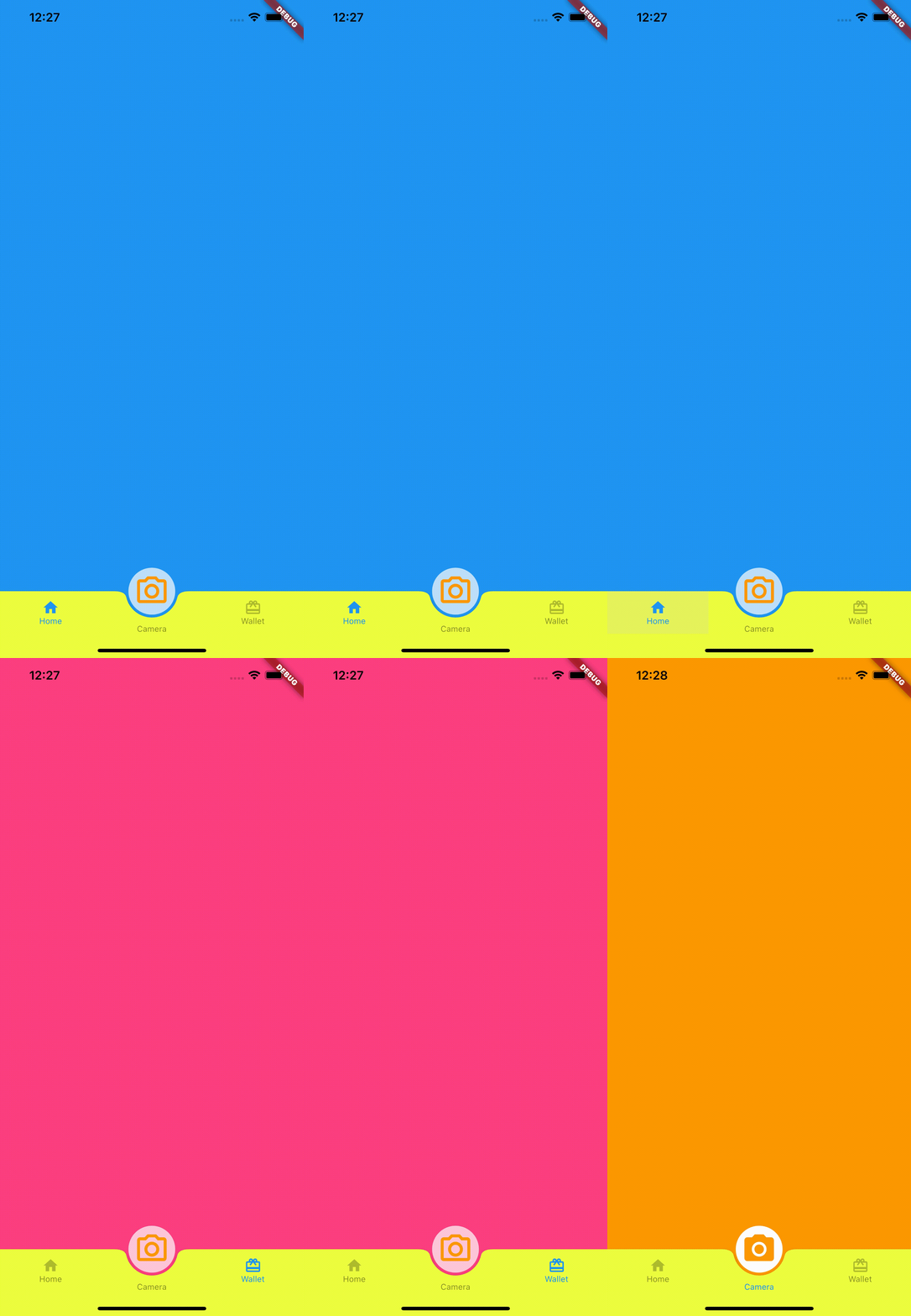
Unterer Navigationsleiste mit FAB, Sie können die FAB als mittlere Registerkarte verwenden oder andere Aktionen ausführen, wie z. B. ein Popup öffnen oder die Kamera aktivieren.

AndroidiOSWebmacOSWindowsLinux
30-Tage-Downloads
466
Likes
33
Pub-Punkte
160

Paket installieren

flutter pub add curved_nav_bar

Paketübersicht

Aus öffentlichen Paketdaten erstellte Orientierung.

CurvedNavBar ist ein Flutter-Paket, das eine anpassbare untere Navigationsleiste mit gekrümmtem Design bietet, wobei sich ein fliegender Aktionsschalter (FAB) in der Mitte befindet. Der FAB kann als zentrale Registerkarte dienen oder Aktionen wie das Öffnen von Pop-ups oder das Starten der Kamera auslösen. Es unterstützt mehrere Plattformen wie Android, iOS, Web, macOS, Windows und Linux und bietet reibungslose Animationen sowie responsive Layouts. Ideal für Apps, die ein elegantes, modernes Navigationserlebnis mit interaktiven Elementen benötigen.

Anwendungsfälle

  • Mobile App-Navigation
  • Verbesserte Bottom-Tabs mit FAB
  • Kamera- oder Popup-Auslöser
  • Plattformübergreifende UI-Konsistenz
  • Modernes App-Design
  • interaktive Navigationsgesten

Hauptmerkmale

  • Gekrümmte Bottom-Navigation
  • Anpassbare FAB-Position
  • Unterstützung für mehrere Plattformen
  • Glatte Animationen
  • Erweiterbare Aktionenverarbeitung
  • Reaktives Design

Geeignet für

  • Entwickler, die moderne Benutzeroberflächen suchen
  • Apps, die interaktive FABs erfordern
  • Plattformübergreifende mobile Anwendungen
  • Designorientierte Flutter-Projekte
  • Benutzer, die animierte Navigationsleisten möchten

Hinweise

  • Erfordert sorgfältige Layoutplanung
  • Möglicherweise sind benutzerdefinierte Stile für komplexe Designs erforderlich
  • Beschränkt auf den Einsatz in der unteren Navigation
  • plattformspezifisches Verhalten kann variieren
  • Nicht geeignet für Szenarien ohne Bottom-Navigation
  • Die FAB-Interaktionslogik muss separat implementiert werden

Original-README

Originaler README-Schnappschuss aus dem verknüpften Quell-Repository. Aktuelle Inhalte finden Sie im Repository.

curved_nav_bar

Bottom nav bar with FAB and center text, You can use FAB as a middle tab or perform other operations like, open popup or open camera (pub.dev).

Screenshots

Usage

Example

To use this package :

dependencies:
   flutter:
     sdk: flutter
   curved_nav_bar:

Getting started

To start, import the dependency in your code:

import 'package:curved_nav_bar/curved_bar/curved_action_bar.dart';
import 'package:curved_nav_bar/fab_bar/fab_bottom_app_bar_item.dart';
import 'package:curved_nav_bar/flutter_curved_bottom_nav_bar.dart';

The following options are available for CurvedNavBar:

Property Type Description
appBarItems List List of FABBottomAppBarItem,length of appBarItems should be equal to the length of bodyItems
bodyItems List List of Widget,length of bodyItems should be equal to the length of appBarItems
extendBody bool extendBody default value always true
actionButton CurvedActionBar Typically a FloatingActionButton
activeColor Color Color of selected tab activeColor default value always Colors.black
inActiveColor Color Color of unselected tab inActiveColor default value always Colors.black26
navBarBackgroundColor Color background Color of navigation bar navBarBackgroundColor default value always Colors.white
actionBarView Widget Set as scaffold body when actionButton selected

Options for FABBottomAppBarItem are:

Property Type Description
activeIcon Widget selected icon of navigation bar item
inActiveIcon Widget unselected icon of navigation bar item
text String label of navigation bar item

Options for CurvedActionBar are:

Property Type Description
activeIcon Widget selected icon for actionButton
inActiveIcon Widget unselected icon of actionButton
text String text label for actionButton
onTab ValueChanged return bool value when tab on actionButton
How to use
import 'package:flutter/material.dart';
import 'package:curved_nav_bar/curved_bar/curved_action_bar.dart';
import 'package:curved_nav_bar/fab_bar/fab_bottom_app_bar_item.dart';
import 'package:curved_nav_bar/flutter_curved_bottom_nav_bar.dart';
void main() {
  runApp(MyApp());
}

class MyApp extends StatelessWidget {
  @override
  Widget build(BuildContext context) {
    return MaterialApp(
      title: 'Flutter Demo',
      theme: ThemeData(
        primarySwatch: Colors.blue,
      ),
      home: MyHomePage(title: 'Flutter Demo Home Page'),
    );
  }
}

class MyHomePage extends StatefulWidget {
  MyHomePage({Key? key, required this.title}) : super(key: key);

  final String title;

  @override
  _MyHomePageState createState() => _MyHomePageState();
}

class _MyHomePageState extends State<MyHomePage> {
  @override
  Widget build(BuildContext context) {
    return CurvedNavBar(
      actionButton: CurvedActionBar(
          onTab: (value) {
            /// perform action here
            print(value);
          },
          activeIcon: Container(
            padding: EdgeInsets.all(8),
            decoration:
                BoxDecoration(color: Colors.white, shape: BoxShape.circle),
            child: Icon(
              Icons.camera_alt,
              size: 50,
              color: Colors.orange,
            ),
          ),
          inActiveIcon: Container(
            padding: EdgeInsets.all(8),
            decoration:
                BoxDecoration(color: Colors.white70, shape: BoxShape.circle),
            child: Icon(
              Icons.camera_alt_outlined,
              size: 50,
              color: Colors.orange,
            ),
          ),
          text: "Camera"),
      activeColor: Colors.blue,
      navBarBackgroundColor: Colors.limeAccent,
      inActiveColor: Colors.black45,
      appBarItems: [
        FABBottomAppBarItem(
            activeIcon: Icon(
              Icons.home,
              color: Colors.blue,
            ),
            inActiveIcon: Icon(
              Icons.home,
              color: Colors.black26,
            ),
            text: 'Home'),
        FABBottomAppBarItem(
            activeIcon: Icon(
              Icons.wallet_giftcard,
              color: Colors.blue,
            ),
            inActiveIcon: Icon(
              Icons.wallet_giftcard,
              color: Colors.black26,
            ),
            text: 'Wallet'),
      ],
      bodyItems: [
        Container(
          height: MediaQuery.of(context).size.height,
          color: Colors.blue,
        ),
        Container(
          height: MediaQuery.of(context).size.height,
          color: Colors.pinkAccent,
        )
      ],
      actionBarView: Container(
        height: MediaQuery.of(context).size.height,
        color: Colors.orange,
      ),
    );
  }
}

Pull Requests

Pull requests are most welcome. It usually will take me within 24-48 hours to respond to any issue or request.

  1. Please keep PR titles easy to read and descriptive of changes, this will make them easier to merge :)
  2. Pull requests must be made against develop branch. Any other branch (unless specified by the maintainers) will get rejected.
Created & Maintained By

Boffin Coders Pvt. Ltd.

If you found this project helpful or you learned something from the source code and want to thank me, consider buying me a cup of :coffee:

License

Copyright 2018 Boffin Coders Pvt. Ltd.

Licensed under the Apache License, Version 2.0 (the "License");
you may not use this file except in compliance with the License.
You may obtain a copy of the License at

   http://www.apache.org/licenses/LICENSE-2.0

Unless required by applicable law or agreed to in writing, software
distributed under the License is distributed on an "AS IS" BASIS,
WITHOUT WARRANTIES OR CONDITIONS OF ANY KIND, either express or implied.
See the License for the specific language governing permissions and
limitations under the License.

Kategorien

Quell-Repository

Projekte, die dieses Paket verwenden

Noch keine Daten verfügbar.