Aus öffentlichen Paketdaten erstellte Orientierung.
Dart_Native ermöglicht Entwicklern, native mobile und Desktop-Anwendungen direkt in Dart zu schreiben, wodurch die Notwendigkeit für plattformspezifischen Code und leistungsintensive Interop-Kanäle entfällt. Durch die Nutzung von Dart's starker Typisierung und moderner Syntax ermöglicht es nahtlosen Zugriff auf native APIs unter Android, iOS und macOS. Dieses Paket schließt die Lücke zwischen hochwertigem Dart-Entwicklung und niedrigstufigen Systemfunktionen und bietet einen einheitlichen Arbeitsablauf über Plattformen hinweg. Es ist ideal für Teams, die eine einzige Codebasis beibehalten möchten, während sie native Leistung und Zugriff auf Gerätefunktionen erreichen.
Anwendungsfälle
Plattformübergreifende App-Entwicklung
Zugriff auf native APIs aus Dart
Plattformspezifischer Code beseitigen
Leistungsstarke mobile Anwendungen
Einheitlicher Codebase für mehrere Plattformen
Hauptmerkmale
Direktes Schreiben von Native-Code in Dart
Unterstützung für Android, iOS und macOS
Keine Abhängigkeit von leistungsschwachen Kanälen
Nahtlose Integration mit nativen APIs
Einheitlicher Codebase für mehrere Plattformen
Geeignet für
Entwickler, die Dart für mobile/Desktop-Apps verwenden
Teams, die die Komplexität der Native-Sprache vermeiden
Projekte, die native Leistung erfordern
Plattformübergreifende Anwendungsentwicklung
Diejenigen, die Boilerplate und Interop-Aufwand reduzieren möchten
Hinweise
Eingeschränktes Ökosystem im Vergleich zu etablierten nativen Tools
Die frühe Nutzung erfordert möglicherweise tiefgehendes Debugging
Erfordert Verständnis von native Plattformkonzepten
Unterstützt möglicherweise noch nicht alle speziellen Native-Funktionen
Lernkurve für Entwickler, die mit nativen Integrationsmustern nicht vertraut sind
Original-README
Originaler README-Schnappschuss aus dem verknüpften Quell-Repository. Aktuelle Inhalte finden Sie im Repository.
DartNative
DartNative operates as a bridge to communicate between Dart and native APIs.
Replaces the low-performing Flutter channel with faster and more concise code.
Features
Dynamic synchronous & asynchronous channeling
DartNative calls any native API dynamically. It supports both synchronous and asynchronous channeling.
Direct call between multi-language interfaces
Serialization of parameters and return values like Flutter Channel is no longer required. DartNative provides direct calls and automatic object marshalling between language interfaces.
Dart finalizer
Dart finalizer is only supported above Flutter 3(Dart 2.17), but with DartNative it is available in Dart Flutter 2.2.0(Dart 2.13.0) and up.
Autogenerate succinct bridging code
DartNative supports automatic type conversion so its bridging code is shorter & simpler than the Flutter channel.
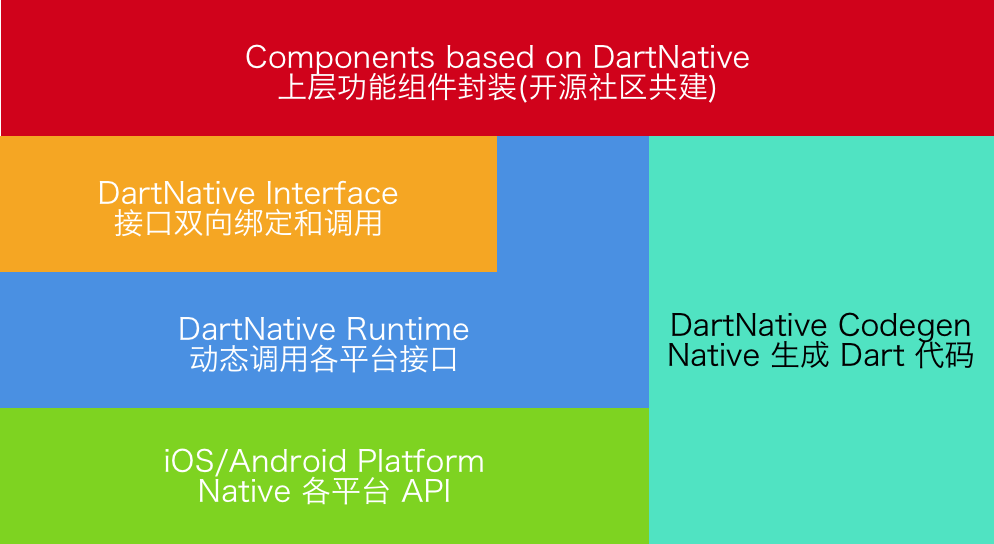
The design and vision of this package:
Requirements
DartNative Version
Flutter Requirements
Codegen Version
0.4.x - 0.7.x
Flutter 2.2.0 (Dart 2.13.0)
2.x
0.3.x
Flutter 1.20.0 (Dart 2.9.1)
1.2.x
0.2.x
Flutter 1.12.13 (Dart 2.7)
1.x
Supported Platforms
iOS & macOS & Android
Usage
Basic usage: Interface binding
Add dart_native to dependencies and build_runner to dev_dependencies. Then you can write code. Here are some examples:
Dart calls Native
Dart code:
finalinterface = Interface("MyFirstInterface");
// Exampleforstringtype.
StringhelloWorld() {
returninterface.invokeMethodSync('hello', args: ['world']);
}
// Example for num type.Future<int> sum(int a, int b) {
returninterface.invokeMethod('sum', args: [a, b]);
}
// load libdart_native.so
DartNativePlugin.loadSo();

@InterfaceEntry(name = "MyFirstInterface")
public class InterfaceDemo extends DartNativeInterface {

    @InterfaceMethod(name = "hello")
    public String hello(String str) {
        return "hello " + str;
    }

    @InterfaceMethod(name = "sum")
    public int sum(int a, int b) {
        return a + b;
    }
}
NOTE: If your so path is custom, you need pass specific path.
invokeMethod("totalCost", new Object[]{0.123456789, 10, Arrays.asList("hello", "world")},
             new DartNativeResult() {
                @Override
                public void onResult(@Nullable Object result) {
                    Map retMap = (Map) result;
                    // do something
                }

                @Override
                public void error(@Nullable String errorMessage) {
                    // do something
                }
              }
);
Dart finalizer
final foo = Bar(); // A custom instance.
unitTest.addFinalizer(() { // register a finalizer callback.print('The instance of \'foo\' has been destroyed!'); // When `foo` is destroyed by GC, this line of code will be executed.
});
Data types support
Dart
Objective-C
Swift
Java
null
nil
nil
null
bool
BOOL
Bool
bool
int
NSInteger
Int
int
double
double
Double
double
String
NSString
String
String
List
NSArray
Array
List, ArrayList
Map
NSDictionary
Dictionary
Map, HashMap
Set
NSSet
Set
Set, HashSet
Function
Block
Closure
Promise
Pointer
void *
UnsafeMutableRawPointer
-
NativeByte
NSData
Data
DirectByteBuffer
NativeObject
NSObject
NSObject
Object
Advanced usage: Invoke methods dynamically
Step 1: Add dart_native to dependencies and build_runner to dev_dependencies.
Step 2: Generate Dart wrapper code with @dartnative/codegen or write Dart code manually.
Step 3: Generate code for automatic type conversion using dart_native_gen with the following steps (3.1-3.3):
3.2 Annotate your own entry (such asmain()) with @nativeRoot.
@nativeRootvoidmain() {
runApp(App());
}
3.3 Run
flutter packages pub run build_runner build --delete-conflicting-outputs
to generate files into your source directory.
Note: we recommend running clean first:
flutter packages pub run build_runner clean
Step 4: Call autogenerated function in <generated-name>.dn.dart in 3.3. The function name is determined by name in pubspec.yaml.
@nativeRootvoidmain() {
// Function name is generated by name in pubspec.yaml.runDartNativeExample();
runApp(App());
}
Step 5: Then you can write code. Here are some examples:
5.1 iOS:
Dart code (generated):
// new Objective-C object.RuntimeStub stub = RuntimeStub();
// Dart function will be converted to Objective-C block.
stub.fooBlock((NSObject a) {
print('hello block! ${a.toString()}');
return101;
});
// support built-in structs.CGRect rect = stub.fooCGRect(CGRect(4, 3, 2, 1));
print(rect);