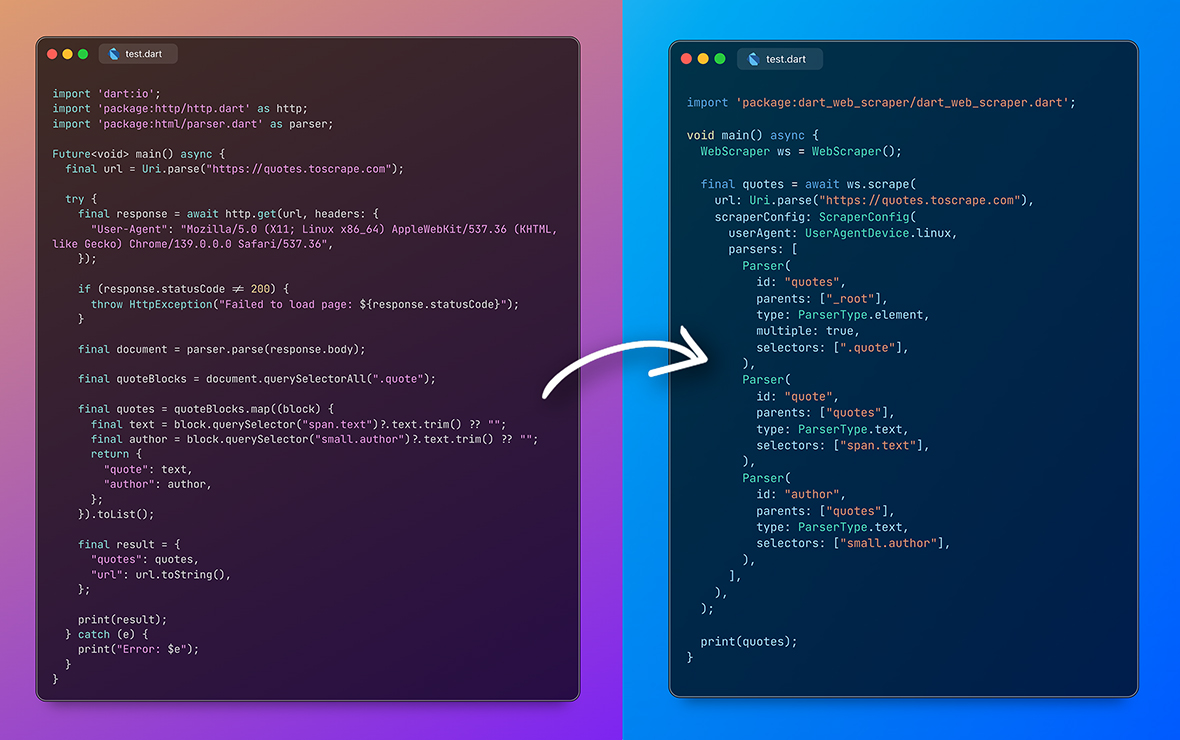
Leistungsstarker, einfach zu bedienender Web- und API-Scraper. Verketten Sie Parser und Transformationen, um genau die Daten zu extrahieren, die Sie benötigen.
Aus öffentlichen Paketdaten erstellte Orientierung.
Ein leistungsstarkes und intuitives Web-Scraping-Paket für Dart und Flutter, das Entwicklern ermöglicht, strukturierte Daten aus Webseiten und APIs zu extrahieren. Dank Unterstützung für die Kette von Parsern und Transformationen wird der Prozess der Navigation im HTML, Filterung von Inhalten und Konvertierung von Daten in nutzbare Formate vereinfacht. Speziell für den plattformübergreifenden Einsatz konzipiert, funktioniert es nahtlos auf Android, iOS, Web, macOS, Windows und Linux. Perfekt geeignet zum Erstellen von Datensammlungstools, Preisverfolgungswerkzeugen oder Content-Harvester mit minimalem Boilerplate.
Anwendungsfälle
Web-Datenextraktion
Preisüberwachung
Inhaltsaggregation
API-Antwortanalyse
Automatisierte Datenerfassung
RSS-Feed-Abfragen
Hauptmerkmale
Verkettete Parser und Transformationen
Plattformübergreifende Kompatibilität
HTML- und API-Unterstützung
Minimale Einrichtung
Flexible Datenumwandlung
Robuste Fehlerbehandlung
Geeignet für
Datenbeschaffungsprojekte
Echtzeit-Informationssammler
Automatisierungsskripte
Scraping beginners
Entwickler, die leichtgewichtige Lösungen benötigen
Apps, die externe Daten erfordern
Hinweise
Respektieren Sie robots.txt und die Nutzungsbedingungen
Rate Limiting behandeln
Rechtliche Einhaltung sicherstellen
Änderungen an der Zielwebsite überwachen
Vermeiden Sie aggressive Scraping
Zuerst an kleinen Datensätzen testen
Original-README
Originaler README-Schnappschuss aus dem verknüpften Quell-Repository. Aktuelle Inhalte finden Sie im Repository.
Config-based, reusable web scraper for web and API scraping. Scrape, parse web pages or APIs without writing parsers or scraping logic, using simple key/value based configs.
Features
Config-based, reusable web scraper for web and API scraping.
Scrape, parse web pages or APIs without writing parsers or scraping logic, using simple key/value based configs.
High-level web scraper that combines HTML fetching and data parsing.
WebScraperWebScraper()
// Main scraping methodFuture<Map<String, Object>> scrape({
// The URL to scraperequiredUri url,
// Scraper configuration for the URLScraperConfig? scraperConfig,
// Map of domain names to lists of scraper configurationsScraperConfigMap? scraperConfigMap,
// Enable debug logging, also dumps scraped file into current path /dump folderbool debug = false,
// Pre-fetched HTML document (optional, avoids HTTP request if provided)String? html,
// Custom cookies to include in HTTP requests (Overrides ScraperConfig cookies)Map<String, String>? overrideCookies,
// Custom HTTP headers to include in requests (Overrides ScraperConfig headers)Map<String, String>? overrideHeaders,
// Overrides proxy config in ScraperConfig and HTTP Parser optionsProxyAPIConfig? overrideProxyAPIConfig,
// Custom user agent string (overrides ScraperConfig userAgent)String? overrideUserAgent,
})
ScraperConfig class
Configuration for targeting and scraping specific types of URLs.
ScraperConfigScraperConfig({
// List of URL path patterns that this configuration should handleList<String> pathPatterns = const [],
// List of parsers that define how to extract data from the pagerequiredList<Parser> parsers,
// Whether HTML content needs to be fetched from the URLbool requiresHtml = true,
// URL preprocessing and cleaning configurationUrlCleaner? urlCleaner,
// Proxy API configProxyAPIConfig? proxyAPIConfig;
// Cookies for base requestMap<String, String>? cookies;
// Headers for base requestMap<String, String>? headers;
// Whether to force a fresh HTTP request even if HTML is providedbool forceRefresh = false,
// User agent device type for base requestUserAgentDevice userAgent = UserAgentDevice.mobile,
})
UrlCleaner class
Clean the URL before it's passed to a scraper.
UrlCleanerUrlCleaner({
// Set whitelisted or blacklisted URL parameters.List<String>? whitelistParams,
List<String>? blacklistParams,
// Set custom static parameters to a URL.Map<String, String>? appendParams,
})
Parser class
Easy to use and reusable parser class :)
ParserParser({
// `id` is used for final result.// Child parsers can reference to parent parser using `id`.// You can have multiple parsers with same id and same parent and will execute one by one and stop execution once data is successfully parsed by one parser.requiredString id,
// A child can have multiple parents, it will execute once parent parser is successfully executed.requiredList<String> parents,
// Set the parser types.requiredParserType type,
// List of selectors will execute one by one and stop execution once data is successfully parsed by one selector.List<String> selectors = const [],
// Set parser for private usage. Will be not added to final result.bool isPrivate = false,
// Set multiple to `true` if data is a List.bool multiple = false,
// Some parsers require additional options to work properly.// You can pass these options here.// For example, `ParserType.table` requires `ParserOptions.table`.ParserOptions? parserOptions;
// Data transformation options to apply after extraction.TransformationOptions? transformationOptions,
// Custom cleaner function, clean the data and return data.Object? Function(Data, bool)? cleaner,
// If you plan to create configs from JSON, you can pass cleaner name here.// This cleaner should be registered in `CleanerRegistry` to be used.// If you pass cleaner along with cleanerName, cleanerName function will be ignored.String? cleanerName,
})
Parser Types
Type
Description
Selector
ParserOptions
ParserType.element
Extracts element nodes from HTML using CSS selectors.
CSS selector required.
-
ParserType.attribute
Extracts attribute value from HTML element using CSS selectors.
Use CSS selector to select an element and append attribute name with ::. Ex: div#myid::name where name refers to the attribute name.
-
ParserType.text
Extracts text from HTML element using CSS selectors.
CSS selector required.
-
ParserType.image
Extracts image URL from HTML element.
CSS selector required. After selecting an element it tries to find src attribute.
-
ParserType.url
Extracts URL from an HTML element
CSS selector required. After selecting an element it tries to find href attribute.
-
ParserType.urlParam
From an URL it extracts query parameter.
Add parameter name in selector.
ParserOptions.urlParam
ParserType.table
Extracts data from HTML table.
CSS selector required. Select table using this selector.
ParserOptions.table
ParserType.sibling
Used when target element doesn't have a valid selector but sibling does.
CSS selector is required.
ParserOptions.sibling
ParserType.strBetween
Extracts the string between two strings.
Not required
ParserOptions.stringBetween
ParserType.http
Get data using http request
Not required
ParserOptions.http
ParserType.responseHeaders
Sends a GET/POST request and extracts a value from the response headers (e.g. a cookie from set-cookie).
Parser-specific configuration options that control how individual parsers behave during data extraction.
Use the appropriate named constructor for the parser type you're configuring:
// For HTTP parsersParserOptions.http(options: HttpParserOptions(...))
// For response header parsersParserOptions.responseHeaders(options: ResponseHeaderParserOptions(...))
// For table and JSON table parsersParserOptions.table(options: TableParserOptions(...))
// For sibling parsersParserOptions.sibling(options: SiblingParserOptions(...))
// For static value parsersParserOptions.staticValue(options: StaticValueParserOptions(...))
// For string between parsersParserOptions.stringBetween(options: StringBetweenParserOptions(...))
// For URL parameter parsersParserOptions.urlParam(options: UrlParamParserOptions(...))
Response Headers parser
ParserType.responseHeaders sends a request and returns a value from the response headers — handy for grabbing a cookie out of set-cookie.
Parser(
  id: "session",
  parents: ["_root"],
  type: ParserType.responseHeaders,
  parserOptions: ParserOptions.responseHeaders(
    options: ResponseHeaderParserOptions(
      // Optional: defaults to the URL passed to WebScraper.scrape
      url: "https://example.com/login",
      // HttpMethod.get (default) or HttpMethod.post
      method: HttpMethod.get,
      // Response header to read (case-insensitive). Omit to return all headers as a Map.
      headerName: "set-cookie",
      // Optional: extract a single cookie's value from the header
      cookieName: "at",
    ),
  ),
)
TransformationOptions class
Comprehensive data transformation system that can be applied to extracted data.
TransformationOptionsTransformationOptions({
// Text to add to the beginningString? prepend,
// Text to add to the endString? append,
// List of values to check for matches, returns booleanList<Object>? match,
// Index to extract from a list (negative for reverse indexing)int? nth,
// Delimiter to split data byString? splitBy,
// Whether to decode URL-encoded stringsbool? urldecode,
// Whether to convert map values to a listbool? mapToList,
// Regular expression extraction optionsRegexTransformationOptions? regexMatch,
// Regular expression replacement optionsRegexReplaceTransformationOptions? regexReplace,
// Text replacement optionsReplaceTransformationOptions? replace,
// Text cropping options (start/end)CropTransformationOptions? crop,
// Extract text between two stringsStringBetweenTransformationOptions? stringBetween,
// Extract sibling elementsSiblingTransformationOptions? sibling,
// Table processing optionsTableTransformationOptions? table,
// Return static value optionsStaticValueTransformationOptions? staticValue,
// Custom order for applying transformationsList<TransformationType>? transformationOrder,
})
Error handling
Scraping throws WebScraperError. When a request (the base fetch, or an http / responseHeaders parser) returns 404, the error carries statusCode: 404, signalling the URL is no longer available:
try {
final result = await webScraper.scrape(url: url, scraperConfig: config);
} onWebScraperErrorcatch (e) {
if (e.statusCode == 404) {
// URL is gone
} else {
print(e.message);
}
}
Browser-like requests
Every request automatically includes a coherent set of browser headers — a randomized User-Agent plus matching Accept, Accept-Language, Sec-Fetch-*, and (for Chromium User-Agents) version-aligned Sec-CH-UA client hints. Choose the device profile with ScraperConfig.userAgent (UserAgentDevice.mobile, desktop, windows, mac, linux, android, ios, random). Any headers or overrideUserAgent you set take precedence.
Note: this mimics header-level fingerprints only. TLS/JA3 and HTTP/2 fingerprints come from the Dart networking stack and can't be changed here — route through a ProxyAPIConfig unblocker for sites that fingerprint at those layers.
Creating configs from JSON
You can now create configs from JSON string using ScraperConfig.fromJson method.
Cleaner Registry for parsers created using JSON
You can register cleaners using CleanerRegistry.register method. This is useful when you want to create configs from JSON and want to use custom cleaner for Parser.