Pakete, Repositories und App-Kategorien suchen

Paketdetailsv0.9.6

device_simulator

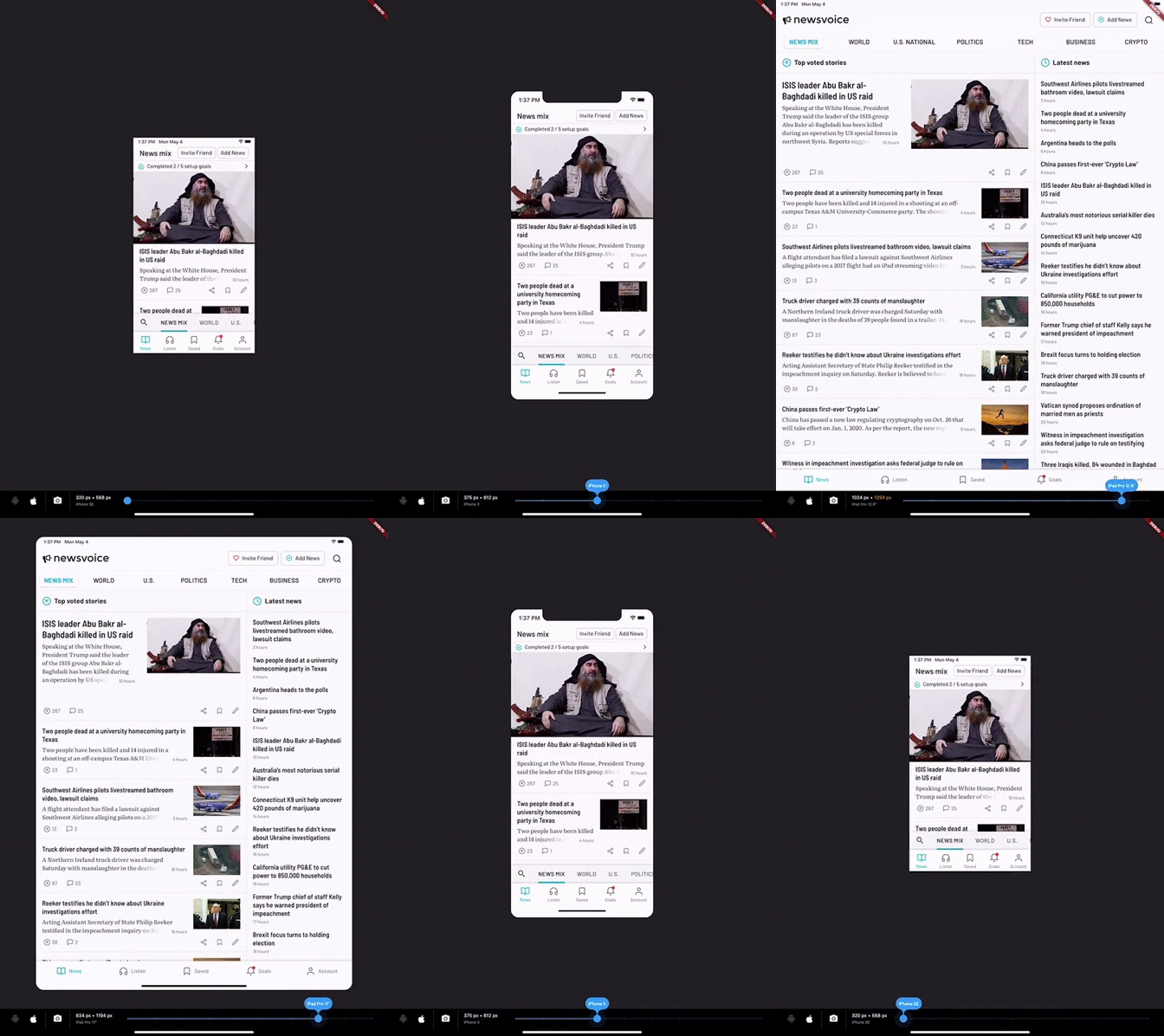
DeviceSimulator ermöglicht Ihnen die einfache Prüfung Ihrer Flutter-App für verschiedene Bildschirmauflösungen und Plattformen.

30-Tage-Downloads
80
Likes
177
Pub-Punkte
40

Paket installieren

flutter pub add device_simulator

Paketübersicht

Aus öffentlichen Paketdaten erstellte Orientierung.

DeviceSimulator ist ein Flutter-Paket, das Entwicklern ermöglicht, ihre Anwendungen direkt in der Entwicklungsumgebung über verschiedene Bildschirmauflösungen und Plattformen hinweg zu testen. Es bietet eine benutzerfreundliche Oberfläche zum Simulieren verschiedener Geräte und hilft dabei, responsive Designs und konsistente Benutzererfahrungen sicherzustellen. Das Paket unterstützt dynamische Vorschauanpassungen ohne physische Geräte oder komplexe Einrichtung. Ideal für schnelle Iterationen während der UI-Entwicklung, verbessert es die Testeffizienz durch Nachahmung realer Geräteverhalten.

Anwendungsfälle

  • Tests responsive Layouts
  • Vorschau des App-Aussehens auf mehreren Geräten
  • Überprüfung der UI-Konsistenz über verschiedene Bildschirmgrößen hinweg
  • Schnelle UI-Prototypenerstellung
  • Plattformübergreifende Kompatibilitätsprüfungen
  • Debugging von Layoutproblemen

Hauptmerkmale

  • Echtzeit-Gerätesimulation
  • Unterstützung für verschiedene Bildschirmauflösungen
  • Einfache Integration in Flutter-Projekte
  • Dynamische Vorschauaktualisierungen
  • Minimale Konfiguration erforderlich
  • Plattformunabhängiger Entwurf

Geeignet für

  • Flutter-Entwickler, die sich auf UI/UX konzentrieren
  • Teams, die die Testung über Geräte hinweg priorisieren
  • Anfänger lernen responsive Design
  • Remote-Entwicklungswerkflüsse
  • Apps für mehrere Gerätearten

Hinweise

  • Simuliert nicht das tatsächliche Hardware-Verhalten
  • Beschränkt auf visuelle Vorschau, keine vollständige Funktionsprüfung
  • Keine Laufzeit-Leistungsmetriken
  • Benötigt manuelle Aktualisierung für Layoutänderungen
  • Kein Ersatz für die physische Geräteprüfung
Original-README

Originaler README-Schnappschuss aus dem verknüpften Quell-Repository. Aktuelle Inhalte finden Sie im Repository.

DeviceSimulator

DeviceSimulator allows you to easily test your Flutter app for different screen resolutions and platforms. If you use this package, please consider downloading the Newsvoice app and giving us a five star review. Thanks!

Device Simulator demo

With DeviceSimulator you will be able to get a quick look at what your app would look like on all iOS / iPadOS devices and a selection of common Android devices. In addition, there is a screenshot mode that makes it really easy to take screens in different resolutions for App Store and Google Play.

Getting Started

This project was born out of the frustration of testing apps on multiple devices to make sure that the layout looked good in all resolutions. DeviceSimulator will let you quickly emulate different device types. It works best if you run it on an iPad Pro, but it also works well on the iOS Simulator and smaller tablets.

To learn more about designing for multiple resolutions, check out the Medium article that I wrote on the topic.

Add DeviceSimulator to your widget tree

It's really easy to add DeviceSimulator to your app. Simply add it to the root of your widget tree, right under your App widget. Build the rest of the widget tree as you would normally do. This is a minimal example:

import 'package:flutter/material.dart';
import 'package:device_simulator/device_simulator.dart';

const bool debugEnableDeviceSimulator = true;

void main() => runApp(MyApp());

class MyApp extends StatelessWidget {
  @override
  Widget build(BuildContext context) {
    return MaterialApp(
      title: 'DeviceSimulator demo',
      home: DeviceSimulator(
        brightness: Brightness.dark,
        enable: debugEnableDeviceSimulator,
        child: Scaffold(
          appBar: AppBar(
            title: Text('DeviceSimulator Demo'),
          ),
          body: Center(
            child: Text('Hello multiple resolutions!'),
          ),
        ),
      ),
    );
  }
}
Known issues & limitations
  • Hero animations may be broken while having the DeviceSimulator enabled. It will not affect the production ready app.
  • It's currently only possible to use the home route of MaterialApp. To get around this limitation, you can place another Navigator as a child to MaterialApp.
Caveats

I built DeviceSimulator for my own needs and it's working great for me, but it's not heavily tested and provided as is. Feedback and pull requests are most welcome.

Enjoy! / Vik

Kategorien

Abhängigkeiten

Abhängigkeiten 1 Einträge

Quell-Repository

Projekte, die dieses Paket verwenden

Noch keine Daten verfügbar.