Pakete, Repositories und App-Kategorien suchen

Cover von dragsheet
Paketdetailsv0.0.4

dragsheet

Physikbasierte, springende, ziehbare Blätter und Modale für Flutter. Erstellt, um eine Lücke zu schließen, die ich in meiner eigenen App entdeckt habe.

AndroidiOSWebmacOSWindowsLinux
30-Tage-Downloads
53
Likes
4
Pub-Punkte
160

Paket installieren

flutter pub add dragsheet

Paketübersicht

Aus öffentlichen Paketdaten erstellte Orientierung.

Dragsheet ist ein Flutter-Paket, das physikbasierte, springende und verschiebbare Bottom-Sheets und Modals bereitstellt. Es wurde entwickelt, um eine dynamischere und reaktionsschnellere Benutzererfahrung zu bieten und eine Lücke in den Standard-Implementierungen von Flutter-Bottom-Sheets schließt, indem realistische Ziehinteraktionen mit federartigen Animationen hinzugefügt werden. Ideal für Apps, die interaktive, gestenbasierte Panels benötigen, die natürlich und ansprechend wirken.

Anwendungsfälle

  • Interaktive untere Panels
  • gesturegesteuerte Modals
  • Dynamische UI-Komponenten
  • mobile-first Designmuster
  • Anpassbare Blattübergänge
  • Erhöhte Nutzerbeteiligung

Hauptmerkmale

  • physikbasierte Drag-Interaktionen
  • Bouncy-Animations-Effekte
  • Glatte Gestenreaktion
  • Plattformübergreifende Unterstützung
  • Anpassbare Zieh-Schwellenwerte
  • Einfache Integration in bestehende Flutter-Apps

Geeignet für

  • Entwickler, die erweitertes Bottom-Sheet-Verhalten suchen
  • Apps, die taktile, animierte Benutzeroberflächen erfordern
  • Designer konzentrieren sich auf fließende Bewegung
  • Flutter-Projekte mit interaktiven unteren Paneelen
  • Benutzer, die eine Drop-in-Ersatz für den Standard-BottomSheet suchen

Hinweise

  • Kann Anpassungen zur optimalen Physik-Performance erfordern
  • Zusätzlicher Leistungsaufwand durch Animationen
  • Nicht geeignet für einfache statische Tabellen
  • Am besten mit klarem visuellen Feedback verwenden
  • Beschränkte Anpassungsmöglichkeiten außerhalb der Drag-Mechanik
  • Erfordert Verständnis der Prinzipien der Physiksimulation

Original-README

Originaler README-Schnappschuss aus dem verknüpften Quell-Repository. Aktuelle Inhalte finden Sie im Repository.

Dragsheet: Bouncy, Fun, & Draggable ✨

Simple Flutter package for creating bouncy, fun, and most importantly draggable sheets.

Developed because I wanted this for my own app, was familiar with the React Native versions of this, but couldn't find a matching one in the Flutter ecosystem.

Examples

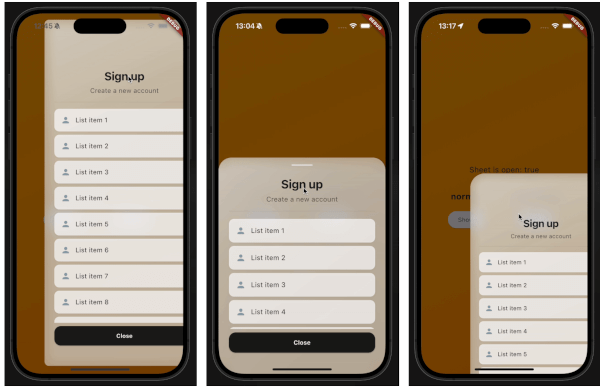
demo gif 1 demo gif 2 demo gif 3

This demo "sign up" blurry sheet is not included with the package. I created it to demonstrate what you are capable of doing with the dragsheet package.

Usage

  1. Initialize the controller.

    final controller = DragSheetController();
    
  2. Open YourWidget via the controller.

    controller.show(
        context,
        (ctx) => YourWidget(),
    ),
    
  3. If you want to close the sheet, use the controller.

    controller.close();
    
  4. If you want to listen to the state of the sheet, use the controller.

    controller.addListener(() {
        print(controller.isOpen);
    });
    
  5. Remember to dispose of the controller when you're done with it.

    @override
    void dispose() {
        super.dispose();
        controller.dispose();
    }
    
  6. If you care about customization, you won't be disapointed. However, the defaults should be solid enough. The main properties to know about are shrinkWrap, which will make the dragsheet shrink to the size of the child you provide it, and if shrinkWrap is true, closeOnShrinkWrapTap, which will close the sheet when you tap outside of the sheet.

    void show(
        BuildContext context,
        WidgetBuilder builder, {
        bool shrinkWrap = false,
        bool closeOnShrinkWrapTap = true, 
        double minScale = 0.85,
        double maxScale = 1.0,
        double minRadius = 0.0,
        double maxRadius = 30.0,
        double minOpacity = 0.0,
        double maxOpacity = 0.5,
        Duration entranceDuration = const Duration(milliseconds: 200),
        Duration exitDuration = const Duration(milliseconds: 200),
        Duration gestureFadeDuration = const Duration(milliseconds: 200),
        Duration programmaticFadeDuration = const Duration(milliseconds: 200),
        double effectDistance = 220.0,
        BgOpacity? bgOpacity,
        double swipeVelocityMultiplier = 2.5,
        double swipeAccelerationThreshold = 50.0,
        double swipeAccelerationMultiplier = 12.0,
        double swipeMinVelocity = 1000.0,
        double swipeMaxVelocity = 10000.0,
        double swipeFriction = 0.09,
        VoidCallback? onShow,
        VoidCallback? onDismiss,
        Duration opacityDuration = const Duration(milliseconds: 200),
        ApplyBorderRadius applyBorderRadius = ApplyBorderRadius.toTop,
    })
    

Kategorien

Quell-Repository

Projekte, die dieses Paket verwenden

Noch keine Daten verfügbar.