Pakete, Repositories und App-Kategorien suchen

Paketdetailsv0.8.2

easy_event_bus

Es ist eine einfach zu verwendende und elegante, auf einem Eventbus basierende Bibliothek.

AndroidiOSWebmacOSWindowsLinux
30-Tage-Downloads
699
Likes
9
Pub-Punkte
145

Paket installieren

flutter pub add easy_event_bus

Paketübersicht

Aus öffentlichen Paketdaten erstellte Orientierung.

Easy EventBus ist eine leichte und intuitive Ereignisbus-Bibliothek für Flutter-Anwendungen, die eine einfache und effiziente Kommunikation zwischen Komponenten über Ereignisse ermöglicht. Sie bietet eine elegante API zum Veröffentlichen und Abonnieren von Ereignissen ohne enge Kopplung und ist daher ideal für Zustandsverwaltung und Nachrichtenübertragung zwischen Komponenten. Die Bibliothek unterstützt alle wichtigen Plattformen, einschließlich Android, iOS, Web, macOS, Windows und Linux, und gewährleistet Konsistenz über Plattformen hinweg. Mit minimalem Setup und sauberer Syntax verbessert sie die Wartbarkeit und Skalierbarkeit von Code in komplexen Apps.

Anwendungsfälle

  • Echtzeitbenachrichtigungen
  • Kommunikation zwischen Widgets
  • Trennung der Benutzeroberfläche von der Geschäftslogik
  • ereignisgesteuerte Architektur
  • Zustands-Synchronisierung über Bildschirme hinweg
  • Plugin- oder Modulintegration

Hauptmerkmale

  • Einfaches Publish/Subscribe-Muster
  • Plattformübergreifende Unterstützung
  • Minimales Boilerplate
  • Typsichere Ereignisbehandlung
  • Leichte Abhängigkeit
  • Saubere und lesbare API

Geeignet für

  • Entwickler, die leichten Zustandsmanagement suchen
  • Apps mit häufiger Kommunikation zwischen Komponenten
  • Projekte mit entkoppelter Architektur
  • Teams, die Code-Einfachheit priorisieren
  • Flutter-Anfänger erkunden ereignisbasiertes Design

Hinweise

  • Nicht geeignet für den Einsatz bei umfangreicher Zustandsverwaltung
  • Eingeschränkte eingebaute Fehlerbehandlung
  • Keine integrierte Persistenz
  • Erfordert sorgfältige Ereignisbenennung, um Konflikte zu vermeiden
  • Am besten zusammen mit anderen State-Management-Lösungen verwendet

Original-README

Originaler README-Schnappschuss aus dem verknüpften Quell-Repository. Aktuelle Inhalte finden Sie im Repository.

pub package GitHub

EasyEventBus

Discord Server Invite Kakao_Talk

It's an easy-to-use and elegant library based on event bus. It was greatly inspired by EventBus and made much simpler.

About Event Bus

An Event Bus follows the publish/subscribe pattern. It allows listeners to subscribe for events and publishers to fire events. This enables objects to interact without requiring to explicitly define listeners and keeping track of them.

The Event Bus pattern is especially helpful for decoupling MVC (or MVP) applications.

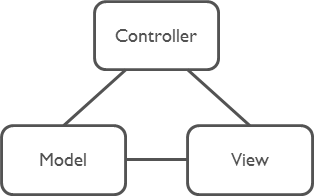
One group of MVC is not a problem.

Model-View-Controller

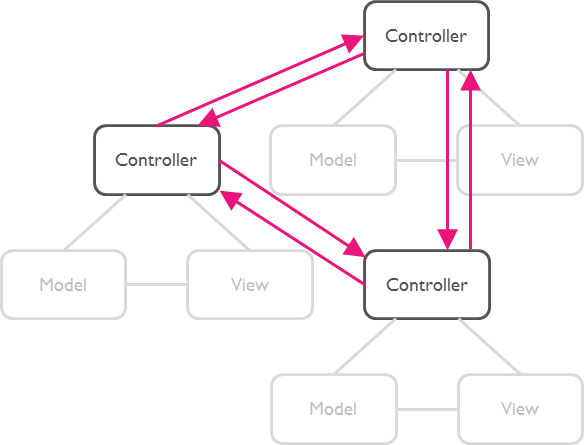
But as soon as there are multiple groups of MVCs, those groups will have to talk to each other. This creates a tight coupling between the controllers.

Multi Model-View-Controllers

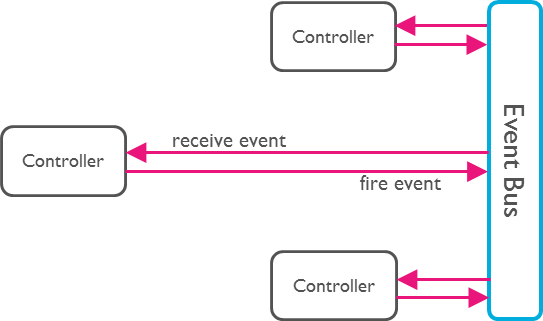
By communication through an Event Bus, the coupling is reduced.

Event Bus

Usage

Step 1: Subscribe to an Event

First, set up a subscription for the desired event. This allows you to listen for and react to the event whenever it is triggered.

EasyEventBus.on('sayHello', (event) {
  print(event); // write your code here.
});
Step 2: Trigger the Event

Next, trigger the event at the appropriate time in your application. This will notify all subscribers of the event.

EasyEventBus.fire('sayHello', 'hello world'); // Triggers the event with a any data.

Note: The event data can be of any type, giving you flexibility in what information you pass to the subscribers.

That's All!

Advance

1. Cancel Subscription

To cancel a subscription, you call the cancel method. This example shows how to cancel all subscriptions for the 'sayHello' event, both anonymous and with identifiers.

// Cancel all subscriptions to the 'sayHello' event.
EasyEventBus.cancel('sayHello');
2. Cancel Specific Subscription

Before canceling a specific subscription, you first need to create a subscription with an identifier (id). Here is how to subscribe to an event with an id and then cancel that specific subscription by calling the cancel method with the same id.

First, subscribe to an event with an id:

// Subscribe to the 'sayHello' event with an identifier.
EasyEventBus.on('sayHello', (event) {
  print('Received: $event');
}, id: 'uniqueId123');

Then, cancel the subscription using the same id:

// Cancel the subscription to the 'sayHello' event using the identifier 'uniqueId123'.
EasyEventBus.cancel('sayHello', id: 'uniqueId123');
3. Cancel All Subscriptions

You can cancel all subscriptions by calling the cancelAll method. This method cancels all subscriptions for all events and closes all event controllers.

// Cancel all subscriptions and close all event controllers.
EasyEventBus.cancelAll();

Kategorien

Quell-Repository

Projekte, die dieses Paket verwenden