Aus öffentlichen Paketdaten erstellte Orientierung.
EasyRichText vereinfacht die Verwendung von RichText in Flutter, indem es die Textsegmentierung und Formatierung automatisch behandelt, ohne dass man Strings manuell aufteilen muss. Es ermöglicht Entwicklern, verschiedene Stile, Farben und Widgets direkt innerhalb einer einzigen Textzeichenkette mit einfacher Syntax anzuwenden. Ideal für die Anzeige formatierter Texte mit gemischten Stilen wie Links, Erwähnungen oder Emojis, reduziert es Boilerplate-Code und verbessert die Lesbarkeit. Das Paket unterstützt alle wichtigen Plattformen, einschließlich Mobilgeräte, Web und Desktop.
Anwendungsfälle
Stilisierten Text mit gemischter Formatierung anzeigen
Reichhaltigen Text mit eingebetteten Links erstellen
Schlüsselwörter im Text hervorheben
Rendern von benutzererzeugtem Inhalt mit Stilen
Emojis innerhalb formatierten Textes hinzufügen
Hauptmerkmale
Automatische Textsegmentierung
Unterstützung für Inline-Styling
Einfache Syntax für komplexe Formatierung
Plattformübergreifende Kompatibilität
Minimale Boilerplate-Code
Geeignet für
Entwickler, die eine einfache Rich-Text-Anzeige suchen
Apps mit dynamischen oder vom Nutzer erstellten Inhalten
Chat- oder Nachrichten-Schnittstellen
Dokumentation oder Hilfesysteme mit formatiertem Text
Hinweise
Eingeschränkt auf grundlegende Formatierung im Vergleich zu vollständigem RichText
Kann bei sehr großen Texten die Leistung beeinträchtigen
EasyRichText(
  "I want blue font. I want bold font. I want italic font.",
  patternList: [
    EasyRichTextPattern(
      targetString: 'blue',
      style: TextStyle(color: Colors.blue),
    ),
    EasyRichTextPattern(
      targetString: 'bold',
      style: TextStyle(fontWeight: FontWeight.bold),
    ),
    EasyRichTextPattern(
      targetString: 'italic',
      style: TextStyle(fontStyle: FontStyle.italic),
    ),
  ],
),
Trademark Example
EasyRichText(
  "ProductTM is a superscript trademark symbol. This TM is not a trademark.",
  patternList: [
    EasyRichTextPattern(
      targetString: 'TM',
      superScript: true,
      stringBeforeTarget: 'Product',
      matchWordBoundaries: false,
      style: TextStyle(color: Colors.blue),
    ),
  ],
),
Default Style:
EasyRichText(
  "This is a EasyRichText example with default grey font. I want blue font here.",
  defaultStyle: TextStyle(color: Colors.grey),
  patternList: [
    EasyRichTextPattern(
      targetString: 'blue',
      style: TextStyle(color: Colors.blue),
    ),
    EasyRichTextPattern(
      targetString: 'bold',
      style: TextStyle(fontWeight: FontWeight.bold),
    ),
  ],
),
Conditional Match
EasyRichText(
  "I want blue color here. I want no blue font here. I want blue invalid here.",
  patternList: [
    EasyRichTextPattern(
      targetString: 'blue',
      stringBeforeTarget: 'want',
      stringAfterTarget: "color",
      style: TextStyle(color: Colors.blue),
    ),
  ],
),
Match Option
matchOption can be a string or a list. default is 'all'.
string: 'all', 'first', 'last'
List:'first', 'last', and any integer index
For example, [0, 1, 'last'] will match the first, second, and last one.
EasyRichText(
  "blue 1, blue 2, blue 3, blue 4, blue 5",
  patternList: [
    EasyRichTextPattern(
      targetString: 'blue',
      //matchOption: 'all'
      matchOption: [0, 1, 'last'],
      style: TextStyle(color: Colors.blue),
    ),
  ],
),
Superscript and Subscript.
EasyRichText(
  "I want superscript font here. I want subscript here",
  patternList: [
    EasyRichTextPattern(
        targetString: 'superscript', superScript: true),
    EasyRichTextPattern(
        targetString: 'subscript', subScript: true),
  ],
),
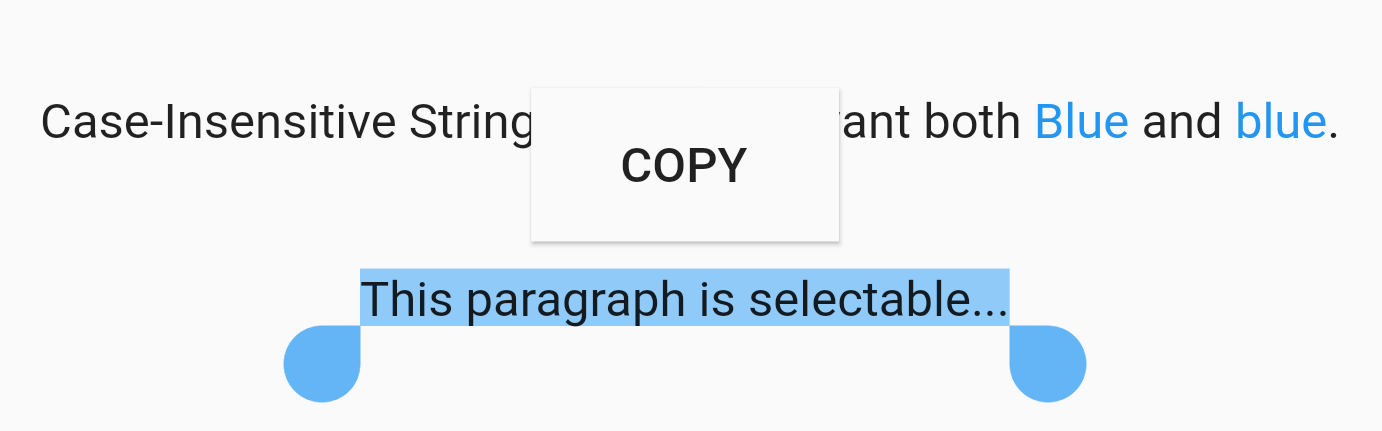
Case Sensitivity
EasyRichText(
  "Case-Insensitive String Matching. I want both Blue and blue. This paragraph is selectable.",
  caseSensitive: false,
  selectable: true,
  patternList: [
    EasyRichTextPattern(
      targetString: 'Blue',
      style: TextStyle(color: Colors.blue),
    ),
  ],
),
Selectable Text
EasyRichText(
  "This paragraph is selectable...",
  selectable: true,
),
Regular Expression
EasyRichText(
  "Regular Expression. I want blue bluea blue1 but not blueA",
  patternList: [
    EasyRichTextPattern(
      targetString: 'bl[a-z0-9]*',
      style: TextStyle(color: Colors.blue),
    ),
  ],
),
Url Launcher
Integrated with url_launcher. Web url, email url, and telephone url are supported.
Set urlType : 'web', 'email', or 'tel'.
EasyRichText provides regular expression formula to match common urls.
EasyRichText(
  "Here is a website https://pub.dev/packages/easy_rich_text. Here is a email address test@example.com. Here is a telephone number +852 12345678.",
  patternList: [
    EasyRichTextPattern(
      targetString: 'https://pub.dev/packages/easy_rich_text',
      urlType: 'web',
      style: TextStyle(
        decoration: TextDecoration.underline,
      ),
    ),
    EasyRichTextPattern(
      targetString: EasyRegexPattern.emailPattern,
      urlType: 'email',
      style: TextStyle(
        decoration: TextDecoration.underline,
      ),
    ),
    EasyRichTextPattern(
      targetString: EasyRegexPattern.webPattern,
      urlType: 'web',
      style: TextStyle(
        decoration: TextDecoration.underline,
      ),
    ),
    EasyRichTextPattern(
      targetString: EasyRegexPattern.telPattern,
      urlType: 'tel',
      style: TextStyle(
        decoration: TextDecoration.underline,
      ),
    ),
  ],
),
GestureRecognizer
///GestureRecognizer, not working when superscript, subscript, or urlType is set.///TapGestureRecognizer, MultiTapGestureRecognizer, etc.EasyRichText(
"Tap recognizer to print this sentence.",
patternList: [
EasyRichTextPattern(
targetString: 'recognizer',
recognizer: TapGestureRecognizer()
..onTap = () {
print("Tap recognizer to print this sentence.");
},
style: TextStyle(
decoration: TextDecoration.underline,
),
),
],
),
//if the targetString contains the following special characters \[]()^*+?EasyRichText(
"Received 88+ messages. Received 99+ messages",
patternList: [
//set hasSpecialCharacters to trueEasyRichTextPattern(
targetString: '99+',
hasSpecialCharacters: true,
style: TextStyle(color: Colors.blue),
),
//or if you are familiar with regular expressions, then use \\ to skip itEasyRichTextPattern(
targetString: '88\\+',
style: TextStyle(color: Colors.blue),
),
],
),