Pakete, Repositories und App-Kategorien suchen

Cover von expand_widget
Paketdetailsv3.1.1

expand_widget

Möglichkeit, Widget-Sammlungen oder Texte einfach zu erweitern und einzurollen

AndroidiOSWebmacOSWindowsLinux
30-Tage-Downloads
5670
Likes
147
Pub-Punkte
150

Paket installieren

flutter pub add expand_widget

Paketübersicht

Aus öffentlichen Paketdaten erstellte Orientierung.

Das expand_widget-Paket bietet eine einfache und intuitive Möglichkeit, die Expansion und Kontraktion von Widgets oder Textinhalten zu animieren. Es ermöglicht reibungslose Übergänge zwischen zusammengeklappten und erweiterten Zuständen und ist ideal für interaktive UI-Elemente wie Akkordeons oder einblendbare Abschnitte. Mit dem Fokus auf Benutzerfreundlichkeit wurde es nahtlos in Flutter-Apps für mehrere Plattformen integriert. Das Paket unterstützt benutzerdefinierte Animationen, Dauersteuerung und flexible Inhaltslayouts und eignet sich sowohl für kleine Komponenten als auch für komplexe UI-Strukturen.

Anwendungsfälle

  • Klappbare Akkordeons erstellen
  • Interaktive FAQ-Bereiche erstellen
  • Animation der Inhaltseinblendung in Listen
  • Entwurf von responsiven Karten-Interfaces
  • Dynamische Formularabschnitte implementieren

Hauptmerkmale

  • Glatte Expandieren-/Einklappen-Animationen
  • Anpassbare Animationsdauer
  • Unterstützung für jedes Widget als Inhalt
  • Einfache Integration in bestehende Layouts
  • Flexible Auslösemechanismen

Geeignet für

  • Entwickler, die einfache Erweiterungssteuerelemente suchen
  • UI-Designer, die interaktive Karten erstellen
  • Apps, die dynamische Inhaltswechsel erfordern
  • Plattformübergreifende Flutter-Anwendungen
  • Projekte mit Akkordeon-artigen Schnittstellen

Hinweise

  • Kann die Leistung bei großen Widget-Bäumen beeinträchtigen
  • Erfordert sorgfältige Behandlung der Zustandsverwaltung
  • Das Animationsverhalten hängt von den Layoutbeschränkungen des übergeordneten Elements ab
  • Nicht für extrem hohe Frequenzumschaltungen optimiert
  • Am besten mit leichtem Inhalt für optimale Reaktionsfähigkeit verwenden

Original-README

Originaler README-Schnappschuss aus dem verknüpften Quell-Repository. Aktuelle Inhalte finden Sie im Repository.

Expand Widget

Package style: very good analysis Build Patreon License

This Dart package offers developers a streamlined library of Flutter widgets, useful for expanding widgets and text views, when users interact with them.

There are two main 'expand' widgets:

  • Expand Child: Useful to show more widgets related to the content already visible by the user.
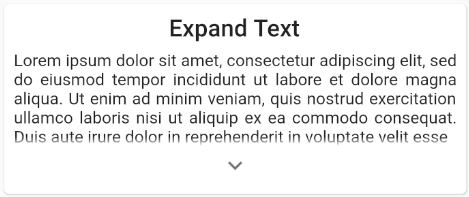
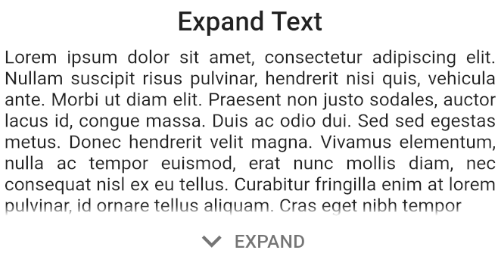
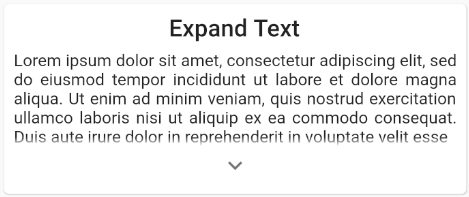
  • Expand Text: Useful when texts can be quite big for a certain screen. It adds the ability to show the full content when the user wants to.

Features

  • The ExpandIndicatorStyle parameter allows you to select various render options, related to the expand arrow itself.

  • Hide the arrow widget when the view is being expanded, using the hideIndicatorOnExpand parameter.

  • Custimze the arrow widget itself: color, size, padding, icon...

  • You can also provide your own widget for the expand indicator, using the indicatorBuilder for both expaning widgets.

  • Use custom expanding hint strings! By default, it will use the ones provided by MaterialLocalizations.

  • Expand text view with swipe-down gestures, using the expandOnGesture, which by default is set to false.

  • You can also customize expand animation duration and curve easilly.

  • The collapsedVisibilityFactor (exclusive to the ExpandChild widget), allows the reveal of a section of the hidden content.

Example

Here is an example of a simple use of this package, featuring the ExpandChild & ExpandText widgets.

If you want to take a deeper look at the example, take a look at the example folder provided with the project.

  • ExpandChild
ExpandChild(
  child: Column(
    children: [
      OutlineButton(
        child: Text('Button1'),
        onPressed: () => print('Pressed button1'),
      ),
      OutlineButton(
        child: Text('Button2'),
        onPressed: () => print('Pressed button2'),
      ),
      OutlineButton(
        child: Text('Button3'),
        onPressed: () => print('Pressed button3'),
      ),
    ],
  ),
),
  • ExpandText
ExpandText(
  'Lorem ipsum dolor sit amet, consectetur adipiscing elit, sed do eiusmod tempor incididunt ut labore et dolore magna aliqua.',
  textAlign: TextAlign.justify,
),

Getting Started

This project is a starting point for a Dart package, a library module containing code that can be shared easily across multiple Flutter or Dart projects.

For help getting started with Flutter, view our online documentation, which offers tutorials, samples, guidance on mobile development, and a full API reference.

Built with

Authors

License

This project is licensed under the GNU GPL v3 License - see the LICENSE file for details.

Kategorien

Quell-Repository

Projekte, die dieses Paket verwenden