Originaler README-Schnappschuss aus dem verknüpften Quell-Repository. Aktuelle Inhalte finden Sie im Repository.
extended_image


Language: English | 中文简体
A powerful official extension library of images, which supports placeholder(loading)/ failed state, cache network, zoom pan image, photo view, slide-out page, editor (crop, rotate, flip), paint custom etc.
Web demo for ExtendedImage
ExtendedImage is an third-party library that extends the functionality of Flutter's Image component. The main extended features are as follows:
| Feature |
ExtendedImage |
Image |
| Cache network images locally and load from cache |
Supported |
Not supported |
| Compression display |
Supported, with additional options (compressionRatio and maxBytes) |
Supported, with cacheHeight, cacheWidth |
| Automatic release of image resources |
Supported |
Requires manual management |
| Scaling mode |
Supported |
Not supported |
| Editing mode |
Supported |
Not supported |
| Drag-to-dismiss effect for images in a page transition |
Supported |
Not supported |
Table of contents
Import
environment:
  sdk: '>=2.12.0 <3.0.0'
  flutter: '>=2.0'
dependencies:
  extended_image: ^4.0.0
1.22.6 to 2.0, Flutter Api has breaking change,please use non-null-safety if you under 1.22.6.
environment:
  sdk: '>=2.6.0 <2.12.0'
  flutter: '>1.17.0 <=1.22.6'
dependencies:
  extended_image: ^3.0.0-non-null-safety
Cache Network
Simple use
You can use ExtendedImage.network as Image Widget
ExtendedImage.network(
url,
width: ScreenUtil.instance.setWidth(400),
height: ScreenUtil.instance.setWidth(400),
fit: BoxFit.fill,
cache: true,
border: Border.all(color: Colors.red, width: 1.0),
shape: boxShape,
borderRadius: BorderRadius.all(Radius.circular(30.0)),
)
Use ExtendedNetworkImageProvider
ExtendedNetworkImageProvider
   ExtendedNetworkImageProvider(
      this.url, {
      this.scale = 1.0,
      this.headers,
      this.cache: false,
      this.retries = 3,
      this.timeLimit,
      this.timeRetry = const Duration(milliseconds: 100),
      CancellationToken cancelToken,
    })  : assert(url != null),
          assert(scale != null),
          cancelToken = cancelToken ?? CancellationToken();
| parameter |
description |
default |
| url |
The URL from which the image will be fetched. |
required |
| scale |
The scale to place in the [ImageInfo] object of the image. |
1.0 |
| headers |
The HTTP headers that will be used with [HttpClient.get] to fetch image from network. |
- |
| cache |
whether cache image to local |
false |
| retries |
the time to retry to request |
3 |
| timeLimit |
time limit to request image |
- |
| timeRetry |
the time duration to retry to request |
milliseconds: 100 |
| cancelToken |
token to cancel network request |
CancellationToken() |
you can create new provider and extends it with ExtendedProvider, and override instantiateImageCodec method.
so that you can handle image raw data here (compress image).
Load State
Extended Image provide 3 states(loading,completed,failed), you can define your state widget with
loadStateChanged call back.
loadStateChanged is not only for network, if your image need long time to load,
you can set enableLoadState(default value is true for network and others are false) to true
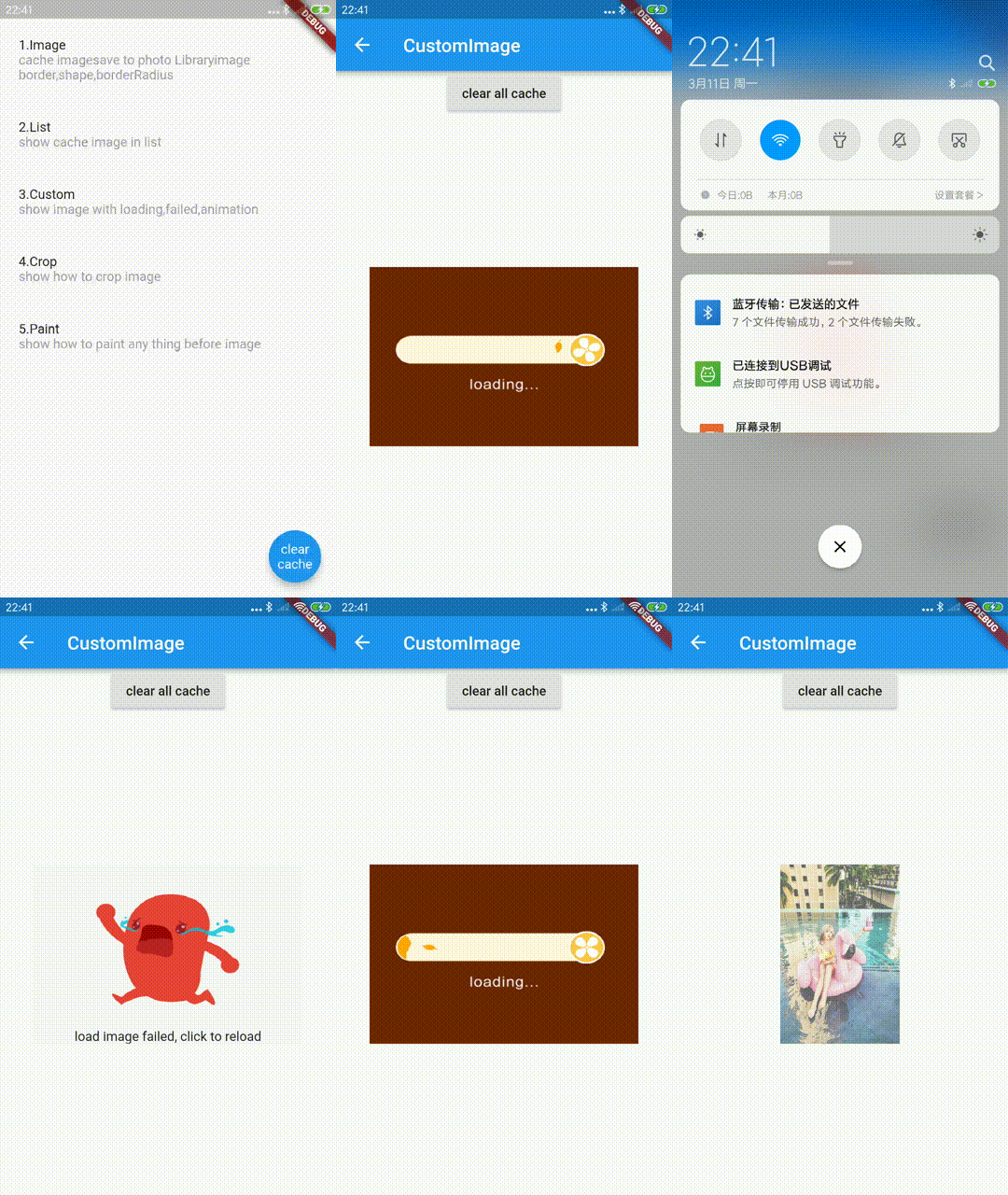
Notice:
-
if you don't want to override any state, please return null in this case
-
if you want to override size or sourceRect, you can override it with ExtendedRawImage at completed state
-
if you want to add something (like animation) at completed state, you can override it with ExtendedImageState.completedWidget
-
ExtendedImageState.completedWidget is include gesture or editor, so that you would't miss them
final LoadStateChanged loadStateChanged;
enum LoadState {
loading,
completed,
failed
}
final bool enableLoadState;
ExtendedImageState(LoadStateChanged call back)
| parameter/method |
description |
default |
| extendedImageInfo |
image info |
- |
| extendedImageLoadState |
LoadState(loading,completed,failed) |
- |
| returnLoadStateChangedWidget |
if this is true, return widget which from LoadStateChanged function immediately(width/height/gesture/border/shape etc, will not effect on it) |
- |
| imageProvider |
ImageProvider |
- |
| invertColors |
invertColors |
- |
| imageStreamKey |
key of image |
- |
| reLoadImage() |
if image load failed,you can reload image by call it |
- |
| completedWidget |
return completed widget include gesture or editor |
- |
| loadingProgress |
return the loading progress for network image (ImageChunkEvent ) |
- |
abstract class ExtendedImageState {
void reLoadImage();
ImageInfo get extendedImageInfo;
LoadState get extendedImageLoadState;
bool returnLoadStateChangedWidget;
ImageProvider get imageProvider;
bool get invertColors;
Object get imageStreamKey;
Widget get completedWidget;
}
demo code
ExtendedImage.network(
url,
width: ScreenUtil.instance.setWidth(600),
height: ScreenUtil.instance.setWidth(400),
fit: BoxFit.fill,
cache: true,
loadStateChanged: (ExtendedImageState state) {
switch (state.extendedImageLoadState) {
case LoadState.loading:
_controller.reset();
return Image.asset(
"assets/loading.gif",
fit: BoxFit.fill,
);
break;
case LoadState.completed:
_controller.forward();
return FadeTransition(
opacity: _controller,
child: ExtendedRawImage(
image: state.extendedImageInfo?.image,
width: ScreenUtil.instance.setWidth(600),
height: ScreenUtil.instance.setWidth(400),
),
);
break;
case LoadState.failed:
_controller.reset();
return GestureDetector(
child: Stack(
fit: StackFit.expand,
children: <Widget>[
Image.asset(
"assets/failed.jpg",
fit: BoxFit.fill,
),
Positioned(
bottom: 0.0,
left: 0.0,
right: 0.0,
child: Text(
"load image failed, click to reload",
textAlign: TextAlign.center,
),
)
],
),
onTap: () {
state.reLoadImage();
},
);
break;
}
},
)
Zoom Pan

ExtendedImage
| parameter |
description |
default |
| mode |
image mode (none, gesture, editor) |
none |
| initGestureConfigHandler |
init GestureConfig when image is ready,for example, base on image width/height |
- |
| onDoubleTap |
call back of double tap under ExtendedImageMode.gesture |
- |
| extendedImageGestureKey |
you can handle zoom/pan by using this key manually |
- |
GestureConfig
| parameter |
description |
default |
| minScale |
min scale |
0.8 |
| animationMinScale |
the min scale for zooming then animation back to minScale when scale end |
minScale _ 0.8 |
| maxScale |
max scale |
5.0 |
| animationMaxScale |
the max scale for zooming then animation back to maxScale when scale end |
maxScale _ 1.2 |
| speed |
speed for zoom/pan |
1.0 |
| inertialSpeed |
inertial speed for zoom/pan |
100 |
| cacheGesture |
save Gesture state (for example in ExtendedImageGesturePageView, gesture state will not change when scroll back),remember clearGestureDetailsCache at right time |
false |
| inPageView |
whether in ExtendedImageGesturePageView |
false |
| initialAlignment |
init image rect with alignment when initialScale > 1.0 |
InitialAlignment.center |
| hitTestBehavior |
How to behave during hit tests |
HitTestBehavior.deferToChild |
ExtendedImage.network(
imageTestUrl,
fit: BoxFit.contain,
mode: ExtendedImageMode.gesture,
initGestureConfigHandler: (state) {
return GestureConfig(
minScale: 0.9,
animationMinScale: 0.7,
maxScale: 3.0,
animationMaxScale: 3.5,
speed: 1.0,
inertialSpeed: 100.0,
initialScale: 1.0,
inPageView: false,
initialAlignment: InitialAlignment.center,
);
},
)
double tap animation
onDoubleTap: (ExtendedImageGestureState state) {
var pointerDownPosition = state.pointerDownPosition;
double begin = state.gestureDetails.totalScale;
double end;
_animation?.removeListener(animationListener);
_animationController.stop();
_animationController.reset();
if (begin == doubleTapScales[0]) {
end = doubleTapScales[1];
} else {
end = doubleTapScales[0];
}
animationListener = () {
state.handleDoubleTap(
scale: _animation.value,
doubleTapPosition: pointerDownPosition);
};
_animation = _animationController
.drive(Tween<double>(begin: begin, end: end));
_animation.addListener(animationListener);
_animationController.forward();
},
Editor
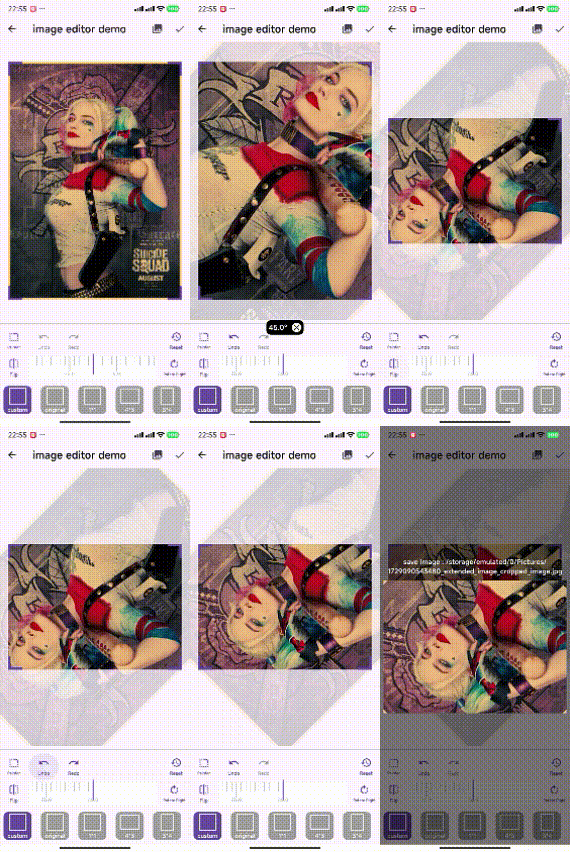
    ExtendedImage.network(
      imageTestUrl,
      fit: BoxFit.contain,
      mode: ExtendedImageMode.editor,
      initEditorConfigHandler: (state) {
        return EditorConfig(
            maxScale: 8.0,
            cropRectPadding: EdgeInsets.all(20.0),
            hitTestSize: 20.0,
            cropAspectRatio: _aspectRatio.aspectRatio,
        );
      },
    );
ExtendedImage
| parameter |
description |
default |
| mode |
image mode (none,gestrue,editor) |
none |
| initEditorConfigHandler |
init EditorConfig when image is ready. |
- |
| extendedImageEditorKey |
key of ExtendedImageEditorState to flip/rotate/get crop rect |
- |
EditorConfig
| parameter |
description |
default |
| maxScale |
max scale of zoom |
5.0 |
| cropRectPadding |
the padding between crop rect and image layout rect. |
EdgeInsets.all(20.0) |
| cornerSize |
size of corner shape (DEPRECATED! Use cornerPainter) |
Size(30.0, 5.0) |
| cornerColor |
color of corner shape (DEPRECATED! Use cornerPainter) |
primaryColor |
| lineColor |
color of crop line |
scaffoldBackgroundColor.withOpacity(0.7) |
| lineHeight |
height of crop line |
0.6 |
| editorMaskColorHandler |
call back of editor mask color base on pointerDown |
scaffoldBackgroundColor.withOpacity(pointerDown ? 0.4 : 0.8) |
| hitTestSize |
hit test region of corner and line |
20.0 |
| animationDuration |
auto center animation duration |
Duration(milliseconds: 200) |
| tickerDuration |
duration to begin auto center animation after crop rect is changed |
Duration(milliseconds: 400) |
| cropAspectRatio |
aspect ratio of crop rect |
null(custom) |
| initialCropAspectRatio |
initial aspect ratio of crop rect |
null(custom: initial crop rect will fill the entire image) |
| initCropRectType |
init crop rect base on initial image rect or image layout rect |
imageRect |
| cornerPainter |
corner shape |
ExtendedImageCropLayerPainterNinetyDegreesCorner() |
| hitTestBehavior |
How to behave during hit tests |
HitTestBehavior.deferToChild |
| controller |
providing functions like rotating, flipping, undoing, redoing and reset actions. |
null |
crop aspect ratio
it's a double value, so it's easy for you to define by yourself.
following are official values
class CropAspectRatios {
static const double custom = null;
static const double original = 0.0;
static const double ratio1_1 = 1.0;
static const double ratio3_4 = 3.0 / 4.0;
static const double ratio4_3 = 4.0 / 3.0;
static const double ratio9_16 = 9.0 / 16.0;
static const double ratio16_9 = 16.0 / 9.0;
}
crop layer painter
you can define your crop layer by override [EditorConfig.editorCropLayerPainter].
class EditorCropLayerPainter {
const EditorCropLayerPainter();
void paint(
Canvas canvas,
Size size,
ExtendedImageCropLayerPainter painter,
Rect rect,
) {
paintMask(canvas, rect, painter);
paintLines(canvas, size, painter);
paintCorners(canvas, size, painter);
}
void paintCorners(
Canvas canvas, Size size, ExtendedImageCropLayerPainter painter) {
}
void paintMask(
Canvas canvas, Rect rect, ExtendedImageCropLayerPainter painter) {
}
void paintLines(
Canvas canvas, Size size, ExtendedImageCropLayerPainter painter) {
}
}
flip, rotate, cropAspectRatio, undo ,redo , reset
ImageEditorController
final ImageEditorController _editorController = ImageEditorController();

    initEditorConfigHandler: (ExtendedImageState? state) {
      return EditorConfig(
        maxScale: 4.0,
        cropRectPadding: const EdgeInsets.all(20.0),
        hitTestSize: 20.0,
        initCropRectType: InitCropRectType.imageRect,
        cropAspectRatio: CropAspectRatios.ratio4_3,
        controller: _editorController,
      );
    },
flip
   _editorController.flip();

  void flip({
    bool animation = false,
    Duration duration = const Duration(milliseconds: 200),
  })
rotate
   _editorController.rotate();

  void rotate({
    double degrees = 90,
    bool animation = false,
    Duration duration = const Duration(milliseconds: 200),
    bool rotateCropRect = true,
  })
cropAspectRatio
_editorController.updateCropAspectRatio(CropAspectRatios.ratio4_3);
undo
  bool canUndo = _editorController.canUndo;
   _editorController.undo();
redo
  bool canRedo = _editorController.canRedo;
   _editorController.redo();
reset
_editorController.reset();
history
   _editorController.currentIndex;
   _editorController.history;
   _editorController.saveCurrentState();
update config
   _editorController.updateConfig(EditorConfig config);
   _editorController.config;
crop data
dart library(stable)
- add Image library into your pubspec.yaml, it's used to crop/rotate/flip image data
dependencies:
  image: any
- get crop rect and raw image data from ExtendedImageEditorState
final Rect cropRect = state.getCropRect();
var data = state.rawImageData;
- convert raw image data to image library data.
final lb = await loadBalancer;
Image src = await lb.run<Image, List<int>>(decodeImage, data);
image = bakeOrientation(image);
if (editAction.hasRotateDegrees) {
image = copyRotate(image, angle: editAction.rotateDegrees);
}
if (editAction.flipY) {
image = flip(image, direction: FlipDirection.horizontal);
}
if (editAction.needCrop) {
image = copyCrop(
image,
x: cropRect.left.toInt(),
y: cropRect.top.toInt(),
width: cropRect.width.toInt(),
height: cropRect.height.toInt(),
);
}
- convert to original image data
output is raw image data, you can use it to save or any other thing.
var fileData = await lb.run<List<int>, Image>(encodeJpg, src);
native library(faster)
- add ImageEditor library into your pubspec.yaml, it's used to crop/rotate/flip image data
dependencies:
  image_editor: any
- get crop rect and raw image data from ExtendedImageEditorState
final Rect cropRect = state.getCropRect();
var data = state.rawImageData;
  if (action.hasRotateDegrees) {
    final int rotateDegrees = action.rotateDegrees.toInt();
    option.addOption(RotateOption(rotateDegrees));
  }
  if (action.flipY) {
    option.addOption(const FlipOption(horizontal: true, vertical: false));
  }

  if (action.needCrop) {
    Rect cropRect = imageEditorController.getCropRect()!;
    option.addOption(ClipOption.fromRect(cropRect));
  }
output is raw image data, you can use it to save or any other thing.
  final result = await ImageEditor.editImage(
    image: img,
    imageEditorOption: option,
  );
more detail
Photo View
ExtendedImageGesturePageView is the same as PageView and it's made for show zoom/pan image.
if you have cache the gesture, remember call clearGestureDetailsCache() method at the right time.(for example,page view page is disposed)

ExtendedImageGesturePageView
| parameter |
description |
default |
| canMovePage |
whether should move page |
true |
| allowImplicitScrolling |
whether to respond to implicit accessibility scrolling requests (keeps neighboring pages alive) |
false |
GestureConfig
| parameter |
description |
default |
| cacheGesture |
save Gesture state (for example in ExtendedImageGesturePageView, gesture state will not change when scroll back),remember clearGestureDetailsCache at right time |
false |
| inPageView |
whether in ExtendedImageGesturePageView |
false |
ExtendedImageGesturePageView.builder(
itemBuilder: (BuildContext context, int index) {
var item = widget.pics[index].picUrl;
Widget image = ExtendedImage.network(
item,
fit: BoxFit.contain,
mode: ExtendedImageMode.gesture,
gestureConfig: GestureConfig(
inPageView: true, initialScale: 1.0,
cacheGesture: false
),
);
image = Container(
child: image,
padding: EdgeInsets.all(5.0),
);
if (index == currentIndex) {
return Hero(
tag: item + index.toString(),
child: image,
);
} else {
return image;
}
},
itemCount: widget.pics.length,
onPageChanged: (int index) {
currentIndex = index;
rebuild.add(index);
},
controller: PageController(
initialPage: currentIndex,
),
scrollDirection: Axis.horizontal,
),
Slide Out Page
Extended Image support to slide out page as WeChat.

enable slide out page
ExtendedImage
| parameter |
description |
default |
| enableSlideOutPage |
whether enable slide out page |
false |
| heroBuilderForSlidingPage |
build Hero only for sliding page, the transform of sliding page must be working on Hero,so that Hero animation wouldn't be strange when pop page |
null |
include your page in ExtendedImageSlidePage
take care of onSlidingPage call back, you can update other widgets' state as you want.
but, do not setState directly here, image state will changed, you should only notify the widgets which are needed to change
return ExtendedImageSlidePage(
child: result,
slideAxis: SlideAxis.both,
slideType: SlideType.onlyImage,
onSlidingPage: (state) {
var showSwiper = !state.isSliding;
if (showSwiper != _showSwiper) {
_showSwiper = showSwiper;
rebuildSwiper.add(_showSwiper);
}
},
);
ExtendedImageGesturePage
| parameter |
description |
default |
| child |
The [child] contained by the ExtendedImageGesturePage. |
- |
| slidePageBackgroundHandler |
build background when slide page |
defaultSlidePageBackgroundHandler |
| slideScaleHandler |
customize scale of page when slide page |
defaultSlideScaleHandler |
| slideEndHandler |
call back of slide end,decide whether pop page |
defaultSlideEndHandler |
| slideAxis |
axis of slide(both,horizontal,vertical) |
SlideAxis.both |
| resetPageDuration |
reset page position when slide end(not pop page) |
milliseconds: 500 |
| slideType |
slide whole page or only image |
SlideType.onlyImage |
| onSlidingPage |
call back when it's sliding page, change other widgets state on page as you want |
- |
| slideOffsetHandler |
customize offset when slide page |
- |
Color defaultSlidePageBackgroundHandler(
    {Offset offset, Size pageSize, Color color, SlideAxis pageGestureAxis}) {
  double opacity = 0.0;
  if (pageGestureAxis == SlideAxis.both) {
    opacity = offset.distance /
        (Offset(pageSize.width, pageSize.height).distance / 2.0);
  } else if (pageGestureAxis == SlideAxis.horizontal) {
    opacity = offset.dx.abs() / (pageSize.width / 2.0);
  } else if (pageGestureAxis == SlideAxis.vertical) {
    opacity = offset.dy.abs() / (pageSize.height / 2.0);
  }
  return color.withOpacity(min(1.0, max(1.0 - opacity, 0.0)));
}

bool defaultSlideEndHandler(
    {Offset offset, Size pageSize, SlideAxis pageGestureAxis}) {
  if (pageGestureAxis == SlideAxis.both) {
    return offset.distance >
        Offset(pageSize.width, pageSize.height).distance / 3.5;
  } else if (pageGestureAxis == SlideAxis.horizontal) {
    return offset.dx.abs() > pageSize.width / 3.5;
  } else if (pageGestureAxis == SlideAxis.vertical) {
    return offset.dy.abs() > pageSize.height / 3.5;
  }
  return true;
}

double defaultSlideScaleHandler(
    {Offset offset, Size pageSize, SlideAxis pageGestureAxis}) {
  double scale = 0.0;
  if (pageGestureAxis == SlideAxis.both) {
    scale = offset.distance / Offset(pageSize.width, pageSize.height).distance;
  } else if (pageGestureAxis == SlideAxis.horizontal) {
    scale = offset.dx.abs() / (pageSize.width / 2.0);
  } else if (pageGestureAxis == SlideAxis.vertical) {
    scale = offset.dy.abs() / (pageSize.height / 2.0);
  }
  return max(1.0 - scale, 0.8);
}
make sure your page background is transparent
if you use ExtendedImageSlidePage and slideType =SlideType.onlyImage,
make sure your page background is transparent
push with transparent page route
you should push page with TransparentMaterialPageRoute/TransparentCupertinoPageRoute
  Navigator.push(
    context,
    Platform.isAndroid
        ? TransparentMaterialPageRoute(builder: (_) => page)
        : TransparentCupertinoPageRoute(builder: (_) => page),
  );
Slide Out Page Demo Code 1
Slide Out Page Demo Code 2
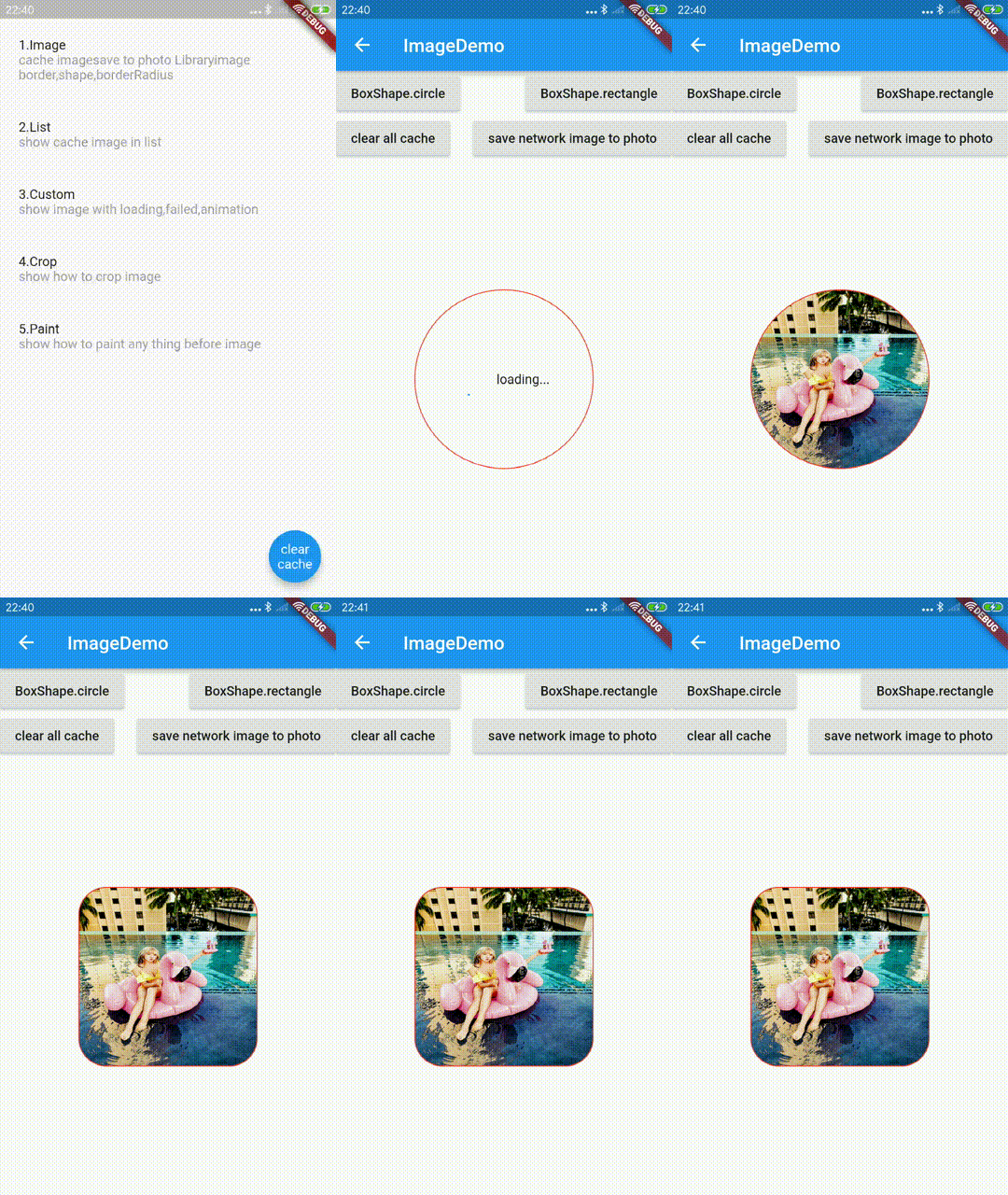
Border BorderRadius Shape
ExtendedImage
| parameter |
description |
default |
| border |
BoxShape.circle and BoxShape.rectangle,If this is [BoxShape.circle] then [borderRadius] is ignored. |
- |
| borderRadius |
If non-null, the corners of this box are rounded by this [BorderRadius].,Applies only to boxes with rectangular shapes; ignored if [shape] is not [BoxShape.rectangle]. |
- |
| shape |
BoxShape.circle and BoxShape.rectangle,If this is [BoxShape.circle] then [borderRadius] is ignored. |
- |
ExtendedImage.network(
  url,
  width: ScreenUtil.instance.setWidth(400),
  height: ScreenUtil.instance.setWidth(400),
  fit: BoxFit.fill,
  cache: true,
  border: Border.all(color: Colors.red, width: 1.0),
  shape: boxShape,
  borderRadius: BorderRadius.all(Radius.circular(30.0)),
),
Clear Save
clear
to clear disk cached , call clearDiskCachedImages method.
Future<bool> clearDiskCachedImages({Duration duration})
to clear disk cached with specific url, call clearDiskCachedImage method.
Future<bool> clearDiskCachedImage(String url) async {
get the local cached image file
Future<File> getCachedImageFile(String url) async {
to clear memory cache , call clearMemoryImageCache method.
clearMemoryImageCache();
getMemoryImageCache() ;
save network
call saveNetworkImageToPhoto and save image with image_picker_saver
Future<bool> saveNetworkImageToPhoto(String url, {bool useCache: true}) async {
var data = await getNetworkImageData(url, useCache: useCache);
var filePath = await ImagePickerSaver.saveFile(fileData: data);
return filePath != null && filePath != "";
}
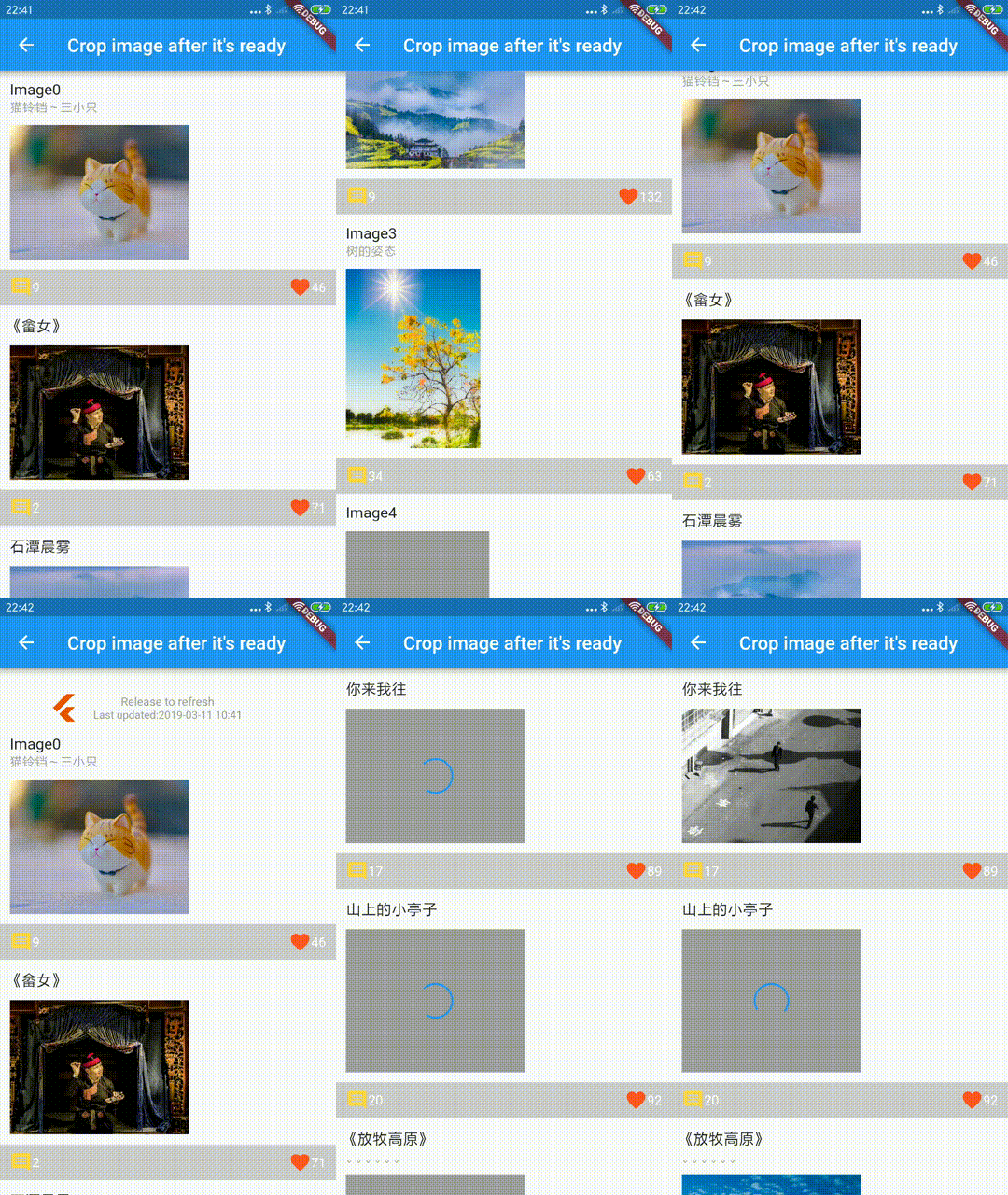
Show Crop Image
get your raw image by [Load State](#Load State), and crop image by sourceRect.
ExtendedRawImage
sourceRect is which you want to show image rect.
ExtendedRawImage(
  image: image,
  width: num400,
  height: num300,
  fit: BoxFit.fill,
  sourceRect: Rect.fromLTWH(
      (image.width - width) / 2.0, 0.0, width, image.height.toDouble()),
)
Paint
provide BeforePaintImage and AfterPaintImage callback, you will have the chance to paint things you want.
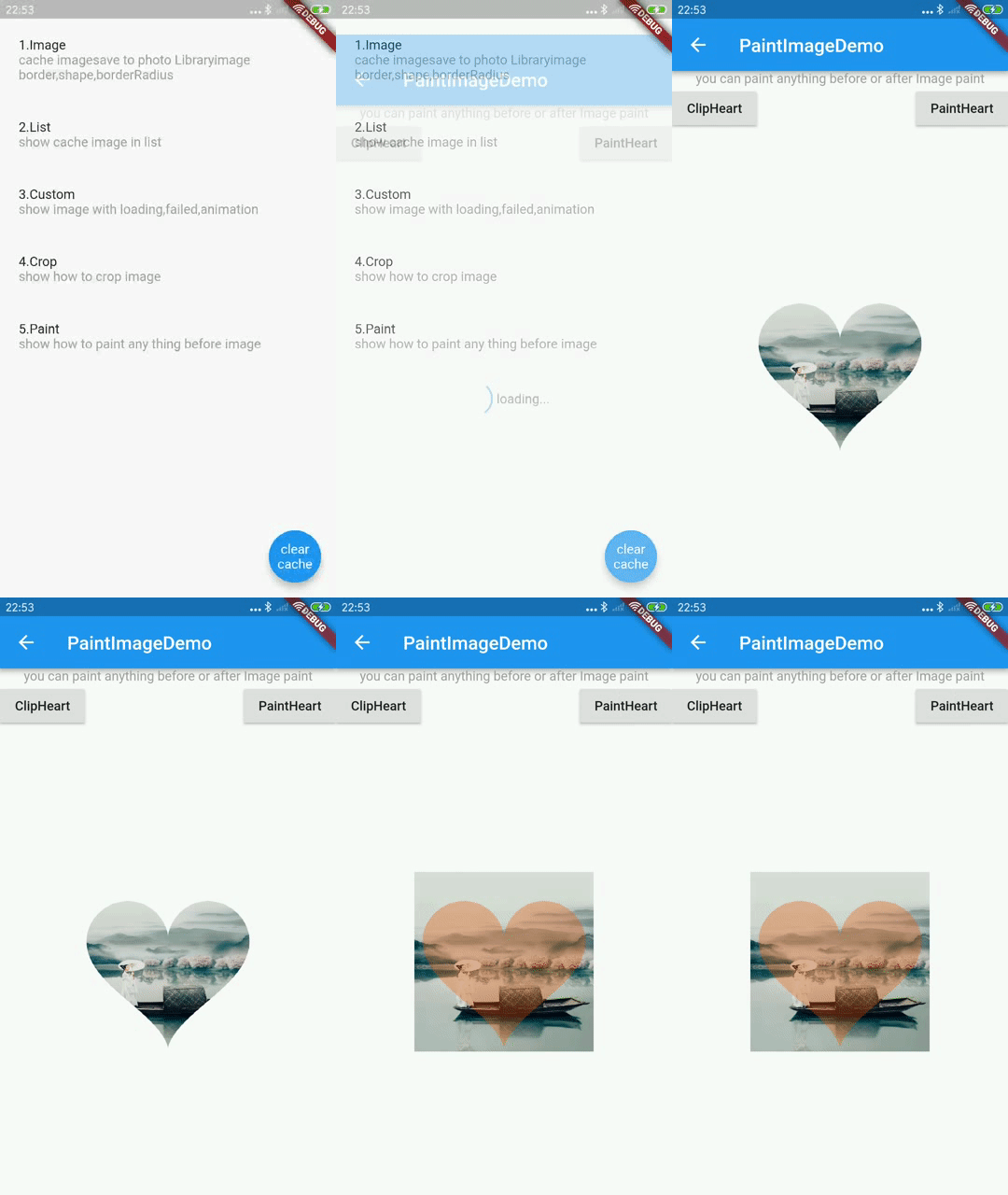
ExtendedImage
| parameter |
description |
default |
| beforePaintImage |
you can paint anything if you want before paint image. |
- |
| afterPaintImage |
you can paint anything if you want after paint image. |
- |
  ExtendedImage.network(
    url,
    width: ScreenUtil.instance.setWidth(400),
    height: ScreenUtil.instance.setWidth(400),
    fit: BoxFit.fill,
    cache: true,
    beforePaintImage: (Canvas canvas, Rect rect, ui.Image image) {
      if (paintType == PaintType.ClipHeart) {
        if (!rect.isEmpty) {
          canvas.save();
          canvas.clipPath(clipheart(rect, canvas));
        }
      }
      return false;
    },
    afterPaintImage: (Canvas canvas, Rect rect, ui.Image image) {
      if (paintType == PaintType.ClipHeart) {
        if (!rect.isEmpty) canvas.restore();
      } else if (paintType == PaintType.PaintHeart) {
        canvas.drawPath(
            clipheart(rect, canvas),
            Paint()
              ..colorFilter =
                  ColorFilter.mode(Color(0x55ea5504), BlendMode.srcIn)
              ..isAntiAlias = false
              ..filterQuality = FilterQuality.low);
      }
    },
  );
see paint image demo
and push to refresh header which is used in crop image demo
Notch
By setting layoutInsets, you can ensure the image is positioned outside of obstructing elements such as
the phone notch or home indicator if displayed in full screen. This will still allow the image margin to
show underneath the notch if zoomed in.
ExtendedImage
| parameter |
description |
default |
| layoutInsets |
Amount to inset from the edge during image layout |
EdgeInsets.zero |
  ExtendedImage.network(
    url,
    fit: BoxFit.contain,
    layoutInsets: MediaQuery.of(context).padding
  );
MemoryUsage
You can reduce memory usage with following settings now.
| parameter |
description |
default |
| [ExtendedResizeImage.compressionRatio] |
The images size will resize to original * [compressionRatio].It's ExtendedResizeImages first pick.The compressionRatio`s range is from 0.0 (exclusive), to 1.0 (exclusive). |
null |
| [ExtendedResizeImage.maxBytes] |
[ExtendedResizeImage] will compress the image to a size that is smaller than [maxBytes]. The default size is 50KB. It's actual bytes of Image, not decode bytes |
50 << 10 |
| [ExtendedResizeImage.width]/[ExtendedResizeImage.height] |
The width/height the image should decode to and cache. It's same as [ResizeImage], |
null |
    ExtendedImage.network(
      'imageUrl',
      compressionRatio: 0.1,
      maxBytes: null,
      cacheWidth: null,
      cacheHeight: null,
    )

    ExtendedImage(
      image: ExtendedResizeImage(
        ExtendedNetworkImageProvider(
          'imageUrl',
        ),
        compressionRatio: 0.1,
        maxBytes: null,
        width: null,
        height: null,
      ),
    )
- clearMemoryCacheWhenDispose
| parameter |
description |
default |
| clearMemoryCacheWhenDispose |
It's not good enough after Flutter 2.0, it seems that we can't release memory usage if this image is not completed(https://github.com/fluttercandies/extended_image/issues/317). It will release memory usage only for completed image now. |
false |
   ExtendedImage.network(
     'imageUrl',
     clearMemoryCacheWhenDispose: true,
   )
| parameter |
description |
default |
| imageCacheName |
The name of [ImageCache], you can define custom [ImageCache] to store this image. In this way you can work with them without affecting other [ImageCache] |
null |
ExtendedImage.network(
'imageUrl',
imageCacheName: 'MemoryUsage',
)
@override
void dispose() {
clearMemoryImageCache(imageCacheName);
super.dispose();
}
Other APIs
ExtendedImage
| parameter |
description |
default |
| enableMemoryCache |
whether cache in PaintingBinding.instance.imageCache) |
true |
| clearMemoryCacheIfFailed |
when failed to load image, whether clear memory cache.if true, image will reload in next time. |
true |
| clearMemoryCacheWhenDispose |
when image is removed from the tree permanently, whether clear memory cache. |
false |