Pakete, Repositories und App-Kategorien suchen

Cover von external_path_ios_mac
Paketdetailsv0.0.8

external_path_ios_mac

Ein Flutter-Paket zum Abrufen von Verzeichnispfaden auf iOS- und macOS-Geräten, das den Dateizugriff und die Verwaltung über Plattformen hinweg sicherstellt.

iOSmacOS
30-Tage-Downloads
271
Likes
3
Pub-Punkte
160

Paket installieren

flutter pub add external_path_ios_mac

Paketübersicht

Aus öffentlichen Paketdaten erstellte Orientierung.

Ein Flutter-Paket, das entwickelt wurde, um standardisierte Verzeichnispfade auf iOS- und macOS-Geräten abzurufen und so eine konsistente Dateizugriffs- und -verwaltung auf beiden Plattformen zu ermöglichen. Es vereinfacht die Handhabung externer Speicherorte wie Dokumente, Downloads und Cache durch zuverlässige Pfadauflösung. Das Paket ist besonders nützlich für Anwendungen, die plattformübergreifende Dateisysteminteraktionen benötigen, ohne plattformspezifischen Code schreiben zu müssen. Mit Fokus auf Einfachheit und Zuverlässigkeit sorgt es dafür, dass Entwickler Dateivorgänge einheitlich und effizient verwalten können.

Anwendungsfälle

  • Zugriff auf Benutzerdokumentenverzeichnis
  • App-Cache-Dateien verwalten
  • Verwaltung des Downloads-Ordners
  • Plattformübergreifende Pfadauflösung für Dateien
  • Integration mit externem Speicher

Hauptmerkmale

  • plattformunabhängige Pfadabfrage
  • Unterstützung für iOS und macOS
  • Einfaches API für häufig verwendete Verzeichnisse
  • Zuverlässige Pfadauflösung
  • Keine zusätzlichen Berechtigungen erforderlich

Geeignet für

  • dateiintensive Anwendungen
  • Plattformübergreifende Flutter-Anwendungen
  • Apps, die Zugriff auf externen Speicher benötigen
  • Entwickler, die Native Code vermeiden
  • Projekte, die konsistente Dateipfade erfordern

Hinweise

  • Beschränkt auf iOS und macOS
  • Behandelt keine Dateierstellung oder -löschung
  • Erfordert Verständnis der plattformspezifischen Verzeichnissyntax
  • Nicht geeignet für Android oder Windows
  • Abhängig von der korrekten Verwendung von Pfadkonstanten

Original-README

Originaler README-Schnappschuss aus dem verknüpften Quell-Repository. Aktuelle Inhalte finden Sie im Repository.

external_path_ios_mac

A Flutter package for retrieving directory paths on iOS and macOS devices, ensuring file access and management across platforms.

Platform support: iOS ✓ | macOS ✓


Getting Started

Add the dependency to your pubspec.yaml file:

dependencies:
  external_path_ios_mac: ^0.0.8

Alternatively, you can use the Git repository:

dependencies:
  external_path_ios_mac:
    git:
      url: https://github.com/SwanFlutter/external_path_ios_mac.git


How to Use

Import the package in your Dart file:

import 'package:external_path_ios_mac/external_path_ios_mac.dart';

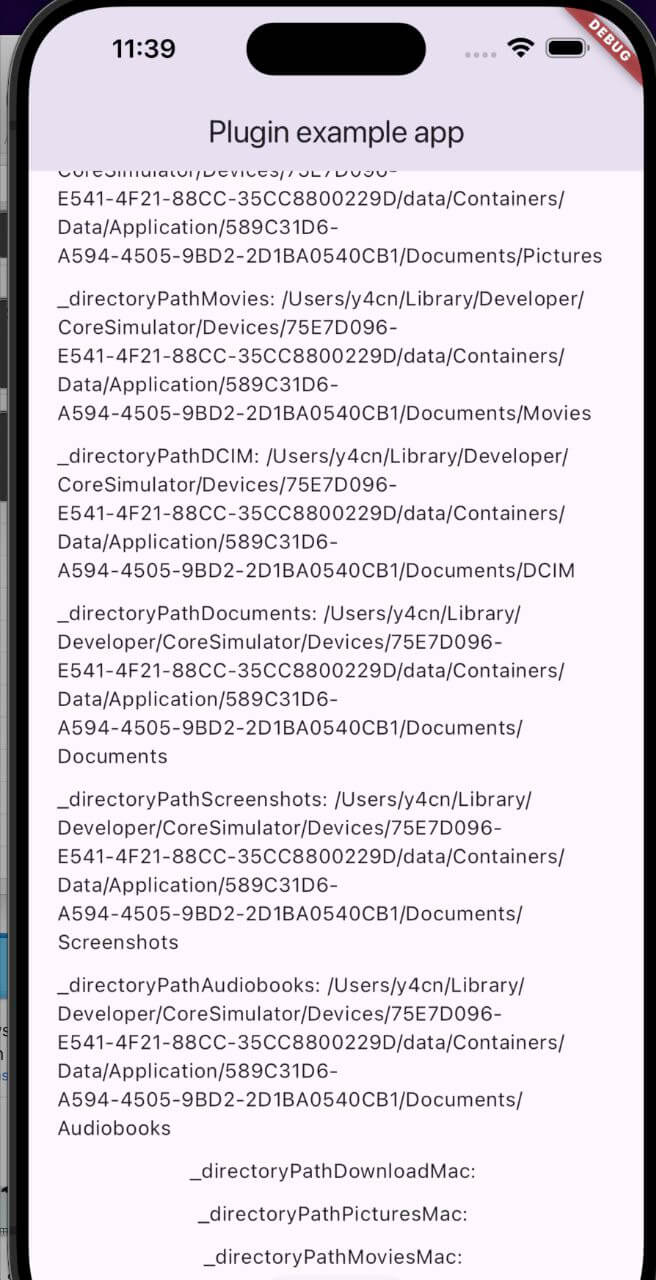
Supported Directories

iOS Directories
Directory Type Description
DirectoryType.downloads Path to the Downloads directory.
DirectoryType.music Path to the Music directory.
DirectoryType.podcasts Path to the Podcasts directory.
DirectoryType.ringtones Path to the Ringtones directory.
DirectoryType.alarms Path to the Alarms directory.
DirectoryType.notifications Path to the Notifications directory.
DirectoryType.pictures Path to the Pictures directory.
DirectoryType.movies Path to the Movies directory.
DirectoryType.dcim Path to the DCIM directory.
DirectoryType.documents Path to the Documents directory.
DirectoryType.screenshots Path to the Screenshots directory.
DirectoryType.audiobooks Path to the Audiobooks directory.
macOS Directories
Directory Type Description
MacDirectoryType.downloads Path to the Downloads directory.
MacDirectoryType.pictures Path to the Pictures directory.
MacDirectoryType.movies Path to the Movies directory.

Example Usage

Retrieving Directory Paths on iOS
final externalPath = ExternalPathIosMac();

// Downloads directory
final downloadsPath = await externalPath.getDirectoryPath(
  directory: DirectoryType.downloads,
);

// Music directory
final musicPath = await externalPath.getDirectoryPath(
  directory: DirectoryType.music,
);

// Documents directory
final documentsPath = await externalPath.getDirectoryPath(
  directory: DirectoryType.documents,
);

// DCIM directory
final dcimPath = await externalPath.getDirectoryPath(
  directory: DirectoryType.dcim,
);
Retrieving Directory Paths on macOS
final externalPath = ExternalPathIosMac();

// Downloads directory
final downloadsPathMac = await externalPath.getDirectoryPathMacOs(
  directory: MacDirectoryType.downloads,
);

// Pictures directory
final picturesPathMac = await externalPath.getDirectoryPathMacOs(
  directory: MacDirectoryType.pictures,
);

// Movies directory
final moviesPathMac = await externalPath.getDirectoryPathMacOs(
  directory: MacDirectoryType.movies,
);
Retrieving Platform Version
final platformVersion = await externalPath.getPlatformVersion();
print('Platform Version: $platformVersion');
Retrieving Root Installation Path
final externalPath = ExternalPathIosMac();

try {
  final rootPath = await externalPath.getRootInstallationPath();
  print('Root installation path: $rootPath');
} catch (e) {
  print('Error: $e');
}

On iOS, returns the main bundle path. On macOS, returns the application's installation directory.


Full Example

import 'package:flutter/material.dart';
import 'dart:io';
import 'package:external_path_ios_mac/external_path_ios_mac.dart';

class MyApp extends StatefulWidget {
  const MyApp({super.key});

  @override
  State<MyApp> createState() => _MyAppState();
}

class _MyAppState extends State<MyApp> {
  final _externalPath = ExternalPathIosMac();

  String _platformVersion = '';
  String _downloadsPath = '';
  String _musicPath = '';
  String _documentsPath = '';
  String _downloadsPathMac = '';
  String _picturesPathMac = '';

  @override
  void initState() {
    super.initState();
    _initPlatformState();
  }

  Future<void> _initPlatformState() async {
    final platformVersion = await _externalPath.getPlatformVersion();

    // iOS paths
    final downloadsPath = await _externalPath.getDirectoryPath(
      directory: DirectoryType.downloads,
    );
    final musicPath = await _externalPath.getDirectoryPath(
      directory: DirectoryType.music,
    );
    final documentsPath = await _externalPath.getDirectoryPath(
      directory: DirectoryType.documents,
    );

    // macOS paths
    final downloadsPathMac = await _externalPath.getDirectoryPathMacOs(
      directory: MacDirectoryType.downloads,
    );
    final picturesPathMac = await _externalPath.getDirectoryPathMacOs(
      directory: MacDirectoryType.pictures,
    );

    setState(() {
      _platformVersion = platformVersion ?? 'Unknown';
      _downloadsPath = downloadsPath ?? 'Unknown';
      _musicPath = musicPath ?? 'Unknown';
      _documentsPath = documentsPath ?? 'Unknown';
      _downloadsPathMac = downloadsPathMac ?? 'Unknown';
      _picturesPathMac = picturesPathMac ?? 'Unknown';
    });
  }

  Future<void> _saveFile(String path, String fileName) async {
    if (path != 'Unknown') {
      final file = File('$path/$fileName');
      await file.writeAsString('Sample content');
      print('File saved to $path/$fileName');
    }
  }

  @override
  Widget build(BuildContext context) {
    return MaterialApp(
      home: Scaffold(
        appBar: AppBar(title: const Text('Directory Paths Example')),
        body: Center(
          child: Column(
            mainAxisAlignment: MainAxisAlignment.center,
            children: [
              Text('Platform: $_platformVersion'),
              const SizedBox(height: 16),
              Text('iOS Downloads: $_downloadsPath'),
              Text('iOS Music: $_musicPath'),
              Text('iOS Documents: $_documentsPath'),
              const SizedBox(height: 16),
              Text('macOS Downloads: $_downloadsPathMac'),
              Text('macOS Pictures: $_picturesPathMac'),
              const SizedBox(height: 16),
              ElevatedButton(
                onPressed: () => _saveFile(_downloadsPath, 'example.txt'),
                child: const Text('Save File to Downloads'),
              ),
            ],
          ),
        ),
      ),
    );
  }
}

Platform-Specific Setup

iOS

Add the following keys to your Info.plist if your app accesses photos or camera:

<key>NSPhotoLibraryUsageDescription</key>
<string>We need access to your photo library.</string>
<key>NSCameraUsageDescription</key>
<string>We need access to your camera.</string>
macOS

Add the following entitlement to macos/Runner/DebugProfile.entitlements and macos/Runner/Release.entitlements:

<key>com.apple.security.files.user-selected.read-only</key>
<true/>

Swift Package Manager

This package supports Swift Package Manager (SPM) for both iOS and macOS, compatible with Flutter 3.44+. CocoaPods is also supported for backwards compatibility.


Additional Information

For issues, questions, or suggestions, contact us at [swan.dev1993@gmail.com](mailto:swan.dev1993@gmail.com) or visit our GitHub repository.

Kategorien

Abhängigkeiten

Abhängigkeiten 1 Einträge

  • plugin_platform_interface^2.1.8

Quell-Repository

Projekte, die dieses Paket verwenden

Noch keine Daten verfügbar.