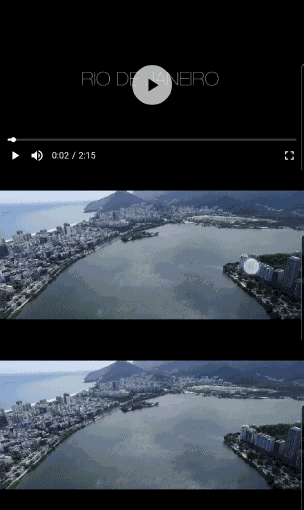
Aus öffentlichen Paketdaten erstellte Orientierung.
Flick Video Player ist ein hochwertiges Video-Wiedergabepaket für Flutter, das auf dem nativen video_player-Plugin basiert. Es bietet eine benutzerfreundliche, anpassbare Oberfläche mit Funktionen wie Wiedergabe/Pause-Steuerung, Fortschrittsverfolgung, Vollbildunterstützung und Gestenerkennung. Entwickelt, um die Integration von Videos in Flutter-Apps zu vereinfachen, abstractiert es tiefgreifende Komplexitäten und bietet Entwicklern Flexibilität. Das Paket unterstützt die Plattformen Android, iOS und macOS und ist daher ideal für plattformübergreifende Videoanwendungen.
Anwendungsfälle
Streaming-Videoinhalte in mobilen Apps
Videowiedergabe in Bildungs- oder Unterhaltungs-Apps hinzufügen
Video-Tutorials oder Demos integrieren
Medienplayer-Oberflächen erstellen
Erstellung von video-reichen sozialen Medien-Funktionen
Hauptmerkmale
Vordefinierte UI-Komponenten
Geste-basierte Steuerung
Unterstützung für Vollbildmodus
Anpassbare Themen
Plattformübergreifende Kompatibilität
Glatte Wiedergabepreformance
Geeignet für
Flutter-Entwickler, die Medien-Apps erstellen
Apps, die eine einfache Videowiedergabe erfordern
Projekte, die responsive Video-UIs benötigen
Entwickler, die eine schnelle Videointegration suchen
Teams, die der plattformübergreifenden Konsistenz Priorität einräumen
Hinweise
Benötigt video_player als Abhängigkeit
Eingeschränkte Anpassung über die bereitgestellten Widgets hinaus
Möglicherweise sind zusätzliche Stile für komplexe Benutzeroberflächen erforderlich
Abhängig von plattformspezifischen Video-Codecs
Nicht ideal für erweiterte Videobearbeitungsfunktionen
Original-README
Originaler README-Schnappschuss aus dem verknüpften Quell-Repository. Aktuelle Inhalte finden Sie im Repository.
Flick Video Player
Flick Video Player is a video player for flutter.
The video_player plugin gives low level access for the video playback. Flick Player wraps video_player under the hood and provides base architecture for developers to create their own set of UI and functionalities.
Features
Double tap to seek video.
On video tap play/pause, mute/unmute, or perform any action on video.
Main entry point, takes a FlickManager and a widget flickVideoWithControls as one of the arguments.
FlickManager
Manages all the video related operations with the help of different managers. FlickVideoManager is responsible to maintain life-cycle of a video, change a video and listen to state changes on the video. FlickControlManager is responsible to perform action on the video such as play, mute, seek, toggle full-screen etc. FlickDisplayManager is responsible to show/hide controls when player state changes.
FlickVideoWithControls
A helper widget to render video_player using FlickNativeVideoPlayer and Custom player controls. To create video player with custom controls you have to use this widget and pass this to FlickVideoPlayer in the argument flickVideoWithControls. closedCaptionTextStyle argument added to style video subtitles.
FlickPlayToggle
A UI helper widget to create play/pause/replay button for the video player. You can either pass your custom play, pause and replay widgets or change settings for the default icons.
FlickSoundToggle
A UI helper widget to create mute/unmute button for the video player. You can either pass your custom mute and unmute widgets or change settings for the default icons.
FlickFullscreenToggle
A UI helper widget to create fullscreen/fullscreen_exit button for the video player. You can either pass your custom fullscreen and fullscreen_exit widgets or change settings for the default icons.
FlickVideoProgressBar
A UI helper widget to create progress bar for your video player. It takes FlickProgressBarSettings as one of the arguments so that user can create a custom progress bar. This is highly customizable, user can almost change all the properties of the progress bar like height, handleRadius, provide custom Color or custom Paint.
FlickTotalDuration
A text UI helper widget to show total duration of the video.
FlickCurrentPosition
A text UI helper widget to show current position of the video.
FlickLeftDuration
A text UI helper widget to show left duration of the video.
FlickSetPlayBack
A text UI helper widget to change the playback speed of the video.
FlickVideoBuffer
A UI helper widget to show CircularProgressIndicator or your custom widget when the video is buffering.
FlickAutoPlayCircularProgress
A UI helper widget to show circular progress bar with timer to switch to the next video.
FlickSeekVideoAction
An Action helper to seek video forward/backward by custom Duration on double tap of screen. Takes child as one of the arguments to nest other actions or widgets.
FlickShowControlsAction
An Action helper to toggle between show/hide of controls on tap of the screen. Takes child as one of the arguments to nest other actions or widgets.
FlickTogglePlayAction
An action helper to toggle between play/pause on tap of the screen. Takes child as one of the arguments to nest other actions or widgets.
FlickToggleSoundAction
An action helper to toggle between mute/unmute on tap of the screen. Takes child as one of the arguments to nest other actions or widgets.
FlickSubtitleToggle
An action helper to toggle between display subtitle/no-subtitle on tap of the screen. Takes child as one of the arguments to nest other actions or widgets.
To play a list of videos you have to create your custom DataManager, You can find some of the implementations in /example folder.
UI Helper and Action helpers are widgets which interacts with FlickDisplayManager, FlickControlManager and FlickVideoManager you can easily create your custom widgets/actions, Provider package is used for state management.
Web
Guideline for web: As we are using video_player_web under-hood please follow video_player_web doc before you start.
Default shortcuts
Key
Behavior
f
Toggle full-screen
m
Toggle mute
ArrowRight
Seek forward
ArrowLeft
Seek backward
(Space character)
Toggle play
ArrowUp
Increase volume
ArrowDown
Decrease volume
You can pass webKeyDownHandler argument to FlickVideoPlayer and manage the keyboard shortcuts yourself.
Notes
Esc shortcut to exit from full-screen is in development.
Origin of third party content
Videos
9th May & Fireworks - https://mazwai.com/video/9th-May-&-Fireworks/455089
Iceland | Land of Fire and Ice - https://mazwai.com/video/iceland-%7C-land-of-fire-and-ice/455108
Rio from Above - https://mazwai.com/video/rio-from-above/455099
The Valley - https://mazwai.com/video/the-valley/455101