Pakete, Repositories und App-Kategorien suchen

Cover von flicked_cards
Paketdetailsv0.0.3

flicked_cards

Ein gestenbasiertes, anpassbares und erweiterbares Karten-Widget

AndroidiOSWebmacOSWindowsLinux
30-Tage-Downloads
33
Likes
82
Pub-Punkte
145

Paket installieren

flutter pub add flicked_cards

Paketübersicht

Aus öffentlichen Paketdaten erstellte Orientierung.

Flicked Cards ist ein gestenbasiertes, anpassbares und erweiterbares Karten-Widget für Flutter, das interaktive Kartenumdrehungen und Swipen-Animationen ermöglicht. Mit fließenden Übergängen und reaktionsschnellen Gesten ermöglicht es Entwicklern, ansprechende Benutzeroberflächen zu erstellen, bei denen Karten durch intuitive Touch-Interaktionen umgedreht oder verworfen werden können. Das Paket unterstützt mehrere Plattformen wie Android, iOS, Web, macOS, Windows und Linux und ist daher ideal für plattformübergreifende Anwendungen, die dynamische kartenbasierte Navigation oder Inhaltspräsentation erfordern.

Anwendungsfälle

  • Interaktive Karten-Schieberegler
  • Swipe-to-dismiss-Schnittstellen
  • Geste-basierte Inhaltsexploration
  • Kartenflip-Animationen in Dashboards
  • Benutzer-Onboarding-Flows mit swipbaren Karten

Hauptmerkmale

  • Geste gesteuerte Karteninteraktionen
  • Anpassbare Flip- und Swipe-Animationen
  • Erweiterbarer Entwurf für benutzerdefiniertes Verhalten
  • Plattformübergreifende Kompatibilität
  • Unterstützung für mehrere Interaktionszustände
  • Konfigurierbare Übergangsdauern

Geeignet für

  • Entwickler, die interaktive Karten-UIs erstellen
  • Apps, die Swip- oder Flip-Gesten erfordern
  • Designer, die animierte Karten-Erlebnisse suchen
  • Plattformübergreifende mobile und Web-Anwendungen
  • Interaktive Layouts prototypisieren

Hinweise

  • Kann eine Leistungsoptimierung für große Kartenlisten erfordern
  • Die Anpassung kann tiefere Dart-Kenntnisse erfordern
  • Eingeschränkte integrierte Themen im Vergleich zu anderen Paketen
  • Aufgrund der Animationskosten am besten für moderate Kartenanzahlen geeignet

Original-README

Originaler README-Schnappschuss aus dem verknüpften Quell-Repository. Aktuelle Inhalte finden Sie im Repository.

flicked_cards

Build Status Codecov Pub Package MIT License

A gesture driven card swipping widget supporting custom animations.

Features

  • Awesome default animations provided out of the box
  • Progress through cards swipping both direction or in a single direction
  • Extensible through custom provided animations
  • Support piling or popping (depending on animation spec)

Examples

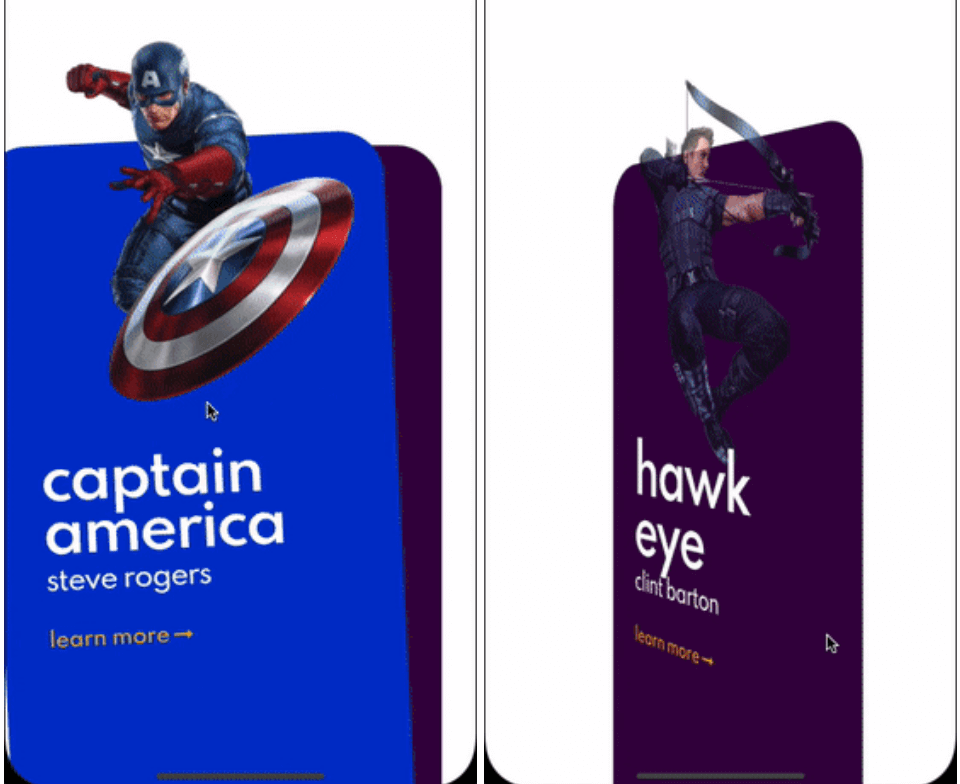
Here are some of the animation provided out of the box, take a look at the example to see all.

Cards used in these examples where taken from Brocodev

Example usage

FlickedCards(
  count: Superhero.marvelHeroes.length,
  animationStyle: FlipAnimation(),
  onSwiped: (idx, dir) => print('>>> $dir $idx'),
  builder: (index, progress, context) {
    final superHeroe = Superhero.marvelHeroes[index];
    return Container(
      child: Center(
        child: SuperheroCard(
            superhero: superHeroe,
            factorChange: 1 - progress),
      ),
    );
  },
)

Custom animations

flicked_cards provides an easy way to create custom animations but it is required to have a basic understanding of how cards can be layed out and how to position them depending on the drag progress and some of the properties in AnimationConfig.

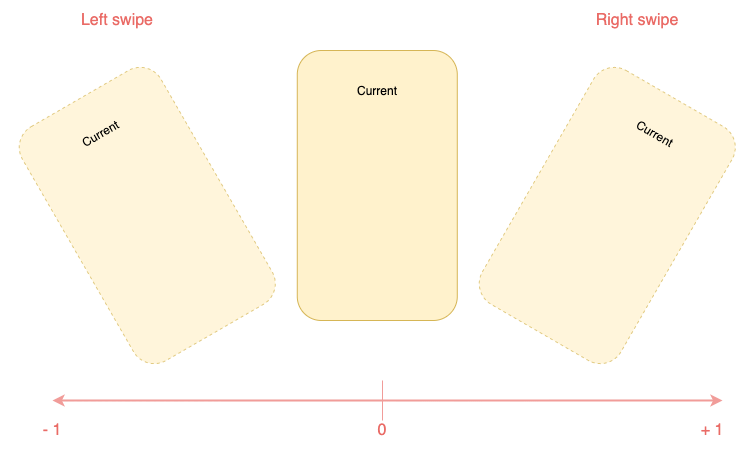
Animations will be provided a progress value in the range (-1, 1) you should try to make you animation symmetric around 0 when posible. Like this:

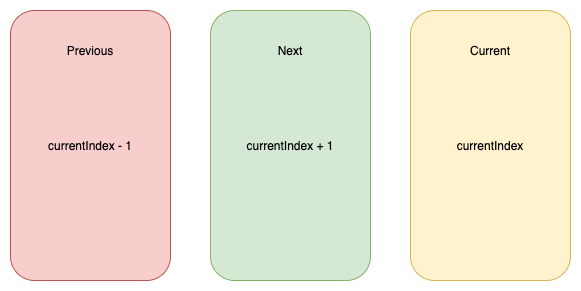
You will have to reason about relative card indices:

Interface for animations

All animations will need to implement CardAnimation which basically defines:

  • animation of a particular card depending on swipe progress required
  • opacity of a particular card depending on swipe progress optional
  • where to apply transformations on cards (Fractional Offset)
typedef SwipeAnimation = Matrix4 Function(double progress);
typedef OpacityAnimation = double Function(double progress);

abstract class CardAnimation {
  AnimationConfig get config;
  LayoutConfig get layoutConfig;

  SwipeAnimation animationForCard({required int relativeIndex});

  OpacityAnimation opacityForCard({required int relativeIndex}) {
    return (_) => 1;
  }

  FractionalOffset fractionalOffsetForCard({required int relativeIndex});
}

Additionally to make this process a bit easier, 2 extra abstract classes that implement CardAnimation which are:

  • SymmetricCardAnimation
  • AsymmetricCardAnimation

Carousel animation is an example of a SymmetricCardAnimation take a look here

If struggling to make the animationlook at how the animations provided out of the box where implemented: here

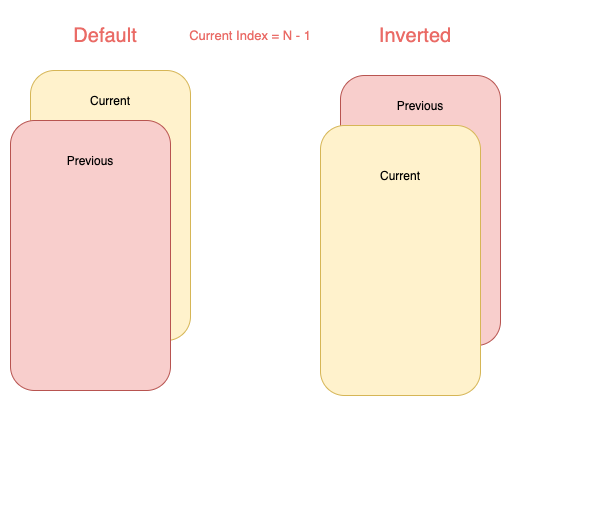
Card layouts

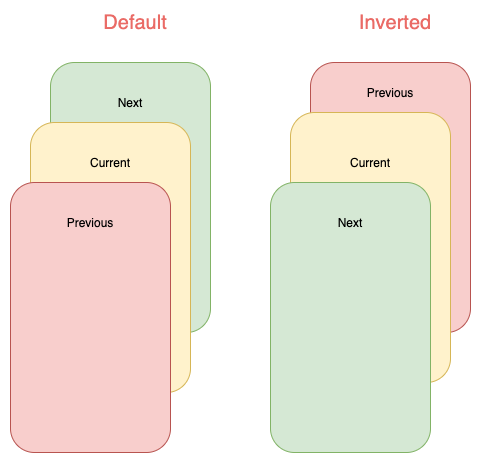
Internally cards are placed in Stack widget so an animation can choose to work with a single or both of the following layouts:

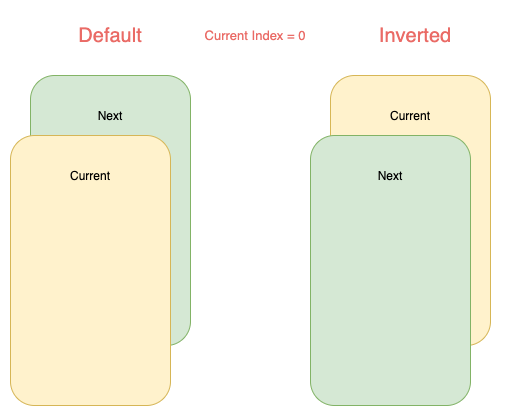
Note that depending on the index some of cards will not be displayed:

Kategorien

Quell-Repository

Projekte, die dieses Paket verwenden

Noch keine Daten verfügbar.