Pakete, Repositories und App-Kategorien suchen

Paketdetailsv0.8.0

flutter_android

Ein Flutter-Plugin für plattformspezifische Android-APIs, um doppelte Arbeit zu reduzieren, indem Android-Bindings in einem einzigen Paket zentralisiert werden.

30-Tage-Downloads
212
Likes
40
Pub-Punkte
30

Paket installieren

flutter pub add flutter_android

Paketübersicht

Aus öffentlichen Paketdaten erstellte Orientierung.

Ein Flutter-Plugin, das Zugriff auf Android-spezifische Plattform-APIs bietet und Entwicklern ermöglicht, native Android-Funktionen innerhalb von Flutter-Apps zu nutzen. Durch die Zentralisierung der Android-Bindings in einem Paket wird Code-Duplikation reduziert und die Entwicklung über Projekte hinweg vereinfacht. Das Plugin ist für eine nahtlose Integration mit dem Plattformkanalsystem von Flutter konzipiert, wodurch eine effiziente Kommunikation zwischen Dart und nativem Android-Code möglich ist. Es unterstützt eine Reihe von gerätespezifischen Funktionen und Systeminteraktionen, die spezifisch für Android sind.

Anwendungsfälle

  • Zugriff auf android-spezifische Systemfunktionen
  • Integration nativer Android-Bibliotheken
  • Reduzierung von Code-Duplikaten über Flutter-Projekte hinweg
  • Plattformoptimierte Android-Erlebnisse erstellen
  • Erweiterte Gerätesteuerung aus Flutter aktivieren

Hauptmerkmale

  • Zentralisierte Android-API-Bindungen
  • Minimales Boilerplate für Native-Integration
  • Unterstützt Flutter's Plattformkanal
  • Für Wartbarkeit konzipiert
  • Open-Source und communitygetrieben

Geeignet für

  • Android-fokussierte Flutter-Entwickler
  • Teams, die mehrere Flutter-Apps pflegen
  • Projekte mit tiefer Android-Integration
  • Entwickler, die redundanten Plattformcode vermeiden

Hinweise

  • Beschränkt auf die Android-Plattform
  • Kenntnisse in der Android-Native-Entwicklung erforderlich
  • Nicht geeignet für reine Cross-Platform-Anwendungsfälle
  • Abhängig von der korrekten Einrichtung der Plattformkanäle
  • Kann Aktualisierungen für neue Android SDK-Versionen erfordern

Original-README

Originaler README-Schnappschuss aus dem verknüpften Quell-Repository. Aktuelle Inhalte finden Sie im Repository.

Flutter Android Bindings

Project license Dart compatibility Pub package Dartdoc reference

This is a Flutter plugin for using Android's numerous platform-specific APIs in Flutter apps.

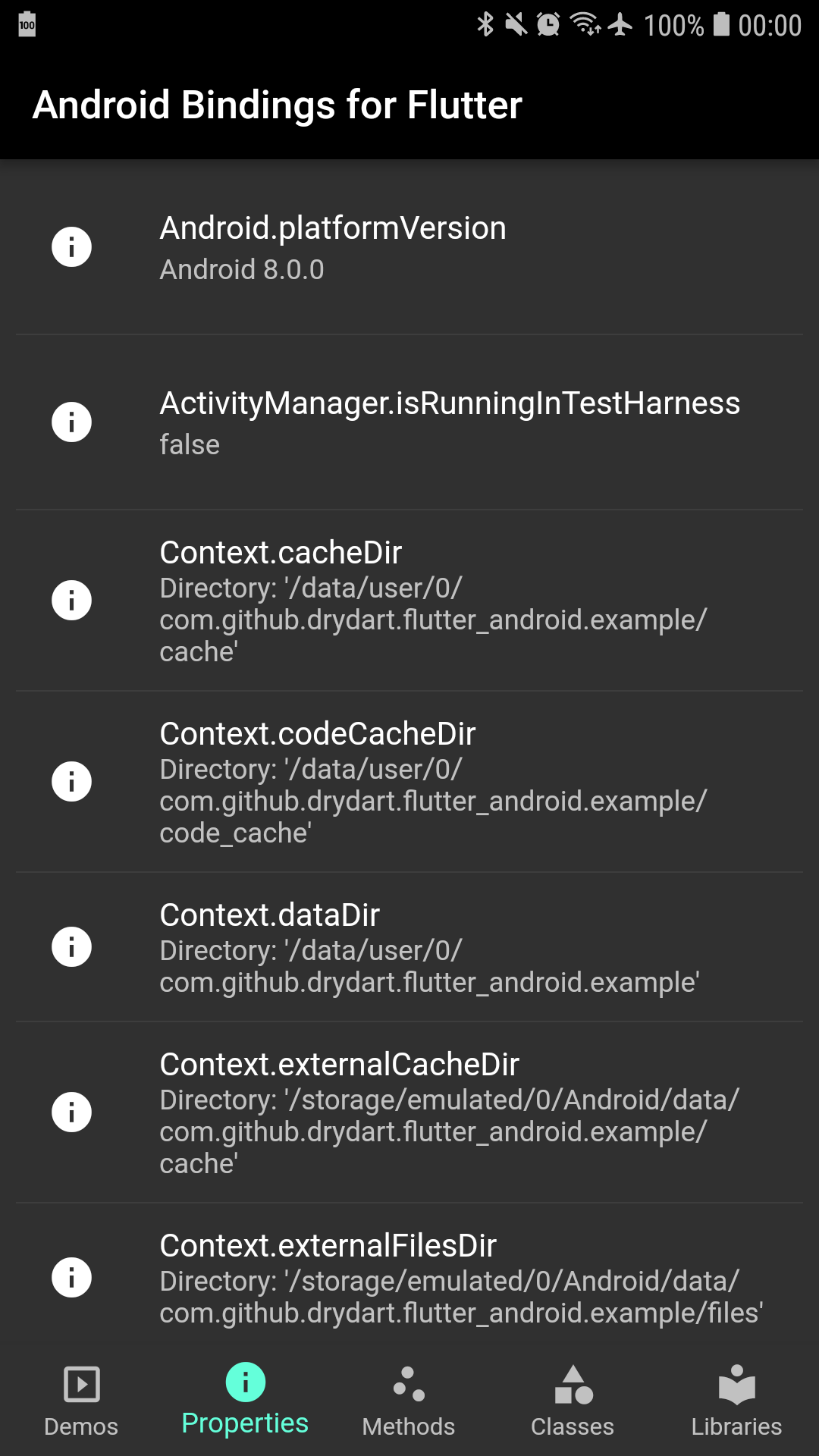
Screenshot

Screenshot of Android settings

Prerequisites

Compatibility

Android only.

Installation

dependencies:
  flutter_android: ^0.8.0

Features

  • Implements bindings to a growing set of Android's platform-specific APIs.

  • Reduces duplication of effort by centralizing Android bindings in a single package.

Feature Table
Feature Flutter API
Activity launch android_content.Intent#startActivity()
Bluetooth scanning android_bluetooth.BluetoothLeScanner
Distance calculation android_location.Location.distanceBetween()
Face detection android_media.FaceDetector
Heart-rate monitoring android_hardware.SensorManager.getDefaultSensor()
Parcel serialization android_os.Parcel
Sensor event streams android_hardware.Sensor#subscribe()

TODO: dirs

Examples

Activity launch
import 'package:flutter_android/android_content.dart' show Intent;

await Intent(
  action: "android.intent.action.VIEW", // Intent.ACTION_VIEW
  data: Uri.parse("https://flutter.dev"),
).startActivity();
Parcel serialization
import 'package:flutter_android/android_os.dart' show Parcel;

var parcel = Parcel.obtain()
  ..writeBoolean(true)
  ..writeInt(42)
  ..writeDouble(3.1415)
  ..writeString("Hello, world!")
  ..writeList(<Object>[1, 2, 3])
  ..writeMap(<String, Object>{"a": 1, "b": 2, "c": 3});

await _channel.invokeMethod('someJavaMethod', parcel.asUint8List());

// In Java, your MethodCallHandler's call.arguments contains the marshaled Parcel
Face detection
import 'package:flutter_android/android_graphics.dart' show Bitmap;
import 'package:flutter_android/android_media.dart' show Face, FaceDetector;

var photo = Image.asset("images/einstein.png");

var bitmap = Bitmap.fromAssetImage(photo.image as AssetImage);
var detector = FaceDetector(width: 280, height: 396);

for (var face in await detector.findFaces(bitmap)) {
  if (face.confidence < Face.CONFIDENCE_THRESHOLD) {
    continue; // skip dubious results below the cut-off threshold
  }
  print("Found a face at (${face.midPoint.x}, ${face.midPoint.y}) with confidence ${face.confidence}");
}
Heart-rate monitoring
import 'package:flutter_android/android_hardware.dart'
    show Sensor, SensorEvent, SensorManager;

var sensor = await SensorManager.getDefaultSensor(Sensor.TYPE_HEART_RATE);

var events = await sensor.subscribe();
events.listen((SensorEvent event) {
  print(event.values[0]);
});

Frequently Asked Questions

TODO

Caveats

  • iOS is not and cannot be supported. All flutter_android APIs throw an AssertionError if they are invoked when running on iOS. For cross-platform apps, we recommend that you depend on the platform package to conditionalize your use of Android APIs.

Reference

android
import 'package:flutter_android/android.dart' as android;
android_app
import 'package:flutter_android/android_app.dart' as android_app;
android_bluetooth
import 'package:flutter_android/android_bluetooth.dart' as android_bluetooth;
android_content
import 'package:flutter_android/android_content.dart' as android_content;
android_database
import 'package:flutter_android/android_database.dart' as android_database;
android_graphics
import 'package:flutter_android/android_graphics.dart' as android_graphics;
android_hardware
import 'package:flutter_android/android_hardware.dart' as android_hardware;
android_location
import 'package:flutter_android/android_location.dart' as android_location;
android_media
import 'package:flutter_android/android_media.dart' as android_media;
android_os
import 'package:flutter_android/android_os.dart' as android_os;

Cross-Reference

Android Flutter
android.app android_app
android.app.Activity android_app.Activity
android.app.ActivityManager android_app.ActivityManager
android.app.AlarmManager android_app.AlarmManager
android.app.AuthenticationRequiredException android_app.AuthenticationRequiredException
android.app.DownloadManager android_app.DownloadManager
android.app.KeyguardManager android_app.KeyguardManager
android.app.Notification android_app.Notification
android.app.Notification.Action android_app.NotificationAction
android.app.Notification.Builder android_app.NotificationBuilder
android.app.NotificationManager android_app.NotificationManager
android.app.PendingIntent android_app.PendingIntent
android.app.SearchManager android_app.SearchManager
android.app.WallpaperColors android_app.WallpaperColors
android.app.WallpaperInfo android_app.WallpaperInfo
android.app.WallpaperManager android_app.WallpaperManager
android.bluetooth android_bluetooth
android.bluetooth.BluetoothAdapter android_bluetooth.BluetoothAdapter
android.bluetooth.BluetoothDevice android_bluetooth.BluetoothDevice
android.bluetooth.BluetoothHeadset android_bluetooth.BluetoothHeadset
android.bluetooth.BluetoothManager android_bluetooth.BluetoothManager
android.bluetooth.le.BluetoothLeScanner android_bluetooth.BluetoothLeScanner
android.bluetooth.le android_bluetooth
android.content android_content
android.content.ActivityNotFoundException android_content.ActivityNotFoundException
android.content.ComponentName android_content.ComponentName
android.content.ContentValues android_content.ContentValues
android.content.Context android_content.Context
android.content.Intent android_content.Intent
android.content.IntentFilter android_content.IntentFilter
android.content.SharedPreferences android_content.SharedPreferences
android.database android_database
android.database.Cursor android_database.Cursor
android.database.CursorIndexOutOfBoundsException android_database.CursorIndexOutOfBoundsException
android.database.DatabaseUtils android_database.DatabaseUtils
android.database.MatrixCursor android_database.MatrixCursor
android.database.SQLException android_database.SQLException
android.graphics android_graphics
android.graphics.Bitmap android_graphics.Bitmap
android.graphics.Color dart-ui.Color
android.graphics.Point android_graphics.Point
android.graphics.PointF android_graphics.PointF
android.graphics.drawable.Icon flutter.Icon
android.hardware android_hardware
android.hardware.Sensor android_hardware.Sensor
android.hardware.SensorEvent android_hardware.SensorEvent
android.hardware.SensorEventListener android_hardware.SensorEventListener
android.hardware.SensorManager android_hardware.SensorManager
android.location android_location
android.location.Location android_location.Location
android.media android_media
android.media.FaceDetector android_media.FaceDetector
android.media.FaceDetector.Face android_media.Face
android.net android_net
android.nfc android_nfc
android.os android_os
android.os.BatteryManager android_os.BatteryManager
android.os.Build android_os.Build
android.os.Bundle android_os.Bundle
android.os.Environment android_os.Environment
android.os.HardwarePropertiesManager android_os.HardwarePropertiesManager
android.os.Parcel android_os.Parcel
android.os.Parcelable android_os.Parcelable
android.os.PowerManager android_os.PowerManager
android.os.Process android_os.Process
android.os.StatFs android_os.StatFs
android.os.SystemClock android_os.SystemClock
android.os.UserManager android_os.UserManager
android.os.VibrationEffect android_os.VibrationEffect
android.os.Vibrator android_os.Vibrator
android.provider android_provider
android.security android_security
android.speech android_speech
android.telephony android_telephony
android.view android_view
java.util.Locale dart-ui.Locale

See Also

  • The win32 package provides bindings to the most common Win32 APIs.

Kategorien

Abhängigkeiten

Abhängigkeiten 2 Einträge

Quell-Repository

Projekte, die dieses Paket verwenden