Aus öffentlichen Paketdaten erstellte Orientierung.
Flutter Auto Form ist ein Paket, das die Erstellung benutzerfreundlicher Formulare in Flutter-Anwendungen vereinfachen soll. Es reduziert Boilerplate-Code, indem es Formularfelder basierend auf Datenmodellen automatisch generiert und so die Entwicklungszeit sowie Konsistenz verbessert. Mit integrierter Validierung, Fehlerbehandlung und anpassbaren Widgets verbessert es sowohl die Entwicklererfahrung als auch die Interaktion mit dem Endbenutzer. Das Paket unterstützt alle wichtigen Plattformen und ist daher ideal für plattformübergreifende Formularimplementierungen.
Anwendungsfälle
Dynamische Formulare aus Datenmodellen erstellen
Wiederholten Formularcode reduzieren
Konsistente Benutzeroberfläche über Plattformen hinweg erstellen
Formularvalidierung einfach umsetzen
Schnellprototyp für Eingabebildschirme
Hauptmerkmale
Automatische Generierung von Formularfeldern
Integrierte Validierungssupport
anpassbare Formular-Widgets
Plattformübergreifende Kompatibilität
Minimaler Boilerplate erforderlich
Geeignet für
Entwickler, die eine schnellere Formularerstellung suchen
Projekte, die ein konsistentes Formulardesign erfordern
Plattformübergreifende Flutter-Anwendungen
Prototypen, die eine schnelle Formularimplementierung benötigen
Teams, die wartbaren Formularcode priorisieren
Hinweise
Eingeschränkte Anpassungsmöglichkeiten für sehr komplexe Formulare
Kann zusätzliche Konfiguration für erweiterte Überprüfung erfordern
Nicht ideal für Formulare mit einzigartigen, nicht standardmäßigen Layouts
Abhängig von der Modellstruktur für die automatische Generierung
Lernkurve für neue Benutzer, die mit Auto-Formularmustern nicht vertraut sind
Original-README
Originaler README-Schnappschuss aus dem verknüpften Quell-Repository. Aktuelle Inhalte finden Sie im Repository.
Flutter Auto Form
The easiest way to create fully customizable forms with only a tiny amount of code.
Introduction
Are you tired of writing endless lines of code to create forms in your Flutter apps? Look no further! Our Flutter Auto
Form package is here to revolutionize your form-building experience.
Our primary goal is to significantly reduce the amount of code required to create forms in Flutter. We achieve this by
embracing a clear separation of concerns between form logic and form display.
With Flutter Auto Form, you write the form logic in pure Dart, without any direct mention of widgets. Instead, we
introduce the AFWidget, which dynamically renders all the necessary widgets based on a straightforward form
declaration—a simple Dart class that extends the TemplateForm class.
But that's not all! Our package empowers you to design your custom fields and linked widgets, making nearly any form
conceivable. Whether you're working on basic forms or tackling complex ones, Flutter Auto Form has got you covered.
The true magic of Flutter Auto Form shines when you're dealing with multiple forms, especially complex ones. All your
validators are automatically called when you submit a form, and you can even create sub-forms that cascade into one
another.
Dynamic form generation is also feasible but still in experimental mode. It is accessible through the
JsonSchemaForm class.
dependencies:flutter:sdk:flutter# Your other packages ...flutter_auto_form:^1.0.6
Support
Platforms: All platforms currently supported
Autofill hints: Automatic support through AFTextFieldType
Validators: Email, Url, Hex colour, Not null, Minimum string length, Same as another field, Alphanumeric.
Fields: Password (auto obscure toggle), Text, Number, Model (built-in support for search through an api),
Boolean, Sub-form (cascading forms), Select (dropdown field allowing only predefined values)
Custom code: You can customize and create new fields, validators, widgets as you please without even touching the
source code of this package !
Usage
The first step in creating a form with Flutter Auto Form is to create a class inheriting from the TemplateForm class.
The second & (already) last step is to add the AFWidget wherever you would like to display a form.
AFWidget<RegistrationForm>(
formBuilder: () => RegistrationForm(),
submitButton: (Function({bool showLoadingDialog}) submit) => Padding(
padding: constEdgeInsets.only(top: 32),
child: MaterialButton(
child: Text('Submit'),
onPressed: () => submit(showLoadingDialog: true),
),
),
onSubmitted: (RegistrationForm form) {
// do whatever you want when the form is submittedprint(form.toMap());
},
);
Example
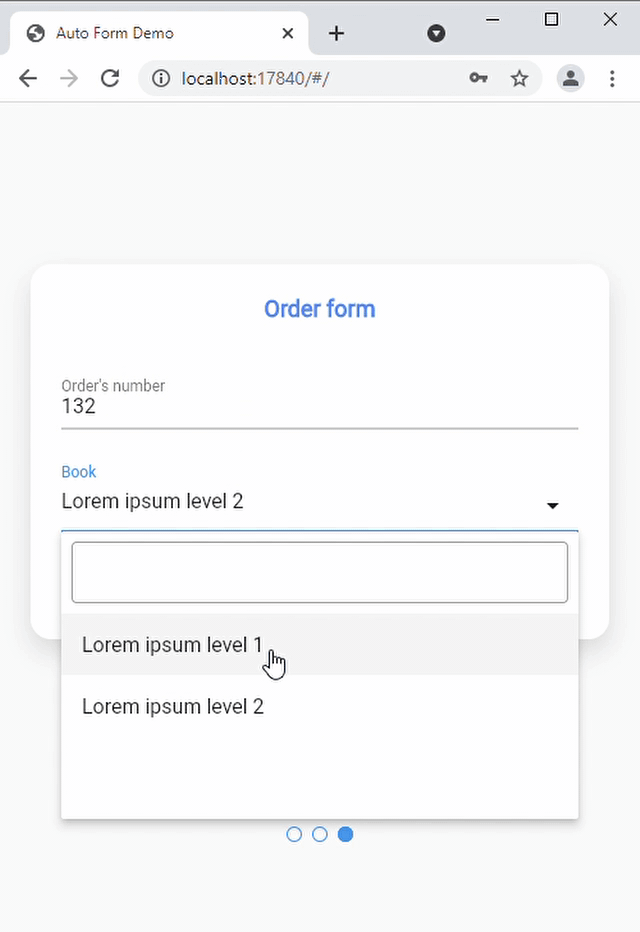
A demo video can be found here. The
four forms displayed in the video are all created with Flutter Auto Form, even the model search field.
The source code is located in the example folder.
Advanced usage
If you need to create your own field (color field, image field, ...) you can always create it by overriding the Field
class. Then to display a custom widget, create a stateful widget that extends the FieldStatefulWidget, and of which the
state extends the FieldState class.
This package is still under construction ! Do not hesitate to create an issue on the GitHub page if you find any bug
or if you would like to see a new type of validator, field !