Aus öffentlichen Paketdaten erstellte Orientierung.
Ein Flutter-Paket, das Entwicklern ermöglicht, auf mehreren Plattformen anpassbare Kontextmenüs zu erstellen und anzuzeigen. Es bietet eine konsistente Möglichkeit, Aktionsoptionen darzustellen, wenn Benutzer auf Widgets lange drücken oder mit der rechten Maustaste klicken, wodurch die Benutzerinteraktion in Apps verbessert wird. Das Paket unterstützt alle wichtigen Plattformen wie Android, iOS, Web, macOS, Windows und Linux und gewährleistet breite Kompatibilität. Mit flexiblen Anpassungsmöglichkeiten können Entwickler Aussehen und Verhalten des Menüs an das App-Design anpassen. Ideal für die Hinzufügung intuitiver, plattformsensibler kontextbezogener Aktionen.
Anwendungsfälle
Rechtsklick-Menüs in Desktop-Anwendungen hinzufügen
Langzeit-Druckaktionen auf mobilen Geräten implementieren
Interaktive Benutzeroberflächen mit kontextbezogenen Auswahlmöglichkeiten erstellen
Produktivitäts-Tools durch schnelle Aktionen verbessern
Unterstützung von Multiplattform-Anwendungen
Hauptmerkmale
Plattformübergreifende Unterstützung
Anpassbare Menüelemente
Einfache Integration mit bestehenden Widgets
Reagiert auf langen Druck und rechten Klick
Konfigurierbare Gestaltung und Anordnung
Geeignet für
Entwickler, die Desktop- oder Mobile-Apps mit reichhaltigen Interaktionen erstellen
Teams, die mehrere Plattformen ansprechen
Apps, die kontextbezogene Benutzeraktionen erfordern
Hinweise
Erfordert sorgfältige Behandlung von Gestenkonflikten
Möglicherweise sind zusätzliche Stile für Konsistenz erforderlich
Nicht geeignet für einfache Einzeltätigkeiten
Original-README
Originaler README-Schnappschuss aus dem verknüpften Quell-Repository. Aktuelle Inhalte finden Sie im Repository.
Flutter Context Menu
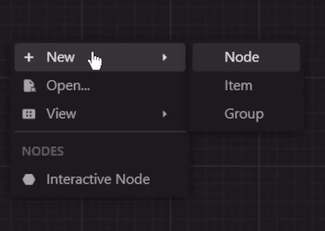
A Flutter library that provides a flexible and customizable solution for creating and displaying context menus in Flutter applications. It allows you to easily add context menus to your UI, providing users with a convenient way to access additional options and actions specific to the selected item or area.
ContextMenu: The package includes a highly customizable context menu system that can be
easily integrated into your Flutter application. It provides a seamless and intuitive user
experience, enhancing the usability of your app.
Hierarchical Structure: The context menu supports a hierarchical structure with submenu
functionality. This enables you to create nested menus, providing a clear and organized
representation of options and suboptions.
Selection Handling: The package includes built-in selection handling for context menu items.
It allows you to define callback functions for individual menu items, enabling you to execute
specific actions or logic when an item is selected.
Customization Options: Customize the appearance and behavior of the context menu to match your
app's design and requirements. Modify the style, positioning, animation, and interaction of the
menu to create a cohesive user interface.
Built-in Components: The package includes built-in components, such as MenuItem,
MenuDivider, and MenuHeader, that can be used in your context menu.
Cross Platform Support: The package is compatible with multiple platforms, including Android,
iOS, Web, and Desktop.
Theme: By default, the context menu and its items uses the MaterialApp's theme data for
styling. However, you can customize the appearance and behavior of the context menu by modifying
the theme data. Or individually by specifying a BoxDecoration in the boxDecoration property of
the ContextMenu.
Custom Entries: You can create your own context menu entries by subclassing the
ContextMenuEntry class. This allows you to customize the appearance, behavior, and functionality
of the context menu items.
Learn More
More info: Full documentation will be provided, inshallah 🙏