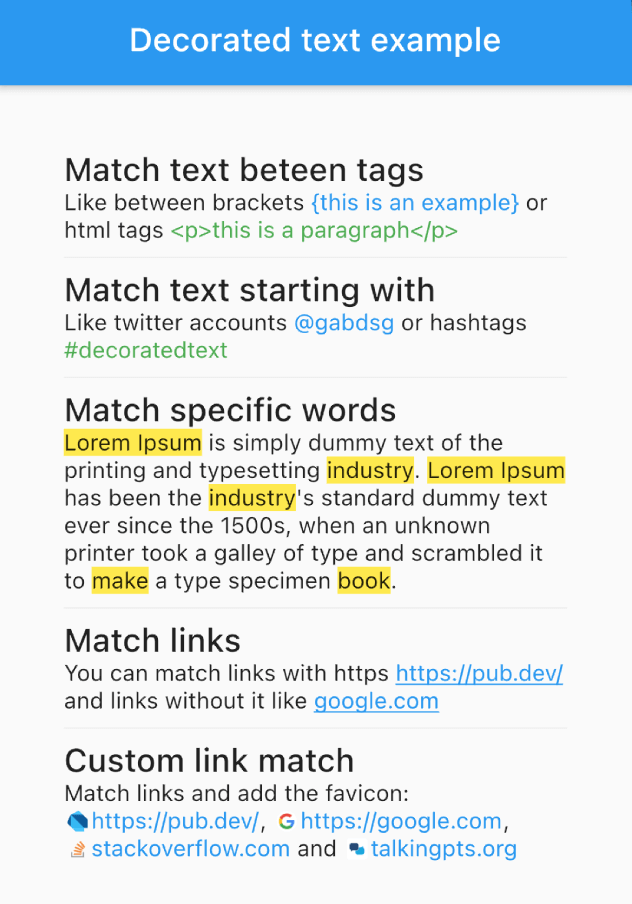
Ein Widget zum Formatieren und Interagieren mit Teilen eines Textes basierend auf Regeln. Passen Sie Wörter, Phrasen oder Muster an und wenden Sie benutzerdefinierte Stile oder Aktionen an.
Aus öffentlichen Paketdaten erstellte Orientierung.
Ein Flutter-Paket, das die Formatierung und Interaktion mit bestimmten Textabschnitten mithilfe definierter Regeln ermöglicht. Es erlaubt das Erkennen von Wörtern, Phrasen oder Mustern und die Anwendung benutzerdefinierter Stile oder Aktionen wie Tap-Ereignisse. Ideal für anspruchsvolle Textanzeigemöglichkeiten mit dynamischer Formatierung, beispielsweise Hervorhebung von Schlüsselwörtern, Einbetten von Links oder Hinzufügen von Animationen zu bestimmten Textsegmenten. Funktioniert auf allen wichtigen Plattformen, einschließlich Mobilgeräte, Web und Desktop.
Anwendungsfälle
Schlüsselwörter im Text hervorheben
Interaktiven Text mit Tip-Aktionen erstellen
Gestylte Links innerhalb von Absätzen einbetten
Animationen zu bestimmten Textabschnitten hinzufügen
Formatierten Inhalt mit dynamischen Regeln anzeigen
Reichhaltige Textdarstellung in Chat- oder Artikel-Apps
Hauptmerkmale
Musterbasierte Textübereinstimmung
Benutzerdefinierte Stilanwendung pro Übereinstimmung
Interaktive Callbacks (z. B. onTap)
Unterstützung mehrerer Regeln gleichzeitig
Plattformübergreifende Kompatibilität
Einfache Integration mit bestehenden Text-Widgets
Geeignet für
Entwickler, die reichhaltige Textinterfaces erstellen
Apps, die Stichwort-Hervorhebung erfordern
Chat- oder Messaging-Anwendungen
inhaltsreiche Bildungs- oder Nachrichten-Apps
Benötigungen von Benutzeroberflächen mit dynamischer Textformatierung
Projekte, die interaktive Textelemente benötigen
Hinweise
Die Leistung kann große Textblöcke beeinträchtigen
Eingeschränkter integrierter Emoji-Unterstützung über grundlegende Stilierung hinaus
Erfordert Verständnis der Textmusterübereinstimmung
Möglicherweise ist zusätzliche Logik für verschachtelte oder überlappende Übereinstimmungen erforderlich
Nicht für voll ausgestattete Rich-Text-Editoren vorgesehen
Original-README
Originaler README-Schnappschuss aus dem verknüpften Quell-Repository. Aktuelle Inhalte finden Sie im Repository.
Flutter DecoratedText
The DecoratedText widget allows you to style and interact with different parts of a text string based on predefined rules. It's versatile, easy-to-use, and can handle different scenarios such as matching specific words, phrases, or patterns, allowing you to style the matched text differently.
Features
Selectable Text: Enable the selectable property (selectable: true) to allow text selection in the DecoratedText widget.
Predefined Rules: These are used to match different elements within the text. These rules include:
Matching words.
Matching text starting with a particular prefix.
Matching text between specific tags.
Matching links (URLs).
Interactive: Each rule can include an onTap callback, which returns the matched text, allowing you to implement interactive behavior such as opening a link when a URL is tapped.
Performance Optimized: RegExp patterns are cached internally, decoration results are memoized in text controllers, and tag deduplication uses an efficient O(n log n) algorithm.
Usage Examples
Match Text Between Tags
DecoratedText(
    text: "Like between brackets {this is an example} or html tags <p>this is a paragraph</p>",
    rules: [
        DecoratorRule.between(
            start: "{",
            end: "}",
            style: TextStyle(
                color: Colors.blue,
            ),
        ),
        DecoratorRule.between(
            start: "<p>",
            end: "</p>",
            style: TextStyle(
                color: Colors.green,
            ),
        ),
    ],
);
DecoratedText(
    text: "Lorem Ipsum is simply dummy text of the printing and typesetting industry. Lorem Ipsum has been the industry's standard dummy text ever since the 1500s, when an unknown printer took a galley of type and scrambled it to make a type specimen book.",
    rules: [
        DecoratorRule.words(
            words: ["lorem ipsum", "industry", "book", "make"],
            onTap: (match) {
                print(match);
            },
            style: TextStyle(
                background: Paint()..color = Colors.yellow,
            ),
        ),
    ],
);
Match URLs
DecoratedText(
    text: "You can match links with https https://pub.dev/ and links without it like google.com",
    rules: [
        DecoratorRule.url(
            onTap: (url) {
                print(url);
            },
            style: TextStyle(
                color: Colors.blue,
                decoration: TextDecoration.underline,
            ),
        ),
    ],
);
DecoratedText(
text: "I love Flutter! 😍",
rules: [
DecoratorRule(
regExp: RegExp(r'(\p{Emoji_Presentation})', unicode: true),
style: constTextStyle(
fontSize: 30.0,
),
onTap: (emoji) {
debugPrint('You tapped on the emoji: $emoji');
},
),
],
);
Performance Tips
For best performance when using custom RegExp patterns, cache them outside the build() method:
// Cache at the class or file level — avoid creating inside build()final _myRegExp = RegExp(r'my-pattern');
@overrideWidgetbuild(BuildContext context) {
returnDecoratedText(
text: "...",
rules: [
DecoratorRule(regExp: _myRegExp, style: TextStyle(...)),
],
);
}
Built-in rules like DecoratorRule.words(), DecoratorRule.url(), etc. handle caching automatically.
Remember, with the DecoratedText widget, you can style your text based on predefined rules, add interactivity, and handle complex matching scenarios with ease. Happy coding!