Aus öffentlichen Paketdaten erstellte Orientierung.
Ein Flutter-Plugin, das dynamische Änderungen von App-Icons und Massenaktualisierungen von Nummern auf Android und iOS ermöglicht. Es erlaubt Entwicklern, das App-Icon zur Laufzeit programmgesteuert zu wechseln, was für individuelle Branding-, saisonale Themen oder Benutzerpräferenzen nützlich ist. Das Plugin unterstützt sowohl plattformspezifische Icon-Verwaltung als auch Batch-Nummerierung für Versionskontrolle oder Werbezwecke. Speziell für nahtlose Integration in Flutter-Apps entwickelt, vereinfacht es die Icon-Manipulation ohne Änderungen am nativen Code. Ideal für Apps, die visuelle Flexibilität oder interaktive Icon-Erfahrungen benötigen.
Anwendungsfälle
App-Icon basierend auf Benutzerpräferenz ändern
Saisonale oder ereignisbasierte Icon-Updates
App-Branding-Anpassung
Verschiedene Icon-Varianten testen
Wechseln des Werbeaktionssymbols
Hauptmerkmale
Dynamisches Wechseln von Symbolen zur Laufzeit
Unterstützung für Android und iOS
Batch-Nummern-Verwaltung
Einfache API-Integration
Kein natives Code erforderlich
Geeignet für
Apps mit anpassbarem Benutzeroberfläche
Markenorientierte Anwendungen
ereignisgesteuerte oder saisonale Apps
Entwicklerwerkzeuge für Icon-Tests
Marketing- oder Werbekampagnen
Hinweise
Neustart der App nach Iconänderung erforderlich
Eingeschränkte Unterstützung auf einigen älteren Geräten
iOS erfordert zusätzliche Konfiguration
Icon-Assets müssen vorab definiert werden
Nicht geeignet für häufige Symbolwechsel
Original-README
Originaler README-Schnappschuss aus dem verknüpften Quell-Repository. Aktuelle Inhalte finden Sie im Repository.
flutter_dynamic_icon
A flutter plugin for dynamically changing app icon and app icon batch number in the mobile platform. Supports only iOS (with version > 10.3).
Check out the example directory for a sample app using flutter_dynamic_icon.
iOS Integration
Index
2x - 120px x 120px
3x - 180px x 180px
To integrate your plugin into the iOS part of your app, follow these steps
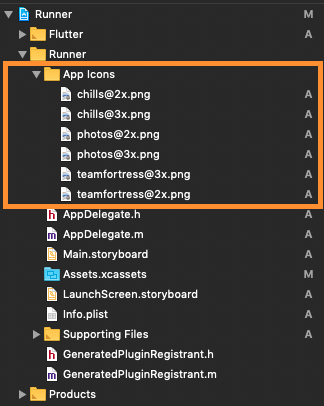
First let us put a few images for app icons, they are
teamfortress@2x.png, teamfortress@3x.png
photos@2x.png, photos@3x.png,
chills@2x.png, chills@3x.png,
These icons shouldn't be kept in Assets.xcassets folder, but outside. When copying to Xcode, you can select 'create folder references' or 'create groups', if not you will get and error when uploading the build to the AppStore saying: (Thanks to @nohli for this observation)
TMS-90032: Invalid Image Path - - No image found at the path referenced under key 'CFBundleAlternateIcons':...
Here is my directory structure:
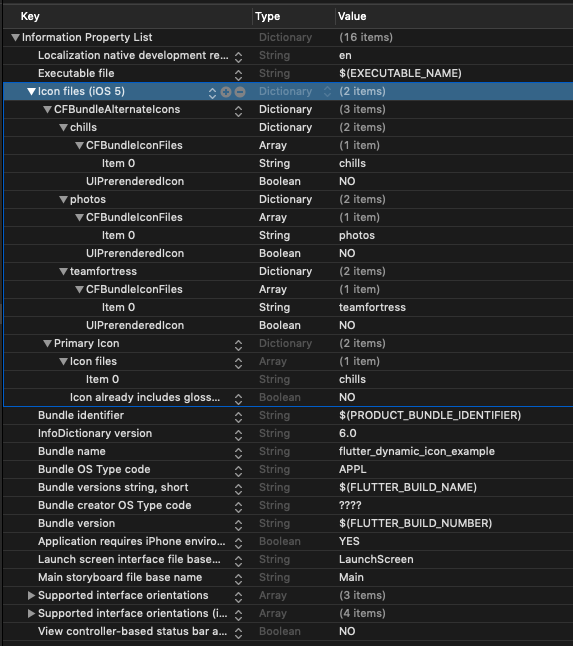
Next, we need to setup the Info.plist
Add Icon files (iOS 5) to the Information Property List
Add CFBundleAlternateIcons as a dictionary, it is used for alternative icons
Set 3 dictionaries under CFBundleAlternateIcons, they are correspond to teamfortress, photos, and chills
For each dictionary, two properties — UIPrerenderedIcon and CFBundleIconFiles need to be configured
If the sub-property UINewsstandIcon is showing under Icon files (iOS 5) and you don't plan on using it (it is intended for use with Newstand features), erase it or the app will get rejected upon submission on the App Store
Note that if you need it work for iPads, You need to add these icon declarations in CFBundleIcons~ipad as well. See here for more details.
Here is my Info.plist after adding Alternate Icons
Now, you can call FlutterDynamicIcon.setAlternateIconName with the CFBundleAlternateIcons key as the argument to set that icon.
Dart/Flutter Integration
From your Dart code, you need to import the plugin and use it's static methods:
import'package:flutter_dynamic_icon/flutter_dynamic_icon.dart';
try {
if (awaitFlutterDynamicIcon.supportsAlternateIcons) {
awaitFlutterDynamicIcon.setAlternateIconName("photos");
print("App icon change successful");
return;
}
} onPlatformException {} catch (e) {}
print("Failed to change app icon");
...
// set batch numbertry {
awaitFlutterDynamicIcon.setApplicationIconBadgeNumber(9399);
} onPlatformException {} catch (e) {}
// gets currently set batch numberint batchNumber = FlutterDynamicIcon.getApplicationIconBadgeNumber();
Check out the example app for more details
Screenrecord
Showing App Icon change
Showing Batch number on app icon change in SpringBoard
Reference
This was made possible because this blog. I borrowed a lot of words from this blog.
https://medium.com/ios-os-x-development/dynamically-change-the-app-icon-7d4bece820d2