Aus öffentlichen Paketdaten erstellte Orientierung.
Ein Flutter-Plugin, das dynamische Änderungen von App-Iconen auf Android und iOS (Version > 10.3) ermöglicht. Es erlaubt Benutzern, zur Laufzeit zwischen verschiedenen App-Iconen zu wechseln, was Personalisierung und Markenflexibilität verbessert. Das Paket lässt sich nahtlos in Flutter-Projekte integrieren und unterstützt beide Hauptmobilitätsplattformen. Entwickler können das App-Icon programmgesteuert aktualisieren, ohne eine Neuinstallation vornehmen zu müssen. Ideal für Apps, die thematische oder kontextbezogene Icons basierend auf Nutzerpräferenzen oder Ereignissen anbieten möchten.
Anwendungsfälle
App-Icon basierend auf Benutzerpräferenz ändern
Unterstützung saisonaler oder ereignisbasierter Symbole
App-Branding-Anpassung aktivieren
Dynamische Icon-Updates in Reaktion auf den App-Zustand
Personalisierte App-Erlebnisse
Hauptmerkmale
Laufzeit-Symbolwechsel
Unterstützung für Android und iOS > 10.3
Einfache API-Integration
Keine erneute Installation der App erforderlich
Plattformübergreifende Kompatibilität
Geeignet für
Apps, die eine Icon-Personalisierung erfordern
Branding- und Marketingkampagnen
Themenanwendungen
Benutzergetriebene UI-Anpassung
ereignisbasierte App-Erlebnisse
Hinweise
Plattformspezifische Einrichtung erforderlich
iOS-Unterstützung beschränkt auf Version 10.3+
Kann eine Genehmigung durch den App Store für Iconänderungen erfordern
Beschränkt auf vordefinierte Icon-Sets
Möglicher Leistungseinbruch während des Neuladens des Symbols
Original-README
Originaler README-Schnappschuss aus dem verknüpften Quell-Repository. Aktuelle Inhalte finden Sie im Repository.
flutter_dynamic_icon_plus
A flutter plugin for dynamically changing app icon and app icon batch number (iOS only) in the mobile platform. Supports only iOS (with version > 10.3).
Update android/src/main/AndroidManifest.xml as follows:
<application...><activityandroid:name=".MainActivity"android:launchMode="singleTop"android:theme="@style/LaunchTheme"android:configChanges="orientation|keyboardHidden|keyboard|screenSize|smallestScreenSize|locale|layoutDirection|fontScale|screenLayout|density|uiMode"android:hardwareAccelerated="true"android:windowSoftInputMode="adjustResize"android:enabled="true"><meta-dataandroid:name="io.flutter.embedding.android.NormalTheme"android:resource="@style/NormalTheme"
/><intent-filter><actionandroid:name="android.intent.action.MAIN" /><categoryandroid:name="android.intent.category.LAUNCHER" /></intent-filter></activity><!-- The activity-alias are your alternatives icons and name of your app, the default one must be enabled (and the others disabled) and the name must be ".DEFAULT". All the names of your activity-alias' name must begin with a dot. --><!-- FOR NOW USE "icon_1" AS ALTERNATIVE ICON NAME --><activity-aliasandroid:label="Your app"android:icon="@mipmap/ic_launcher_1"android:roundIcon="@mipmap/ic_launcher_1"android:name=".icon_1"android:exported="true"android:enabled="false"android:targetActivity=".MainActivity"><meta-dataandroid:name="io.flutter.embedding.android.NormalTheme"android:resource="@style/NormalTheme"
/><intent-filter><actionandroid:name="android.intent.action.MAIN" /><categoryandroid:name="android.intent.category.LAUNCHER" /></intent-filter></activity-alias><activity-aliasandroid:label="Your app"android:icon="@mipmap/ic_launcher_2"android:roundIcon="@mipmap/ic_launcher_2"android:name=".icon_2"android:exported="true"android:enabled="false"android:targetActivity=".MainActivity"><meta-dataandroid:name="io.flutter.embedding.android.NormalTheme"android:resource="@style/NormalTheme"
/><intent-filter><actionandroid:name="android.intent.action.MAIN" /><categoryandroid:name="android.intent.category.LAUNCHER" /></intent-filter></activity-alias></application>
Include applicationIdSuffix
If your app contains applicationIdSuffix please add applicationId on your activity-alias name for example
To integrate your plugin into the iOS part of your app, follow these steps
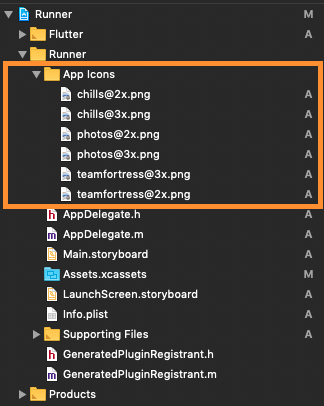
First let us put a few images for app icons, they are
teamfortress@2x.png, teamfortress@3x.png
photos@2x.png, photos@3x.png,
chills@2x.png, chills@3x.png,
These icons shouldn't be kept in Assets.xcassets folder, but outside. When copying to Xcode, you can select 'create folder references' or 'create groups', if not you will get and error when uploading the build to the AppStore saying: (Thanks to @nohli for this observation)
TMS-90032: Invalid Image Path - - No image found at the path referenced under key 'CFBundleAlternateIcons':...
Here is my directory structure:
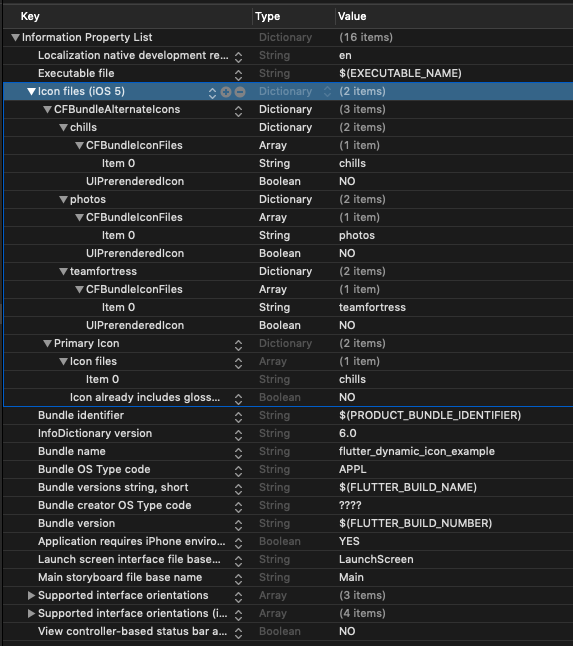
Next, we need to setup the Info.plist
Add Icon files (iOS 5) to the Information Property List
Add CFBundleAlternateIcons as a dictionary, it is used for alternative icons
Set 3 dictionaries under CFBundleAlternateIcons, they are correspond to teamfortress, photos, and chills
For each dictionary, two properties — UIPrerenderedIcon and CFBundleIconFiles need to be configured
If the sub-property UINewsstandIcon is showing under Icon files (iOS 5) and you don't plan on using it (it is intended for use with Newstand features), erase it or the app will get rejected upon submission on the App Store
Note that if you need it work for iPads, You need to add these icon declarations in CFBundleIcons~ipad as well. See here for more details.
Here is my Info.plist after adding Alternate Icons
To update app icon, set iconName with specific value. To restore default app icon fill with null. Fill blacklistBrands, blacklistManufactures, and/or blacklistModels to use old approach (force restart), this property just work on Android only.
applicationIconBadgeNumber
int
To get app icon badge, number of push notification received. This method just work on iOS only.
This was made possible because this blog. I borrowed a lot of words from this blog.
https://medium.com/ios-os-x-development/dynamically-change-the-app-icon-7d4bece820d2
This plugin inspired from another existing plugin. I copy a lot of code from these plugin.
https://pub.dev/packages/flutter_dynamic_icon