Aus öffentlichen Paketdaten erstellte Orientierung.
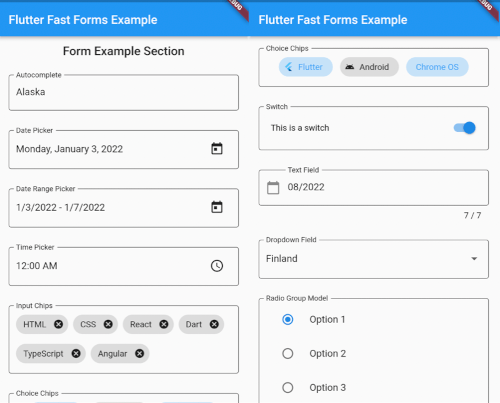
Flutter Fast Forms ist ein Dart-Paket, das die Erstellung von Flutter-Formularen vereinfachen soll, sodass Entwickler schnell starke und wiederverwendbare Formularkomponenten erstellen können. Es bietet eine einfache, deklarative API zum Definieren von Formularfeldern, Validierungsregeln und Übermittlungslogik mit minimalem Boilerplate. Das Paket unterstützt alle wichtigen Plattformen wie Android, iOS, Web, macOS, Windows und Linux und ist daher ideal für plattformübergreifende Anwendungen. Mit integrierter Unterstützung für gängige Eingabetypen und anpassbaren Validatoren beschleunigt es die Entwicklung ohne Kompromisse bei Flexibilität oder Leistung.
Anwendungsfälle
Schnellformprototypen
Plattformübergreifende Formularentwicklung
Komplexe Validierungsarbeitsabläufe
wiederverwendbare Formularkomponenten
Verfeinerte Benutzerregistrierungsabläufe
Hauptmerkmale
Deklarative Formular-Syntax
Eingebaute Validierungs-Hilfsfunktionen
Plattformübergreifende Kompatibilität
Erweiterbare Feldtypen
Minimale Boilerplate-Code
Geeignet für
Anfänger-Flutter-Entwickler
Teams, die Geschwindigkeit priorisieren
Apps, die dynamische Formulare erfordern
Projekte mit engen Fristen
Entwickler, die Formularkomplexität vermeiden
Hinweise
Begrenzte Anpassungsmöglichkeiten außerhalb der Standard-Widgets
Kann das Erlernen einer neuen DSL-ähnlichen Syntax erfordern
Nicht ideal für hoch einzigartige Formularlayouts
Abhängig von der Paketpflege
Am besten geeignet für Standardformmuster
Original-README
Originaler README-Schnappschuss aus dem verknüpften Quell-Repository. Aktuelle Inhalte finden Sie im Repository.
Flutter Fast Forms
Flutter Fast Forms is the only Dart package you need to build Flutter forms fast.
It adds these missing features to the Flutter SDK:
Not all controls in a form are autonomous and act independent of each other.
Occasionally, the state of a form field might be directly related to the state of some other form field as well.
Flutter Fast Forms allows you to define such conditions declaratively.
📓 Example: A FastTextField that is disabled when a FastSwitch is selected.
1. Add the conditions property to the conditional form field and assign an empty Map:
constFastSwitch(
name: 'switch',
titleText: 'Disable text field',
),
FastTextField(
name: 'text_field',
labelText: 'Just some sample text field',
conditions: {},
),
2. Choose a suitable FastConditionHandler as Map key and assign a FastConditionList:
constFastSwitch(
name: 'switch',
titleText: 'Disable text field when selected',
),
FastTextField(
name: 'text_field',
labelText: 'Just some sample text field',
conditions: {
FastCondition.disabled: FastConditionList([]),
},
)
[!NOTE]
A FastConditionHandler is a function that runs whenever a FastConditionList is checked and determines what happens when the condition is either met or not.
3. Add a FastCondition relating the field to another field:
constFastSwitch(
name: 'switch',
titleText: 'Disable text field when selected',
),
FastTextField(
name: 'text_field',
labelText: 'Just some sample text field',
conditions: {
FastCondition.disabled: FastConditionList([
FastCondition(
target: 'switch',
test: (value, field) => value isbool && value,
),
]),
},
),
[!NOTE]
target is the name of the FastFormField that the form field depends on.
📓 Example: A FastTextField that is enabled when a FastSwitchor a FastCheckbox is selected.
constFastCheckbox(
name: 'checkbox',
titleText: 'Enable text field when selected',
),
constFastSwitch(
name: 'switch',
titleText: 'Enable text field when selected',
),
FastTextField(
name: 'text_field',
enabled: false,
labelText: 'Just some sample text field',
conditions: {
FastCondition.enabled: FastConditionList([
FastCondition(
target: 'switch',
test: (value, field) => value isbool && value,
),
FastCondition(
target: 'checkbox',
test: (value, field) => value isbool && value,
),
]),
},
),
📓 Example: A FastTextField that is disabled when both a FastSwitchand a FastCheckbox are selected.
constFastCheckbox(
name: 'checkbox',
titleText: 'Disable text field when selected',
),
constFastSwitch(
name: 'switch',
titleText: 'Disable text field when selected',
),
FastTextField(
name: 'text_field',
labelText: 'Just some sample text field',
conditions: {
FastCondition.enabled: FastConditionList(
[
FastCondition(
target: 'switch',
test: (value, field) => value isbool && value,
),
FastCondition(
target: 'checkbox',
test: (value, field) => value isbool && value,
),
],
match: FastConditionMatch.every,
),
},
),
[!NOTE]
match specifies how all individual test results in the list are evaluated to determine whether the condition is met.
Custom Form Fields
There are use cases where the widget catalog does not fully satisfy your individual requirements.
As a consequence you have to add non-standard controls to your form.
With Flutter Fast Forms you're free to wrap any custom widget into a form field.
📓 Example: A simple widget that provides a random integer whenever a button is pressed.
1. Create a stateful widget class extending FastFormField<T> with a corresponding FastFormFieldState<T>:
[!NOTE]
Always make sure that you apply certain super-initializer parameters like decoration or enabled in your builder functions.
Otherwise assigning those arguments when invoking the constructor won't have any effect.