Aus öffentlichen Paketdaten erstellte Orientierung.
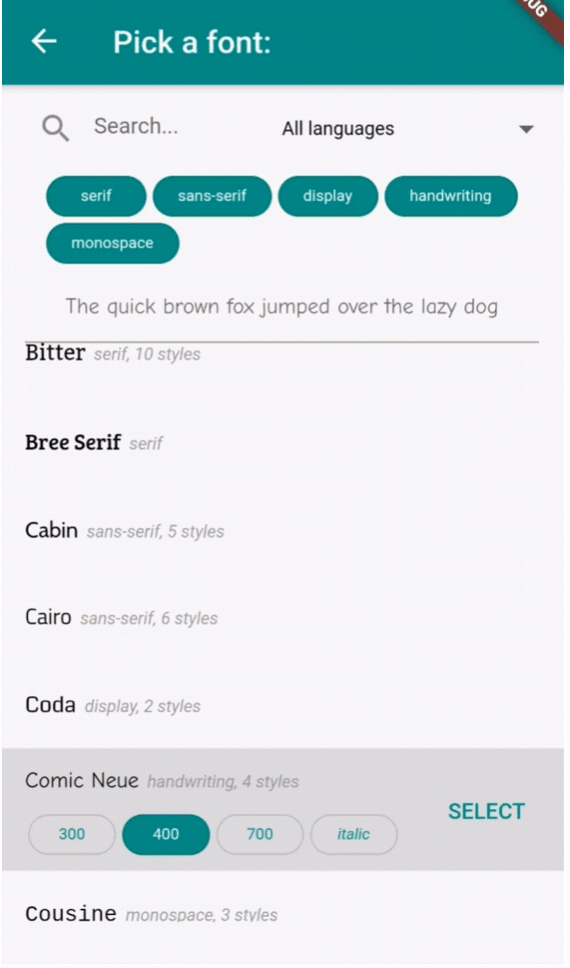
Ein Flutter-Paket, das ein anpassbares Widget zur Auswahl von Google Fonts aus einem Dropdown-Menü oder einer dedizierten Seite bereitstellt. Es integriert sich nahtlos in Flutter-Anwendungen auf mehreren Plattformen und ermöglicht es Benutzern, Schriftarten direkt innerhalb der App-Oberfläche zu durchsuchen und anzuwenden. Das Paket vereinfacht die Integration von Schriftarten, indem es die umfangreiche Bibliothek von Google Fonts nutzt und eine saubere und intuitive Auswahl-Erfahrung bietet. Ideal für Anwendungen, die dynamische Typografie-Anpassung erfordern, wie Design-Tools, Texteditoren oder kreative Anwendungen.
Anwendungsfälle
App mit dynamischer Textgestaltung
Design- und Typografietools
Texteditor mit Schriftartauswahl
Anpassbare UI-Themen
Bildbasierte Bildungs-Apps
kreative Content-Erstellungs-Apps
Hauptmerkmale
Google Fonts-Integration
Anpassbarer Dropdown oder Vollbild-Auswahlfeld
Plattformübergreifende Unterstützung
Einfache Schriftartanwendung
Leicht und schnell
Fontvorschau unterstützt
Geeignet für
Entwickler, die textintensive Apps erstellen
Designorientierte Flutter-Anwendungen
Apps, die Benutzer-Schriftartanpassung erfordern
Bildungs- und kreatives Software
UI/UX-Designer, die Flutter verwenden
Hinweise
Internetverbindung erforderlich für das Laden von Schriftarten
Kann die App-Größe leicht erhöhen
Beschränkt auf Google Fonts
Die Fonten-Rendern-Leistung variiert auf älteren Geräten
Kein Offline-Schriftart-Unterstützung
Anfangsladezeit für große Schriftarten-Listen
Original-README
Originaler README-Schnappschuss aus dem verknüpften Quell-Repository. Aktuelle Inhalte finden Sie im Repository.
flutter_font_picker
A Flutter widget that lets the user select and apply a Google Font from a custom dropdown.
Provides a FontPicker widget that can be used in a route or dialog as a UI for choosing a font from Google Fonts.
Depends on the google_fonts package for loading and displaying the fonts.
Localizations available for 🇪🇸🇩🇪🇮🇹🇵🇹🇫🇷🇵🇱🇳🇱🇯🇵.
Simple Example
Inside your build method, use a button that when pressed, will navigate to the font picker screen:
PickerFont? _selectedFont;

ElevatedButton(
  child: Text('Pick a font'),
  onPressed: () {
    Navigator.push(
      context,
      MaterialPageRoute(
          builder: (context) => FontPicker(
              onFontChanged: (PickerFont font) {
                _selectedFont = font;
                print("${font.fontFamily} with font weight ${font.fontWeight} and font style ${font.fontStyle}.}");
              },
          ),
      ),
    );
  }),
The onFontChanged function retrieves the font that the user selects with an object containing details like the font's name, weight, style, etc.
You can then use its toTextStyle() method to style any text with the selected font:
Text('This will be styled with the font: $_selectedFont.fontFamily',
      style: selectedFont.toTextStyle()),
Check the example project for more usages.
FontPicker settings
onFontChanged: (required) the callback that returns a PickerFont object with all the details and methods for the user's selected font.
googleFonts: A list of Google fonts to use in the font picker. By default it contains all 975 fonts included in constants.dart. You should only use a limited number of them for performance and data saving, as each font is downloaded and stored to the app's storage when it comes into view. Using up to 100-200 fonts should work fine.
initialFontFamily: The font family to use initially in the font picker. Defaults to 'Roboto'.
showFontInfo: Whether to show font details (category, number of variants) next to each font tile in the list.
showFontVariants: Whether to show font variants (weights and styles) in the font picker. If set to false, user will only be able to select the default variant of each font.
showInDialog: Set this to true if you want to use the font picker inside an AlertDialog (check examples).
recentsCount: Fonts that the user selected before are saved to be shown at the start of the list. Sets how many you want saved as recents.
lang: The language in which to show the UI. Defaults to English ('en'). Other options are 🇪🇸🇩🇪🇮🇹🇵🇹🇫🇷🇵🇱🇳🇱🇯🇵 ('es', 'de', 'it', 'pt', 'fr', 'pl', 'nl', 'ja'). If you need a translation in another language: take a look at the dictionary variable in translations.dart, and send me (or fix) the translations for your language .
FontPicker features
The user can:
Browse a list of any Google fonts you want.
Select a variant (font weight and/or style) for each font.
Filter the fonts by category (serif, sans-serif, handwriting, etc.) or available font glyphs (Latin, Greek, Cyrillic, etc.).
Search the fonts by name.
See the most recently used fonts at the top of the list.