Pakete, Repositories und App-Kategorien suchen

Cover von flutter_gradient_animation_text
Paketdetailsv1.0.2

flutter_gradient_animation_text

Erstellen Sie einen animierten Farbverlaufstext sehr einfach, indem Sie Text, Farben und Dauer der Animation als Eingaben verwenden.

AndroidiOSWebmacOSWindowsLinux
30-Tage-Downloads
1050
Likes
42
Pub-Punkte
140

Paket installieren

flutter pub add flutter_gradient_animation_text

Paketübersicht

Aus öffentlichen Paketdaten erstellte Orientierung.

Ein Flutter-Paket, das Entwicklern ermöglicht, mithilfe von Textinhalt, Farbverläufen und Animationsdauer einfach animierte Gradiententexte zu erstellen. Es vereinfacht den Prozess, ansprechende, dynamische Texteffekte auf mehreren Plattformen in Apps hinzuzufügen. Das Paket ist leichtgewichtig und lässt sich nahtlos in bestehende Flutter-Projekte mit minimalem Aufwand integrieren. Ideal zur Verbesserung von Benutzeroberflächen mit ansprechender Typografie ohne komplexe benutzerdefinierte Animationen.

Anwendungsfälle

  • Animierte Gradiententitel hinzufügen
  • Auffällige App-Kopfzeilen erstellen
  • Splash-Bildschirme verbessern
  • Entwicklung interaktiver Benutzeroberflächenelemente
  • Animiertes Text in Onboarding-Flows

Hauptmerkmale

  • Einfache API mit Text- und Farbeingaben
  • Benutzerdefinierbare Animationsdauer
  • Plattformübergreifende Unterstützung
  • Glatte Verlaufübergänge
  • Minimale Boilerplate-Code

Geeignet für

  • UI-Designer, die visuellen Glanz suchen
  • Entwickler, die moderne App-Oberflächen erstellen
  • Projekte, die animierte Typografie erfordern
  • Anfänger lernen Flutter-Animationen
  • Apps mit dynamischen oder interaktiven Textelementen

Hinweise

  • Leistungsbeeinträchtigung bei vielen animierten Texten
  • Begrenzte Anpassungsmöglichkeiten außer Gradient und Dauer
  • Kann eine Optimierung für Low-End-Geräte erfordern
  • Das Animationsverhalten kann sich geringfügig von Plattform zu Plattform unterscheiden
  • Nicht geeignet für statische Textgestaltung

Original-README

Originaler README-Schnappschuss aus dem verknüpften Quell-Repository. Aktuelle Inhalte finden Sie im Repository.

Static Badge Static Badge Static Badge Static Badge

This package lets you make animated gradient texts without any hassle. Just pass the text, colors, the duration of the animation and you're done! Using the transform and reverse, you can achieve amazing effects. For More info read the docs below.

Getting started

Install the package using the following command:

flutter pub add flutter_gradient_animation_text

Import the package in your dart file using the following code:

import 'package:flutter_gradient_animation_text/flutter_gradient_animation_text.dart';

And you are good to go!

Usage

Create your animated gradient text. The 3 required arguments are:

  1. text(Text): The text.
  2. colors(List<Colors>): List of colors you want in your gradient.
  3. duration(Duration): Duration for which a single gradient animation runs.
// rainbow text
GradientAnimationText(
    text: Text(
        'Rainbow Text 1',
        style: TextStyle(
            fontSize: 50,
        ),
    ),
    colors: [
        Color(0xff8f00ff),  // violet
        Colors.indigo,
        Colors.blue,
        Colors.green,
        Colors.yellow,
        Colors.orange,
        Colors.red,
    ],
    duration: Duration(seconds: 5),
),

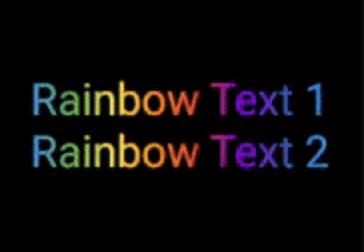
Rainbow Text 1

Reverse the animation. This plays the animation backwards when a single iteration of the forward animation is completed. You set reverse to true to enable this.

// rainbow text with reverse
GradientAnimationText(
    text: Text(
        'Rainbow Text 1',
        style: TextStyle(
            fontSize: 50,
        ),
    ),
    colors: [
        Color(0xff8f00ff),  // violet
        Colors.indigo,
        Colors.blue,
        Colors.green,
        Colors.yellow,
        Colors.orange,
        Colors.red,
    ],
    duration: Duration(seconds: 5),
    reverse: true,  // reverse
),

Rainbow Text 2

Play with colors. It is possible to use the same color more than once to increase the area it covers. Gold Text Example: The following 2 Gold Text animations have different number of Colors.amber color.

// gold text 1
GradientAnimationText(
    text: Text(
        'Gold Text 1',
        style: TextStyle(
            fontSize: 50,
            fontWeight: FontWeight.bold,
        ),
    ),
    colors: [
        Colors.amber,   // 1
        Colors.white,
    ],
    duration: Duration(seconds: 5),
    reverse: true,
),
// gold text 2
GradientAnimationText(
    text: Text(
        'Gold Text 2',
        style: TextStyle(
            fontSize: 50,
            fontWeight: FontWeight.bold,
        ),
    ),
    colors: [
        Colors.amber,   // 1
        Colors.amber,   // 2
        Colors.amber,   // 3
        Colors.white,
    ],
    duration: Duration(seconds: 5),
    reverse: true,
),

Gold Text

Transform your gradient. You can transform your gradient using transform property. Use GradientTranform classes such as SweepGradient, and GradientRotation to tranform.

// Tranform Text
GradientAnimationText(
    text: Text(
    'Tranform Text',
        style: TextStyle(
            fontSize: 90,
            fontWeight: FontWeight.bold,
        ),
    ),
    colors: [
        Color(0xFF061A9C),
        Color(0xff92effd),
    ],
    duration: Duration(seconds: 5),
    transform: GradientRotation(math.pi / 4),   // tranform
),

Tranform Text

Available Properties

Property Type Description
text Text The text to be used in the animation.
colors List Colors of the animation.
duration Duration Duration for which a single gradient animation runs.
reverse bool? If you want to reverse the animation.
transform GradientTransform? You can transform your gradient.

Author

This package is developed by Sahil Shah.

Kategorien

Quell-Repository

Projekte, die dieses Paket verwenden

Noch keine Daten verfügbar.