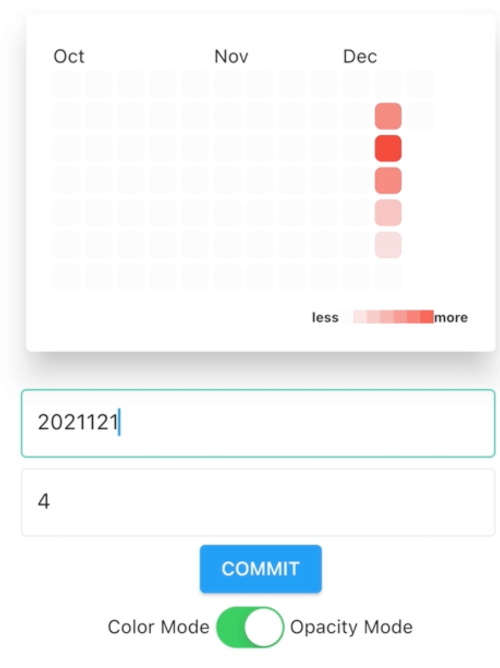
Aus öffentlichen Paketdaten erstellte Orientierung.
Ein Flutter-Paket, das einen Heatmap-Kalender implementiert, der von GitHubs Beitragsschema inspiriert ist und sowohl traditionelle als auch Kalenderansichten bietet. Es visualisiert Daten über Daten mithilfe der Farbintensität zur Darstellung von Aktivitätsleveln und eignet sich hervorragend zum Verfolgen von Gewohnheiten, Produktivität oder Nutzerengagement im Zeitverlauf. Das Paket unterstützt mehrere Plattformen wie Android, iOS, Web, macOS, Windows und Linux und gewährleistet breite Kompatibilität. Anpassbare Farben, Datumsbereiche und Ereignismarker erhöhen seine Flexibilität für verschiedene Anwendungsfälle.
Anwendungsfälle
Tägliche Gewohnheiten verfolgen
Benutzerengagement visualisieren
Überwachung von Produktivitätstrends
Aktivitätsverlauf anzeigen
Wiederkehrende Ereignisse planen
Hauptmerkmale
Heatmap-Design im Stil von GitHub
Zweifach-Ansichtsmodi (traditionell und Kalender)
Farbintensität für Aktivitätsstufen
Plattformübergreifende Unterstützung
Anpassbare Datumsbereiche
Ereignismarker-Integration
Geeignet für
Produktivitäts-Apps
Gesundheits- und Fitness-Tracker
Entwickler-Dashboards
Benutzeraktivitätsanalyse
Gewohnheitsverfolgungstools
Hinweise
Benötigt datenbasierte Eingabe
Beschränkt auf Datenebene
Möglicherweise ist eine Leistungsoptimierung für große Datensätze erforderlich
Nicht für die interaktive Datumsauswahl geeignet
Abhängig von der genauen Formatierung des Zeitstempels
Original-README
Originaler README-Schnappschuss aus dem verknüpften Quell-Repository. Aktuelle Inhalte finden Sie im Repository.
Flutter Heatmap Calendar
Flutter Heatmap Calendar inspired by github contribution chart.
Flutter Heatmap Calendar provides traditional contribution chart called HeatMap and calendar version of it called HeatMapCalendar.
Getting started
Depend on it.
flutter pub add flutter_heatmap_calendar
or
Add below line to your personal package's pubspec.yaml.
Sets of color values for its thresholds key value. At least one Color is required. Be aware that only first color will be used if ColorMode is ColorMode.opacity.
defaultColor
Color?
Color(0xFFF8F9FA)
Default color of every block.
textColor
Color?
Color(0xFF8A8A8A)
Color value of every text.
colorMode
ColorMode
ColorMode.opacity
ColorMode.opacity requires just one colorsets value and changes color dynamically based on hightest value of datasets. ColorMode.color changes colors based on colorsets thresholds key value.
size
double?
20
The size of every block.
fontSize
double?
null
The size of every text.
onClick
Function(DateTime)?
null
Callback function which will be called if user clicks the block.
margin
EdgeInsets?
EdgeInsets.all(2)
The margin value of block.
borderRadius
double?
5
Border radius value of block.
scrollable
bool
false
Make HeatMap scrollable if scrollable is true.
showText
bool?
false
Show day text in every block if showText is true.
showColorTip
bool?
true
Show color tip if showColorTip is true.
colorTipHelper
List<Widget?>?
null
Widgets which are shown at left and right side of colorTip. First value is the left side widget and second value is the right side widget. Give null value makes default 'less' and 'more' text.
colorTipCount
int?
7
Length of colorTip block.
colorTipSize
double?
10
The size of colorTip.
HeatMapCalendar
Props
Types
Default
Description
initDate
DateTime?
Today ( DateTime.now() )
Initialized Year/Month value of HeatMapCalendar.
datasets
Map<DateTime, int>?
null
Sets of data which to be displayed.
colorsets
Map<int, Color>
required
Sets of color values for its thresholds key value. At least one Color is required. Be aware that only first color will be used if ColorMode is ColorMode.opacity.
defaultColor
Color?
Color(0xFFF8F9FA)
Default color of every block.
textColor
Color?
Color(0xFF8A8A8A)
Color value of every text.
colorMode
ColorMode
ColorMode.opacity
ColorMode.opacity requires just one colorsets value and changes color dynamically based on hightest value of datasets. ColorMode.color changes colors based on colorsets thresholds key value.
size
double?
42
The size of every block.
fontSize
double?
null
The size of every text.
monthFontSize
double?
12
The size of month label.
weekFontSize
double?
12
The size of week label.
weekTextColor
Color?
Color(0xFF758EA1)
Default color of every block.
onClick
Function(DateTime)?
null
Callback function which will be called if user clicks the block.
margin
EdgeInsets
EdgeInsets.all(2)
The margin value of block.
borderRadius
double?
5
Border radius value of block.
flexible
bool?
false
Makes HeatMapCalendar's size dynamically fit on screen. If flexible is true then, size props will be ignored.
showColorTip
bool?
true
Show color tip if showColorTip is true.
colorTipHelper
List<Widget?>?
null
Widgets which are shown at left and right side of colorTip. First value is the left side widget and second value is the right side widget. Give null value makes default 'less' and 'more' text.
MIT LicenseCopyright (c) 2021KimSeungHwanPermissionis hereby granted, free of charge, to any person obtaining a copy
of this software and associated documentation files (the "Software"), to deal
in the Software without restriction, including without limitation the rights
to use, copy, modify, merge, publish, distribute, sublicense, and/or sell
copies of the Software, and to permit persons to whom the Softwareis
furnished to do so, subject to the following conditions:
The above copyright notice and this permission notice shall be included in all
copies or substantial portions of the Software.
THE SOFTWARE IS PROVIDED "AS IS", WITHOUT WARRANTY OF ANY KIND, EXPRESS OR
IMPLIED, INCLUDING BUT NOT LIMITED TO THE WARRANTIES OF MERCHANTABILITY,
FITNESS FOR A PARTICULAR PURPOSE AND NONINFRINGEMENT. IN NO EVENT SHALL THE
AUTHORS OR COPYRIGHT HOLDERS BE LIABLE FOR ANY CLAIM, DAMAGES OR OTHER
LIABILITY, WHETHER IN AN ACTION OF CONTRACT, TORT OR OTHERWISE, ARISING FROM,
OUT OF OR IN CONNECTION WITH THE SOFTWARE OR THE USE OR OTHER DEALINGS IN THE
SOFTWARE.