Aus öffentlichen Paketdaten erstellte Orientierung.
Ein Flutter-Paket, das den Standard-ListView mit erweiterten Funktionen wie Sprungindex-Navigation, Positionspersistenz während Neuerstellungen und verbessertem Scrollverhalten erweitert. Es ist darauf ausgelegt, eine flüssigere Benutzererfahrung in listenintensiven Anwendungen zu bieten, indem der Scrollzustand erhalten bleibt und eine schnelle Navigation durch große Datensätze ermöglicht wird. Ideal für Apps, die effizientes und reaktionsfähiges Listenmanagement über mehrere Plattformen hinweg erfordern.
Anwendungsfälle
Große Datenlisten mit schneller Navigation
Scrollposition nach Aktualisierungen beibehalten
Verbesserte Benutzererfahrung bei langen Listen
Plattformübergreifende Listenkonsistenz
Dynamisches Inhaltsreloading ohne Verlust des Scrollzustands
Alphabetische Sprungindizes implementieren
Hauptmerkmale
Sprungindex für schnelle Navigation
Beibehaltung der Scrollposition während Neuberechnungen
Optimierter Leistung für große Listen
Unterstützt alle wichtigen Flutter-Plattformen
anpassbare Indexindikatoren
Glatte Scroll-Übergänge
Geeignet für
Entwickler, die komplexe Listeninterfaces erstellen
Apps mit dynamischen oder häufig aktualisierten Listen
Benutzer, die eine intuitive Listen-Navigation benötigen
Plattformübergreifende mobile und Web-Anwendungen
Anwendungen, die eine leistungsstarke Listenrenderung erfordern
Hinweise
Erfordert sorgfältige Integration mit bestehender Listenlogik
Kann die Bundle-Größe leicht erhöhen
Am besten geeignet für Listen mit mehr als 50 Elementen
Eingeschränkte Anpassungsmöglichkeiten für nicht-standardmäßige Listenlayouts
Abhängig von der Kompatibilität mit stabiler Flutter-Version
Original-README
Originaler README-Schnappschuss aus dem verknüpften Quell-Repository. Aktuelle Inhalte finden Sie im Repository.
Flutter List View
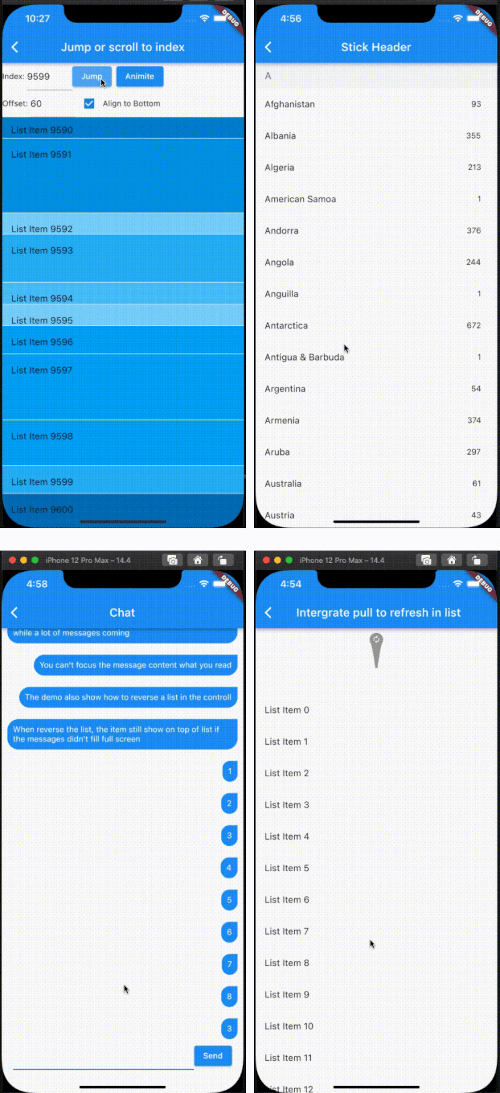
Enhance list view to support scroll to index, jump to index, header sticky, enable without scroll when insert data on top and turn performance to reused items.
Features
Support the list view to jump to and scroll to index.
Support for inserting data without scrolling
Support for show top in reverse mode if the data can't fill the full viewport.
Support sticky header.
Support integrated pull_to_refresh
When initializing data, allow for scrolling to specify an index.
To save performance, flutter list_view always reuses the rendered item.
Support to keep specifying items without reusing and disposing of them once the item is created.
[!NOTE]
The list item will be reuse when disableCacheItems=false and the invisible item will destroy. This mean, one item may be create or destroy multiple times. So The Item widget must not have any state, as it may lead to unforeseeable issues. If you want work same with list_view which item didn't destroy after create, please put onIsPermanent: (keyOrIndex) => true to FlutterListViewDelegate
If you want better user expierence, preferItemHeight or onItemHeight may set to.
preferItemHeight
The package don't know the item's height, If you don't set, package alway think the item height is 50 util layout the item. If you know the height, you should set it.
onItemHeight
like preferItemHeight, the function will used to get height of each item util the item layout.
Notice: Keep positoin need implement onItemKey, the onItemKey used to identify the unique of item. The key should difference with other items' key.
We use the key to know what position you insert to current list. if you insert a item before the rendered item, package should increase the scrollOffset.
@overrideWidgetbuild(BuildContext context) {
returnScaffold(
appBar: AppBar(
title: constText("Intergrate pull to refresh in list"),
),
body: SmartRefresher(
enablePullDown: true,
enablePullUp: true,
header: constWaterDropHeader(),
footer: CustomFooter(
builder: (context, mode) {
Widget body;
if (mode == LoadStatus.idle) {
body = constText("pull up load");
} elseif (mode == LoadStatus.loading) {
body = constCupertinoActivityIndicator();
} elseif (mode == LoadStatus.failed) {
body = constText("Load Failed!Click retry!");
} elseif (mode == LoadStatus.canLoading) {
body = constText("release to load more");
} else {
body = constText("No more Data");
}
returnSizedBox(
height: 55.0,
child: Center(child: body),
);
},
),
controller: _refreshController,
onRefresh: _onRefresh,
onLoading: _onLoading,
child: FlutterListView(
delegate: FlutterListViewDelegate(
(BuildContext context, int index) =>
ListTile(title: Text('List Item ${data[index]}')),
childCount: data.length,
)),
),
);
}
Support to keep specifying items without reusing and disposing of them once the item is created.
FlutterListView(
delegate: FlutterListViewDelegate(
(BuildContext context, int index) =>
Item(text: data[index].toString()),
childCount: data.length,
// If onItemKey is not given, the key is index// The example is indicate the "40" item will not be reused and disposed after it was created
onIsPermanent: (key) => key == "40"))