Pakete, Repositories und App-Kategorien suchen

Cover von flutter_map_line_editor
Paketdetailsv8.0.0

flutter_map_line_editor

Ein einfacher Linien- und Polygon-Editor für `flutter_map` mit ziehbaren Markern

AndroidiOSWebmacOSWindowsLinux
30-Tage-Downloads
6040
Likes
32
Pub-Punkte
130

Paket installieren

flutter pub add flutter_map_line_editor

Paketübersicht

Aus öffentlichen Paketdaten erstellte Orientierung.

Ein Flutter-Paket, das interaktives Bearbeiten von Linien und Polygonen innerhalb des flutter_map-Widgets ermöglicht. Es bietet ziehbare Marker zur Anpassung von Ecken, wodurch Benutzer Vektorformen direkt auf einer Karte erstellen oder bearbeiten können. Speziell für Geolocation-Anwendungen konzipiert, die Benutzereingaben zu Kartengeometrien erfordern, integriert es sich nahtlos in die bestehenden Funktionen von flutter_map. Der Editor unterstützt sowohl Linien- als auch Polygonformen und bietet intuitive Punktmanipulation über Touch- oder Mausinteraktionen auf allen unterstützten Plattformen.

Anwendungsfälle

  • Kartenbasierte Formenerstellung
  • Interaktive Routenplanung
  • Geodatenannotation
  • Bearbeitung der Polygongrenze
  • Echtzeit-Kartendrawing
  • benutzergetriebene Eingabe von Kartengeometrie

Hauptmerkmale

  • verschiebbare Eckpunkt-Marker
  • Unterstützung für Linien und Polygone
  • Nahtlose Integration mit flutter_map
  • Plattformübergreifende Kompatibilität
  • Echtzeit-Formaktualisierungen
  • Einfaches API für Initialisierung und Ereignishandling

Geeignet für

  • GIS-Anwendungen
  • Mapping-Tools mit Benutzereingabe
  • Interaktive Karten-Dashboards
  • Feld-Daten-Erfassungsanwendungen
  • pädagogische Kartierungssoftware
  • Prototypisierung von Karteninteraktionsfunktionen

Hinweise

  • Benötigt flutter_map-Abhängigkeit
  • Beschränkt auf grundlegende Formenbearbeitung
  • Kein integrierter Snap oder Ausrichtung
  • Möglicherweise benutzerdefinierte Stilisierung für Markierungen erforderlich
  • Leistungseinfluss bei vielen Ecken
  • Nicht geeignet für komplexe Geometrieoperationen

Original-README

Originaler README-Schnappschuss aus dem verknüpften Quell-Repository. Aktuelle Inhalte finden Sie im Repository.

Line & Polygon Editor for flutter_map

pub package License: MIT Support me on Ko-fi

A basic line and polygon editor that works with flutter_map, relying on DragMarker from flutter_map_dragmarker.

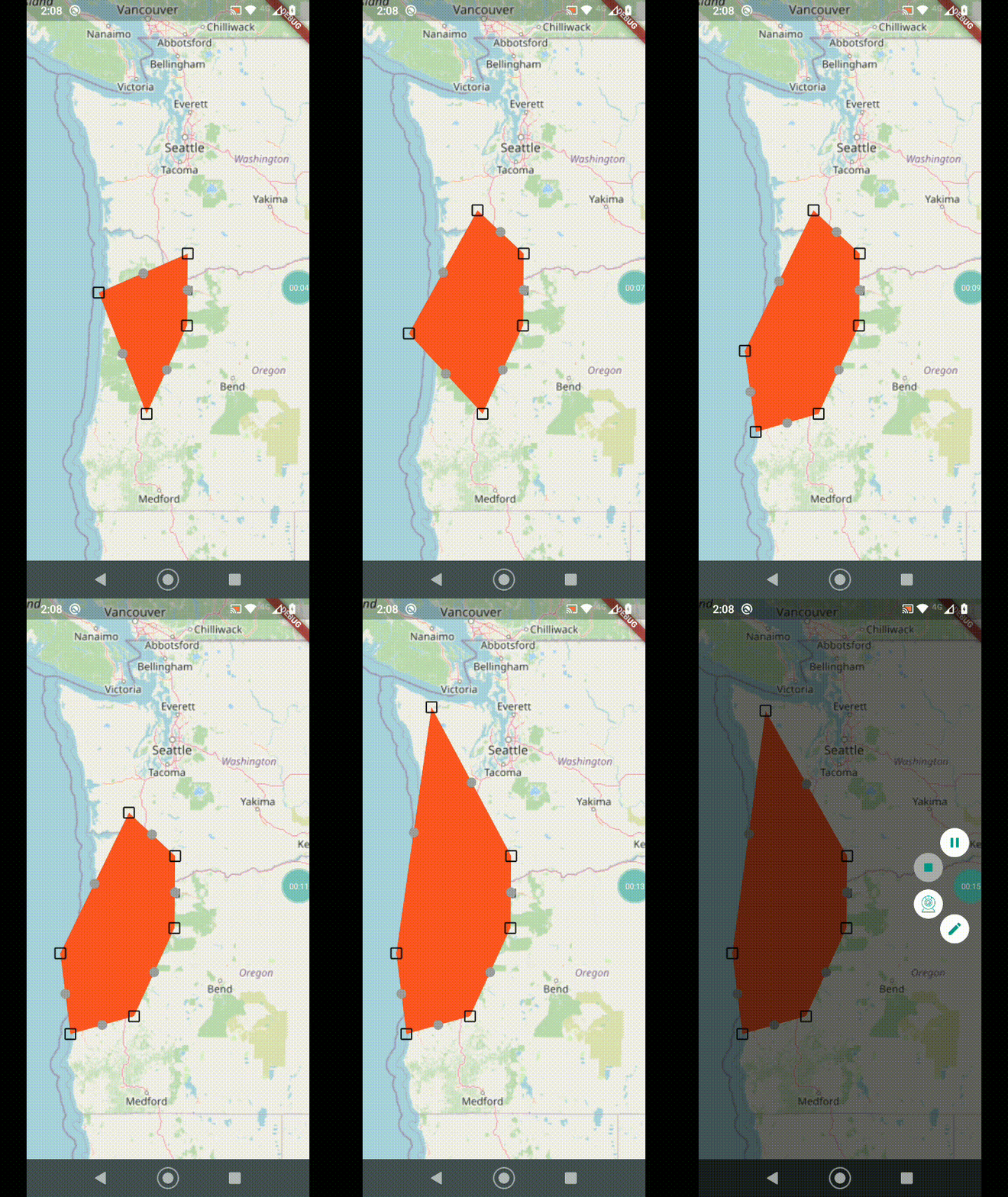
Demo

Demo

Getting started

To use this package, first add flutter_map_line_editor as a dependency in your pubspec.yaml file:

dependencies:
  flutter_map_line_editor: <latest version>

See the example directory for a complete example app demonstrating the usage of this package, here are the most important features:

  • Tap the map to add a marker, add as many as you want.
  • Drag the main points to move them.
  • Drag the intermediate points to create a new point there and drag to where you want.
  • Long press to delete a point.

Usage

Once the package is installed, make sure to import the package in the file that you are going to need it, you may also need to import flutter_map_dragmarker:

import 'package:flutter_map_dragmarker/flutter_map_dragmarker.dart';
import 'package:flutter_map_line_editor/flutter_map_line_editor.dart';

Set up a new editor instance, tipically inside initState():

var polyEditor = PolyEditor(
  points: testPolyline.points,
  pointIcon: Icon(Icons.crop_square, size: 23),
  intermediateIcon: Icon(Icons.lens, size: 15, color: Colors.grey),
  callbackRefresh: () => { this.setState(() {})},
  addClosePathMarker: false, // set to true if polygon
);

The PolyEditor takes a list of LatLng points that are used to put DragMarker's over these locations. PolyEditor does not care if the given list of points is a polyline, it could be something else. This list will be edited in place so that when the build method is triggered it will use updated points.

You must also pass a Widget (tipically an Icon) using the pointIcon parameter that will be used to represent each DragMarker.

You may also pass the optional parameter intermediateIconto display another DragMarker halfway between the main points. Dragging this marker will create another main point and the line will be split.

The screen needs to be updated during a drag, so callbackRefresh takes a function that will get called each drag frame.

For polygons or “closed paths” set the parameter addClosePathMarker to true so that the end auto-returns to the start. Otherwise, if you just want a basic polyline, set this to false.

You can add a point programmatically using the onTap callback in MapOptions:

onTap: (ll) {
  polyEditor.add(testPolyline.points, ll);
},

Add the correspondent layers as FlutterMap childrens:

FlutterMap(
  options: MapOptions(
    onTap: (_, ll) {
      polyEditor.add(testPolyline.points, ll);
    },
  ),
  children: [
    // .....
    PolylineLayer(polylines: polyLines),
    DragMarkers(markers: polyEditor.edit()),
  ],
),

Report issues or feature requests in the GitHub repository, Pull Requests are welcome!

License

This package is licensed under the permissive MIT License. See the LICENSE file in this repository to get a full copy.

Kategorien

Abhängigkeiten

Abhängigkeiten 2 Einträge

Quell-Repository

Projekte, die dieses Paket verwenden