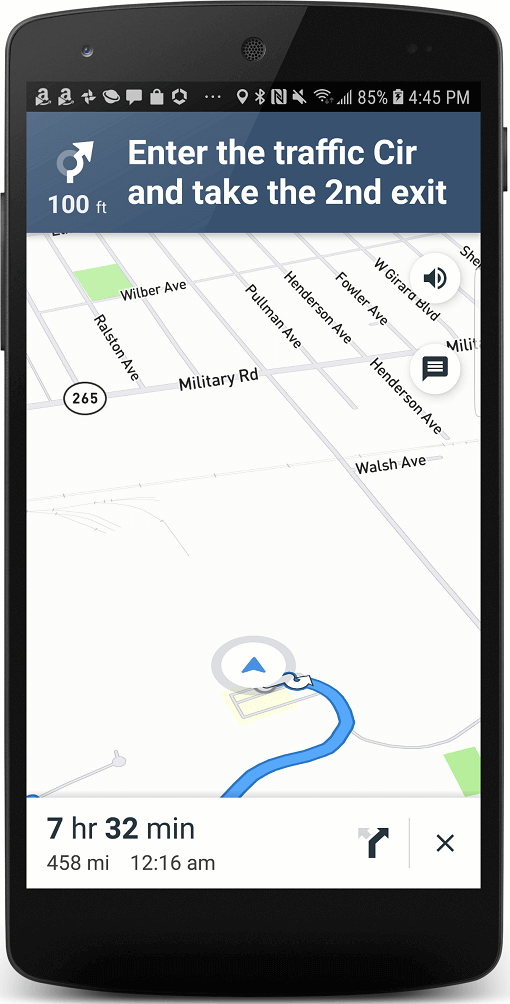
Aus öffentlichen Paketdaten erstellte Orientierung.
Das flutter_mapbox_navigation-Paket ermöglicht die Wegbeschreibung in Flutter-Anwendungen mithilfe der Routenplanungs- und Kartendienste von Mapbox. Es erlaubt Entwicklern die nahtlose Integration von Echtzeit-Navigation direkt innerhalb ihrer Anwendungen, ohne auf externe Karten-Apps umschalten zu müssen. Mit Unterstützung für Android und iOS bietet es eine nativeähnliche Navigationserfahrung mit Routendarstellung, Sprachanweisungen und Live-Tracking. Das Paket ist für einfache Integration und Anpassung konzipiert und eignet sich ideal für Apps, die ortsbasierte Navigationsfunktionen benötigen.
Anwendungsfälle
In-App-Navigation
Taxi-Apps
Lieferverfolgung
Reiseführer-Anwendungen
Feldservice-Management
Hauptmerkmale
Schritt-für-Schritt-Anleitung
Live-Standortverfolgung
Sprachführung
Mapbox-Integration
Anpassbare Benutzeroberfläche
Geeignet für
Navigationsintensive Apps
Standortbasierte Dienste
Mobile Flottenverwaltung
Reise- und Logistik-Apps
Hinweise
Benötigt Mapbox-API-Schlüssel
Eingeschränkter Offline-Unterstützung
Abhängig von Mapbox SDKs
Höherer Akkuverbrauch während der Navigation
Berechtigungen für Standortzugriff erforderlich
Original-README
Originaler README-Schnappschuss aus dem verknüpften Quell-Repository. Aktuelle Inhalte finden Sie im Repository.
flutter_mapbox_navigation
Add Turn By Turn Navigation to Your Flutter Application Using MapBox. Never leave your app when you need to navigate your users to a location.
Features
A full-fledged turn-by-turn navigation UI for Flutter that’s ready to drop into your application
Go to your Mapbox account dashboard and create an access token that has the DOWNLOADS:READ scope. PLEASE NOTE: This is not the same as your production Mapbox API token. Make sure to keep it private and do not insert it into any Info.plist file. Create a file named .netrc in your home directory if it doesn’t already exist, then add the following lines to the end of the file:
where PRIVATE_MAPBOX_API_TOKEN is your Mapbox API token with the DOWNLOADS:READ scope.
Mapbox APIs and vector tiles require a Mapbox account and API access token. In the project editor, select the application target, then go to the Info tab. Under the “Custom iOS Target Properties” section, set MBXAccessToken to your access token. You can obtain an access token from the Mapbox account page.
In order for the SDK to track the user’s location as they move along the route, set NSLocationWhenInUseUsageDescription to:
Shows your location on the map and helps improve OpenStreetMap.
Users expect the SDK to continue to track the user’s location and deliver audible instructions even while a different application is visible or the device is locked. Go to the Capabilities tab. Under the Background Modes section, enable “Audio, AirPlay, and Picture in Picture” and “Location updates”. (Alternatively, add the audio and location values to the UIBackgroundModes array in the Info tab.)
Android Configuration
Mapbox APIs and vector tiles require a Mapbox account and API access token. Add a new resource file called mapbox_access_token.xml with it's full path being <YOUR_FLUTTER_APP_ROOT>/android/app/src/main/res/values/mapbox_access_token.xml. Then add a string resource with name "mapbox_access_token" and your token as it's value as shown below. You can obtain an access token from the Mapbox account page.
Add the MapBox Downloads token with the downloads:read scope to your gradle.properties file in Android folder to enable downloading the MapBox binaries from the repository. To secure this token from getting checked into source control, you can add it to the gradle.properties of your GRADLE_HOME which is usually at $USER_HOME/.gradle for Mac. This token can be retrieved from your MapBox Dashboard. You can review the Token Guide to learn more about download tokens
MAPBOX_DOWNLOADS_TOKEN=sk.XXXXXXXXXXXXXXX
After adding the above, your gradle.properties file may look something like this:
Update MainActivity.kt to extends FlutterFragmentActivity vs FlutterActivity. Otherwise you'll get Caused by: java.lang.IllegalStateException: Please ensure that the hosting Context is a valid ViewModelStoreOwner.
//import io.flutter.embedding.android.FlutterActivity
import io.flutter.embedding.android.FlutterFragmentActivity

class MainActivity: FlutterFragmentActivity() {
}
Add implementation platform("org.jetbrains.kotlin:kotlin-bom:1.8.0") to android/app/build.gradle