Aus öffentlichen Paketdaten erstellte Orientierung.
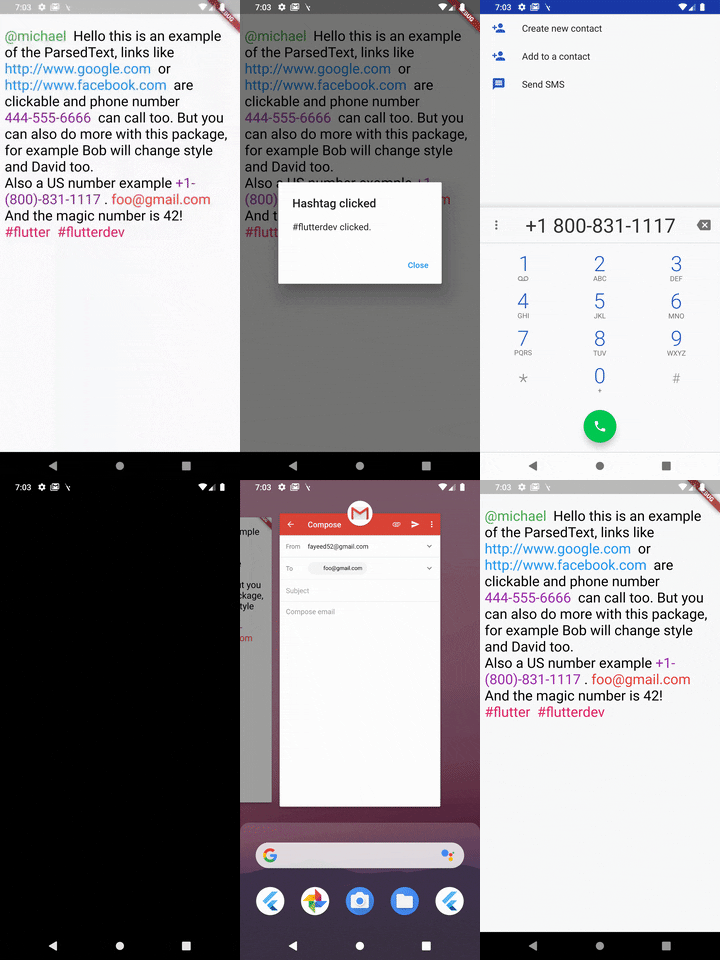
Ein Flutter-Paket, das die Analyse von Text ermöglicht, um bestimmte Muster – wie URLs, E-Mails oder Hashtags – automatisch in interaktive Text-Widgets zu konvertieren. Es vereinfacht den Prozess der Darstellung formatierten Textes mit klickbaren Elementen und verbessert die Benutzererfahrung in Apps, die dynamischen Inhalt anzeigen. Das Paket unterstützt mehrere Plattformen und lässt sich nahtlos in bestehende Flutter-Projekte integrieren. Es ist ideal für Chat-Oberflächen, Social-Media-Feeds oder jede Benutzeroberfläche, die reichhaltige Textanalyse erfordert.
Anwendungsfälle
Parsing von URLs in Chat-Nachrichten
Hashtags und Erwähnungen hervorheben
Klickbare E-Mail-Links erstellen
Reiches Textrendering in sozialen Feeds
Formatierter benutzererzeugter Inhalt wird angezeigt
Hauptmerkmale
Automatische Erkennung von URLs, E-Mails und Hashtags
Anpassbare Formatierung für analysierten Text
Unterstützt mehrere Plattformziele
Einfache Integration mit bestehenden Text-Widgets
erweiterbares Musterübereinstimmungssystem
Geeignet für
Chat- und Messaging-Apps
Soziale Medien-Anwendungen
Inhaltsreiche Benutzeroberflächen mit dynamischen Texten
Apps, die interaktive Textelemente benötigen
Entwickler, die leichte Textanalyse suchen
Hinweise
Kann benutzerdefinierte Regex für erweiterte Muster erfordern
Leistungseinfluss bei sehr langen Texten
Eingeschränkter integrierter Support für komplexe Formatierung
ParsedText can receive this paramters & all the RichText parameters:
text: Text that will be parsed and rendered.
style: It takes a TextStyle object as it's property to style all the non links text objects.
parse: Array of MatchText object - used for defining structure for pattern matching .
MatchText(
  type: ParsedType.EMAIL, // predefined type can be any of this ParsedTypes
  style: TextStyle(
    color: Colors.red,
    fontSize: 24,
  ), // custom style to be applied to this matched text
  onTap: (url) {
    // do something here with passed url
  }, // callback funtion when the text is tapped on
),
You can also define a custom pattern like this:
MatchText(
  pattern: r"\B#+([\w]+)\b", // a custom pattern to match
  style: TextStyle(
    color: Colors.pink,
    fontSize: 24,
  ), // custom style to be applied to this matched text
  onTap: (url) async {
  // do something here with passed url
  }, // callback funtion when the text is tapped on
)
You can also set RegexOption for the custom regex pattern like so:
MatchText(
  pattern: r"\B#+([\w]+)\b", // a custom pattern to match
  regexOptions: RegexOptions(
    multiLine : false,
    caseSensitive : false,
    unicode : false,
    dotAll : false
  ),
  style: TextStyle(
    color: Colors.pink,
    fontSize: 24,
  ), // custom style to be applied to this matched text
  onTap: (url) async {
  // do something here with passed url
  }, // callback funtion when the text is tapped on
)
A boolean that show a diffrent text and passes a diffrent text to the callback
eg: Your str is "Mention [@michel:5455345]" where 5455345 is ID of this user which will be passed as parameter to the callback funtion and @michel the value to display on interface. Your pattern for ID & username extraction : /\[(@[^:]+):([^\]]+)\]/i
Displayed text will be : Mention ^^@michel^^
MatchText(
pattern: r"\[(@[^:]+):([^\]]+)\]",
style: TextStyle(
color: Colors.green,
fontSize: 24,
),
// you must return a map with two keys// [display] - the text you want to show to the user// [value] - the value underneath it
renderText: ({String str, String pattern}) {
Map<String, String> map = Map<String, String>();
RegExp customRegExp = RegExp(pattern);
Match match = customRegExp.firstMatch(str);
map['display'] = match.group(1);
map['value'] = match.group(2);
return map;
},
onTap: (url) {
// do something here with passed url
},
),
ParsedText(
  text:
    "[@michael:51515151] Hello this is an example of the ParsedText, links like http://www.google.com or http://www.facebook.com are clickable and phone number 444-555-6666 can call too. But you can also do more with this package, for example Bob will change style and David too. foo@gmail.com And the magic number is 42! #react #react-native",
  parse: <MatchText>[
    MatchText(
      type: ParsedType.EMAIL,
      style: TextStyle(
        color: Colors.red,
        fontSize: 24,
      ),
      onTap: (url) {
        launch("mailto:" + url);
      },
    ),
  ],
)
Found this project useful? ❤️
If you found this project useful, then please consider giving it a ⭐️ on Github and sharing it with your friends via social media.