Pakete, Repositories und App-Kategorien suchen

Cover von flutter_scroll_to_top
Paketdetailsv2.3.0

flutter_scroll_to_top

Ein Paket, das eine einfache Umhüllung für Ihre Scroll-Widgets bereitstellt, sodass Sie dem Benutzer beim Scrollen eine Aufforderung zum Zurückscrollen nach oben anzeigen können.

30-Tage-Downloads
322
Likes
104
Pub-Punkte
70

Paket installieren

flutter pub add flutter_scroll_to_top

Paketübersicht

Aus öffentlichen Paketdaten erstellte Orientierung.

Ein leichtgewichtiger Flutter-Paket, das scrollbare Widgets umschließt, um automatisch eine 'zum Anfang scrollen'-Anzeige anzuzeigen, wenn der Benutzer nach unten scrollt. Es verbessert die Benutzererfahrung, indem es eine intuitive Möglichkeit bietet, zu Beginn langer Listen oder Scrollansichten zurückzukehren. Das Paket ist einfach zu integrieren und funktioniert nahtlos mit jedem scrollbaren Inhalt, wie ListView, CustomScrollView oder SingleChildScrollView. Es unterstützt die Anpassung des Aussehens und Verhaltens der Schaltfläche.

Anwendungsfälle

  • Ein Scroll-zur-Oben-Schaltfläche zu langen Listen hinzufügen
  • Verbesserung der Benutzererfahrung in scrollbaren Dashboards
  • Verbesserung der Barrierefreiheit in contentintensiven Apps
  • Visuelle Rückmeldung während des Scrollens bereitstellen
  • Vereinfachung der Navigation in verschachtelten Scrollansichten

Hauptmerkmale

  • Automatische Sichtbarkeit basierend auf der Scrollposition
  • Anpassbarer Floating Action Button
  • Minimale Einrichtung mit Wrapper-Widget
  • Funktioniert mit allen scrollbaren Widgets
  • Unterstützt Dunkelmodus und Thema-Integration

Geeignet für

  • Apps mit langem scrollbaren Inhalt
  • Benutzeroberflächen-Designer, die UX priorisieren
  • Entwickler, die eine schnelle Implementierung des Scrollens nach oben suchen
  • Projekte mit minimalen Abhängigkeiten
  • Mobile Apps mit inhaltsreichen Bildschirmen

Hinweise

  • Funktioniert möglicherweise nicht mit komplexen verschachtelten Scrollansichten ohne zusätzliche Konfiguration
  • Benötigt manuelle Behandlung des Scrollcontrollers, wenn nicht der Standard verwendet wird
  • Begrenzte Anpassungsoptionen außer grundlegenden Stilen
  • Nicht geeignet für nicht scrollbare Widgets
  • Abhängig vom plattformspezifischen Scrollverhalten

Original-README

Originaler README-Schnappschuss aus dem verknüpften Quell-Repository. Aktuelle Inhalte finden Sie im Repository.

flutter_scroll_to_top

Pub

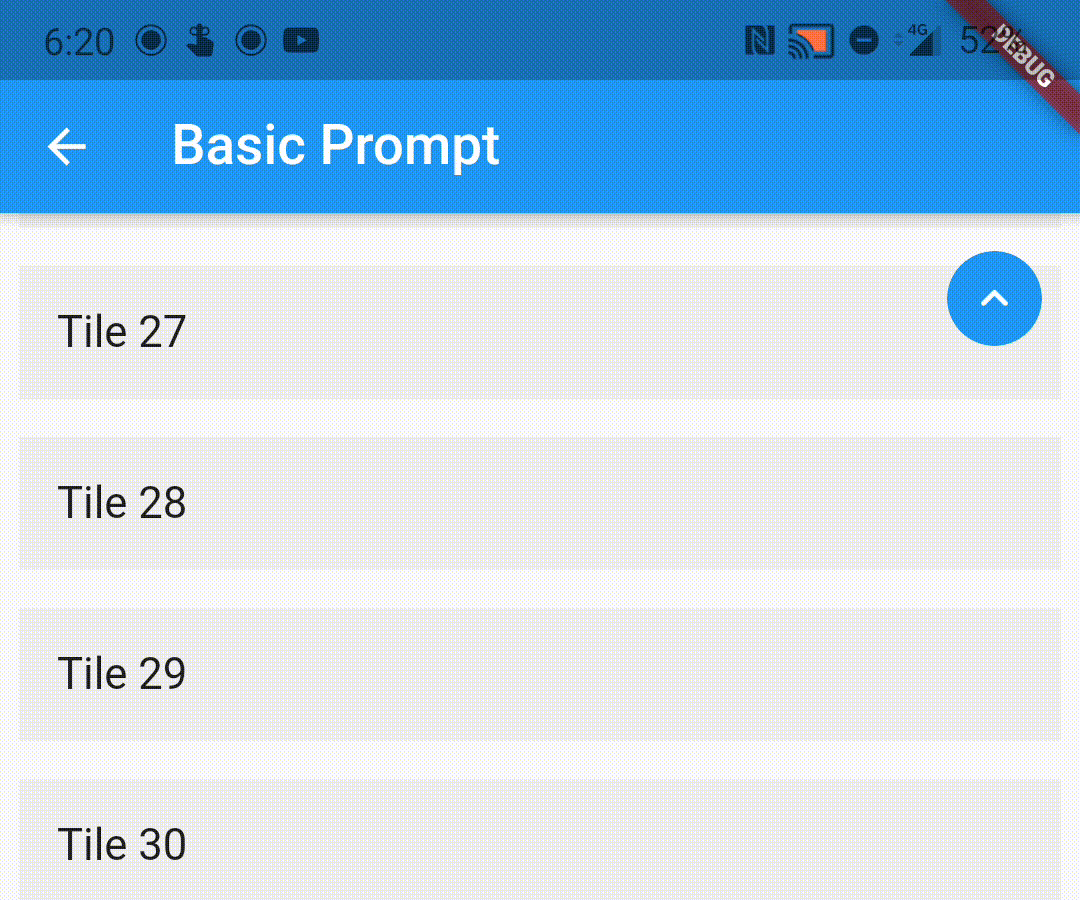
A wrapper to show a scroll to top prompt to the user on ScrollView widgets.

Installing

Add the following dependency to your pubspec.yaml file:

dependencies:
  flutter_scroll_to_top: ^2.2.4

Import the package

import 'package:flutter_scroll_to_top/flutter_scroll_to_top.dart';

ScrollWrapper

Just wrap the scrollable widget you want to show the scroll to top prompt over with a ScrollWrapper.

ScrollWrapper(
    builder: (context, properties) => ListView.builder(
        itemBuilder: (context, index) => Padding(
            padding: const EdgeInsets.all(8.0),
            child: ListTile(
                title: Text('Tile $index'),
                tileColor: Colors.grey.shade200,
            ),
        ),
    ),
)

ScrollView Properties

If the child ScrollView has different properties for scrollController, scrollDirection, primary or reverse parameters than the default values, you need to pass them to the ScrollWrapper widget as it requires the same parameters. It provides a ScrollViewProperties object in the builder callback that you can use to access the properties in the ScrollView widget.

ScrollWrapper(
    primary: true,
    scrollDirection: Axis.horizontal,
    reverse: true,
    builder: (context, properties) => ListView.builder(
        controller: properties.scrollController,
        scrollDirection: properties.scrollDirection,
        reverse: properties.reverse,
        primary: properties.primary,
        itemBuilder: (context, index) => Padding(
            padding: const EdgeInsets.all(8.0),
            child: ListTile(
                title: Text('Tile $index'),
                tileColor: Colors.grey.shade200,
            ),
        ),
    ),
)

Customisation

You can pass the following parameters to customise the prompt accordingly

  • enabledAtOffset - At what scroll offset to enable the prompt on.
  • alwaysVisibleAtOffset - If the prompt is to be always visible at the provided offset. Setting this to false only shows the prompt when the user starts scrolling upwards. Default value is false.
  • scrollOffsetUntilVisible - Offset should the user scroll in the opposite direction before the prompt becomes visible.
  • scrollOffsetUntilHide - Offset should the user scroll before the prompt hides itself, if visible.
  • promptAlignment - Where on the widget to align the prompt.
  • promptDuration - Duration it takes for the prompt to come into view/vanish.
  • promptAnimationCurve - Animation Curve that the prompt will follow when coming into view.
  • promptAnimationType - PromptAnimation that the prompt follows when animating. Has three options, fade, scale and size.
  • scrollToTopDuration - Duration it takes for the page to scroll to the top on prompt button press.
  • scrollToTopCurve - Animation Curve for scrolling to the top.
  • promptTheme - You can pass PromptButtonTheme to modify the prompt button further. It has the following parameters:
    • padding - Padding around the prompt button.
    • iconPadding - Padding around the icon inside the button.
    • icon - The icon inside the button.
    • color - Color of the prompt button.
    • elevation - Elevation of the button.
ScrollWrapper(
    promptAlignment: Alignment.topCenter,
    promptAnimationCurve: Curves.elasticInOut,
    promptDuration: const Duration(milliseconds: 400),
    enabledAtOffset: 300,
    scrollOffsetUntilVisible: 500,
    promptTheme: const PromptButtonTheme(
    icon: Icon(Icons.arrow_circle_up, color: Colors.amber),
    color: Colors.deepPurpleAccent,
    iconPadding: EdgeInsets.all(16),
    padding: EdgeInsets.all(32)),
    builder: (context, properties) => ListView.builder(
        controller: properties.scrollController,
        scrollDirection: properties.scrollDirection,
        reverse: properties.reverse,
        primary: properties.primary,
            itemBuilder: (context, index) => Padding(
            padding: const EdgeInsets.all(8.0),
            child: ListTile(
                title: Text('Tile $index'),
                tileColor: Colors.grey.shade200,
            ),
        ),
    ),
)

Custom Prompt Widget

You can replace the default prompt widget with a widget of your choosing by passing it off in the promptReplacementBuilder parameter.

ScrollWrapper(
    promptReplacementBuilder: (context, function) => MaterialButton(
        onPressed: () => function(),
        child: const Text('Scroll to top'),
    ),
    builder: (context, properties) => ListView.builder(
        controller: properties.scrollController,
        scrollDirection: properties.scrollDirection,
        reverse: properties.reverse,
        primary: properties.primary,
        itemBuilder: (context, index) => Padding(
            padding: const EdgeInsets.all(8.0),
            child: ListTile(
                title: Text('Tile $index'),
                tileColor: Colors.grey.shade200,
            ),
        ),
    ),
)


The prompt shows up inconsistently if I have multipe scrollviews listening to the same scroll controller, how do I fix it?

This is a limitation of the way Flutter handles this scenario. If you are receiving this error (likely due to multiple scrollables under a NestedScrollView), this library bundles a modified version of the scrollviews which would fix this issue.

To use them, add the following import:

import 'package:flutter_scroll_to_top/scroll_view.dart' as scrollview;

Then replace your scrollview in the following way:

Before

ScrollWrapper(
    builder: (context, properties) => ListView.builder(
        itemBuilder: (context, index) => Padding(
            padding: const EdgeInsets.all(8.0),
            child: ListTile(
                title: Text('Tile $index'),
                tileColor: Colors.grey.shade200,
            ),
        ),
    ),
)

After

ScrollWrapper(
    builder: (context, properties) => scrollview.ListView.builder(
        properties: properties,
        itemBuilder: (context, index) => Padding(
            padding: const EdgeInsets.all(8.0),
            child: ListTile(
                title: Text('Tile $index'),
                tileColor: Colors.grey.shade200,
            ),
        ),
    ),
)

Kategorien

Quell-Repository

Projekte, die dieses Paket verwenden