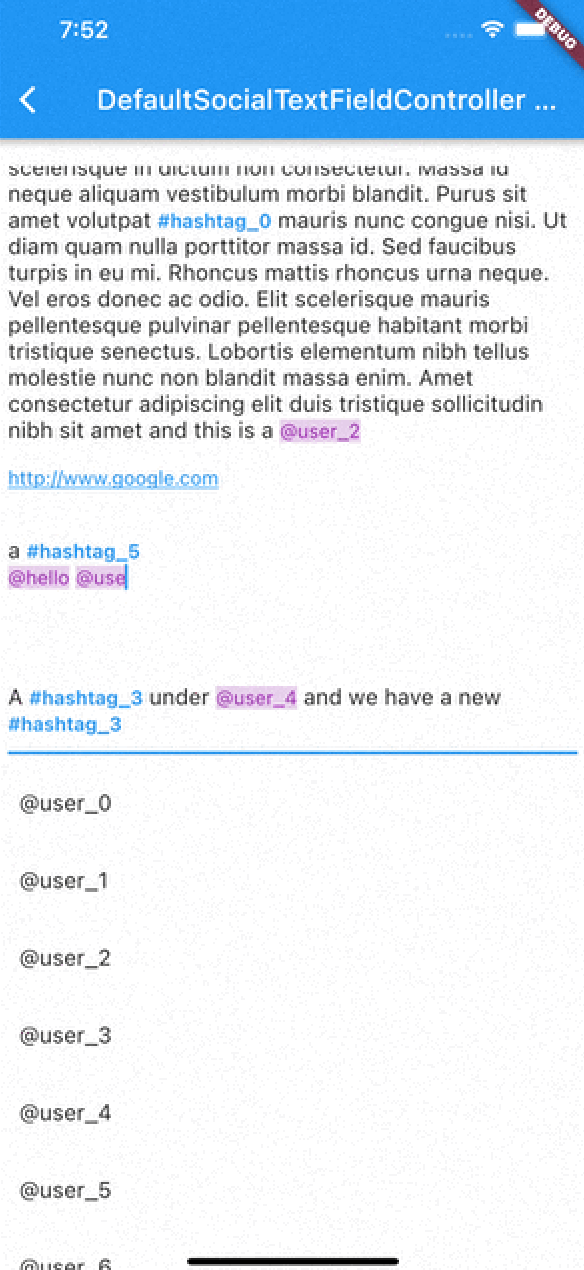
TextEditingController und RichText / TextSpan-Baukasten mit Erkennung von Hashtags, URLs und Erwähnungen mittels regulärer Ausdrücke. Auch mit Tap-Unterstützung.
Aus öffentlichen Paketdaten erstellte Orientierung.
Ein Flutter-Paket, das die Texteingabe mit sozialen Medien-artigen Funktionen verbessert, einschließlich automatischer Erkennung und Formatierung von Hashtags, URLs und Erwähnungen mithilfe von regulären Ausdrücken. Es integriert sich mit TextEditingController und unterstützt Touch-Interaktionen für diese Elemente über RichText und TextSpan. Ideal für Chat-Apps, soziale Plattformen oder jede App, die reichhaltige Textbearbeitung mit interaktiven Inhalten erfordert. Funktioniert auf allen wichtigen Plattformen: Android, iOS, Web, macOS, Windows und Linux.
Anwendungsfälle
Kommentare von Social-Media-Apps
Chat-Anwendungen mit klickbaren Links
Benutzermarkierung in Nachrichten
Rich-Text-Eingabe mit dynamischer Formatierung
Inhalts-Erstellungstools mit Metadaten-Hervorhebung
Hauptmerkmale
Hashtag-Erkennung und Formatierung
Automatische Linkerstellung für URLs und Erwähnungen
berührbare Textabschnitte
RichText-Integration
RegEx-basierte Analyse
Plattformübergreifende Kompatibilität
Geeignet für
Entwickler von sozialen Apps
Teams, die reichhaltige Texteingabe benötigen
Apps mit benutzererzeugtem Inhalt
Interaktive Messaging-Schnittstellen
Anpassbare Texteditoren
Hinweise
Erfordert sorgfältige Anpassung von Regex für Sonderfälle
Möglicherweise ist eine Leistungs-Optimierung für lange Texte erforderlich
Beschränkt auf grundlegende Formatierung ohne erweiterte Gestaltung
Kein integrierter Emoji-Wähler
Hängt von der externen Regex-Logik für Genauigkeit ab
Original-README
Originaler README-Schnappschuss aus dem verknüpften Quell-Repository. Aktuelle Inhalte finden Sie im Repository.
flutter_social_textfield
A Flutter plugin that helps detection of common social media contents.
The current position of the cursor is used for detecting content.
Current detection types are:
HashTag (#): Texts start with #
Mention (@): Text start with @ sign
Web Links: Can detect web links
Emojis: can detect emojis [thanks @moazh]
You can see the supported detection types from DetectedType enum
enum DetectedType{
    mention, //By Default texts starting with @sign
    hashtag,  //By default, texts starting with #hashtag
    url, //By default texts starting with http://xxx.yyy or https://aaa.bbb
    plain_text //Any other type falls into this.
}
One of the main reasons that i want to create this plugin was that i needed to listen detection events from different widgets.
So flutter_social_textfield provides a stream for detections so you can subscribe and listen events when needed.
The Stream Subscriptoin returns SocialContentDetection class:
class SocialContentDetection{
    final DetectedType type; //mention, url, hashtag, plan_text
    final TextRange range; //range of detected content
    final String text; //detected content
    SocialContentDetection(this.type, this.range, this.text);

    @override
    String toString() {
        return 'SocialContentDetection{type: $type, range: $range, text: $text}';
    }
}
DefaultSocialTextFieldController
I've implemented an experimental widget for ease of use. DefaultSocialTextFieldController puts the main content inside a Stack and allows users to show relevant content when curser comes over a detected content
As with version 0.0.9 There are 2 different types of presentation of detection content:
Detection Presentation Mode
DetectionPresentationMode.split_screen : Shows detection view but moving from bottom to determined widget size. useful for full screen textfields like text editors
DetectionPresentationMode.above_text_field : Useful for showing detection view from above the textfield. The location of textfield is detected from the FocusNode automatically.
Please notice the 'scrollPhysics' property of the TextField;
An example usage of the DefaultSocialTextFieldController can be seen in the example project.
The main goal is to provide an easy way to implement features that have been seen in most of the social media applications.
SocialTextSpanBuilder
flutter_social_textfield uses SocialTextSpanBuilder for rendering the text inside the attached textfield.
So if you just want to show formatted text content instead of using inside an editor you can use it like this:
With version 0.0.3 you can also implement onTapDetection function for adding tap gestures to detected strings.
void initBuilder(){
    final Map<DetectedType, RegExp> _regularExpressions = {
        DetectedType.mention:atSignRegExp,
        DetectedType.hashtag:hashTagRegExp,
        DetectedType.url:urlRegex
    };

    final Map<DetectedType, TextStyle> _detectionTextStyles = {
        DetectedType.mention:TextStyle(...)
    };

    final TextStyle _defaultTextStyle = TextStyle();

    final _textSpanBuilder = SocialTextSpanBuilder(regularExpressions: _regularExpressions,defaultTextStyle:_defaultTextStyle,detectionTextStyles: _detectionTextStyles, onTapDetection: (detection){print("Tapped on detection: $detection");});
}

//And you can return RichText content bu calling build(context) method afterwards.
@override
    Widget build(BuildContext context) {
        var height = MediaQuery.of(context).size.height * 0.4;
        return Scaffold(
            appBar: AppBar(
                title: Text(widget.title),
            ),
        body: Container(
           child:RichText(
              text:_textSpanBuilder.build(context)
            )
        )// This trailing comma makes auto-formatting nicer for build methods.
    );
}
Acknowledgements
Thanks https://github.com/Bhupesh-V (@Bhupesh-V) for his contribution to url regex 👌
This widget's default regular expressions taken from this wonderful widget: