Pakete, Repositories und App-Kategorien suchen

Cover von flutter_stateless_chessboard
Paketdetailsv1.1.2

flutter_stateless_chessboard

Ein Schachbrett-Widget für Flutter. Dieses Paket bietet nur das Schachbrett. Die Spiellogik kann mithilfe der chess-Bibliothek implementiert werden.

30-Tage-Downloads
103
Likes
25
Pub-Punkte
50

Paket installieren

flutter pub add flutter_stateless_chessboard

Paketübersicht

Aus öffentlichen Paketdaten erstellte Orientierung.

Ein leichter Flutter-Widget zur Darstellung eines Schachbretts ohne eingebaute Spiellogik. Einfach und flexibel gestaltet, konzentriert er sich ausschließlich auf die Anzeige des Bretts, sodass Entwickler ihre eigenen Spielmechaniken mit externen Bibliotheken wie 'chess' integrieren können. Ideal für die Erstellung benutzerdefinierter Schachanwendungen mit vollständiger Kontrolle über Regeln, Züge und Interaktionen. Das Paket ist plattformunabhängig und einfach in bestehende Projekte zu integrieren.

Anwendungsfälle

  • Benutzerdefinierte Schach-Apps erstellen
  • Schachbretter in Spiele integrieren
  • Interaktive Puzzle-Schnittstellen erstellen
  • Implementierung von Mehrspieler-Schach-Funktionen
  • Entwicklung von Bildungswerkzeugen für Schach

Hauptmerkmale

  • Minimalistisches Design
  • Keine eingebaute Spiellogik
  • Einfache Integration mit Schachbibliotheken
  • Reaktives Brettlayout
  • Anpassbare Stückdarstellung

Geeignet für

  • Entwickler mit vorhandener Spiellogik
  • UI-orientierte Entwickler von Schach-Apps
  • Bildung-App-Entwickler
  • Game-Engine-Integrator

Hinweise

  • Benötigt externe Spiellogik
  • Nur auf Anzeige der Platine beschränkt
  • Manuelle Handhabung der Bewegungsüberprüfung
  • Abhängig von Drittanbieter-Schachbibliotheken
  • Keine integrierte Unterstützung für Animationen oder Sounds

Original-README

Originaler README-Schnappschuss aus dem verknüpften Quell-Repository. Aktuelle Inhalte finden Sie im Repository.

flutter_stateless_chessboard

A Stateless Chessboard Widget for Flutter. This package provides just the chessboard. The game logic can be implemented using chess library. Check example/main.dart file, for implementing game logic.

Simple Chess App]
Using the Chessboard

To use Chessboard widget, add flutter_stateless_chessboard as a dependency in your pubspec.yaml

Simple Example
void main() {
  runApp(
    new MaterialApp(
      home: Scaffold(
        body: Center(
          child: Chessboard(
            size: 300,
            fen: "rnbqkbnr/pppppppp/8/8/8/8/PPPPPPPP/RNBQKBNR w KQkq - 0 1",
            onMove: (move) {
              // optional
              // TODO: process the move
              print("move from ${move.from} to ${move.to}");
            },
            orientation: BoardColor.BLACK, // optional
            lightSquareColor: Color.fromRGBO(240, 217, 181, 1), // optional
            darkSquareColor: Color.fromRGBO(181, 136, 99, 1), // optional
          ),
        ),
      ),
    ),
  );
}

Handling Promotion

For handling promotion. You can implement onPromote param. And return the PieceType you want to promote to. See below example.

Chessboard(
  fen: "rnbqkbnr/pppppppp/8/8/8/8/PPPPPPPP/RNBQKBNR w KQkq - 0 1",
  size: 400,
  onMove: ...,
  onPromote: () {
    return showDialog<PieceType>(
      context: context,
      builder: (_) {
        return AlertDialog(
          title: Text('Promotion'),
          content: Column(
            mainAxisSize: MainAxisSize.min,
            children: [
              ListTile(
                title: Text("Queen"),
                onTap: () => navigator.pop(PieceType.QUEEN),
              ),
              ListTile(
                title: Text("Rook"),
                onTap: () => navigator.pop(PieceType.ROOK),
              ),
              ListTile(
                title: Text("Bishop"),
                onTap: () => navigator.pop(PieceType.BISHOP),
              ),
              ListTile(
                title: Text("Knight"),
                onTap: () => navigator.pop(PieceType.KNIGHT),
              ),
            ],
          ),
        );
      },
    );
  },
);
Handling Promotion
Building Custom Pieces

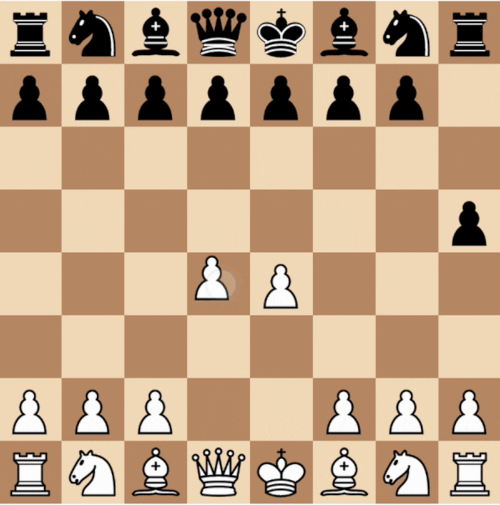
By default, library uses chess_vectors_flutter for pieces. But you can build your own piece widget by implementing buildPiece param. See below example.

Chessboard(
  fen: "rnbqkbnr/pppppppp/8/8/8/8/PPPPPPPP/RNBQKBNR w KQkq - 0 1",
  size: 400,
  buildPiece: (piece, size) {
    if (piece == Piece.WHITE_PAWN) {
      return Icon(
        Icons.person,
        size: size,
        color: Colors.white,
      );
    } else if (piece == Piece.BLACK_PAWN) {
      return Icon(
        Icons.person,
        size: size,
        color: Colors.black,
      );
    }
  },
);

If you don't return widget for a PieceType default widget will be rendered. This is how the above Chessboard will look.

Custom Piece Build

Parameters

fen:

fen that should be show on the board (example rnbqkbnr/pppppppp/8/8/8/8/PPPPPPPP/RNBQKBNR w KQkq - 0 1)

size:

Size of the chessboard widget

onMove (optional):

Called when a move is made on the board. Passing a ShortMove(from, to, promotion).

orientation (optional):

Specify orientation of the chessboard.

lightSquareColor (optional):

color of light square on chessboard.

darkSquareColor (optional):

color of dart square on chessboard.

onPromote (optional):

handle piece promotion

buildPiece (optional):

handle building of custom piece

Kategorien

Abhängigkeiten

Abhängigkeiten 4 Einträge

Quell-Repository

Projekte, die dieses Paket verwenden

Noch keine Daten verfügbar.